
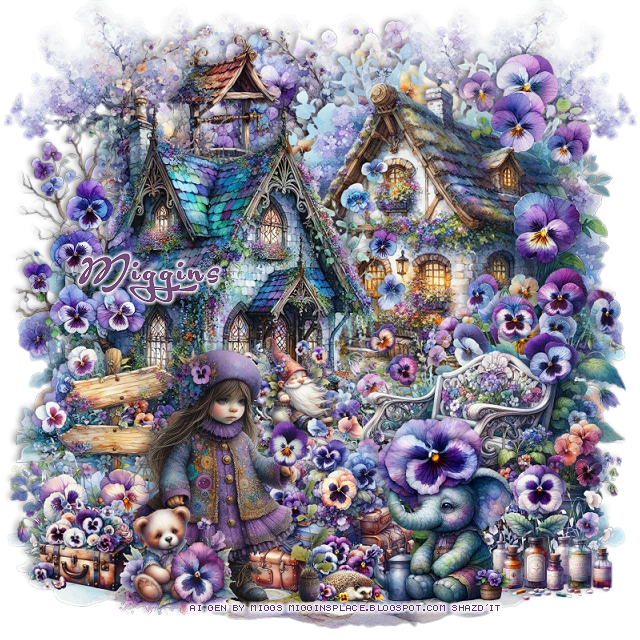
This tut was written May 11th, 2025 for those with a basic knowledge of psp.
Al generated tube and kit by Miggins
Several tubes, elements, templates, mask and more
Pansies for Positively kit
Drop shadow is V-1 H-4 Black, 40, 10, use what you prefer.
Let's get started
*Remember to add your drop shadow as you go along*
Open a new image 800 x 800.
Resize element 132 to 50%, paste on the upper right.
Resize element 18 to 50%, paste on the left.
Resize element 184 to 35%, paste at the upper left below the houses.
Resize element 142 to 35%, paste at the upper right below the well layer,
duplicate, mirror, no drop shadow.
Resize element 129 to 65%, paste at the top above the other trees.
Resize element 132 to 80%, paste on the bottom layer and move to the bottom
so the stones will show.
Resize element 163 to 40%, paste on the bottom right above the houses.
Resize element 30 to 25%, paste at the bottom above the bench.
Resize element 46 to 25%, mirror, paste at the bottom right.
Resize element 145 to 35%, mirror, paste at the bottom left.
Resize element 19 to 30%, paste on the left below the girl.
Resize element 58 to 20%, paste on the bottom right below the elephant.
Resize element 156 to 15%, paste at the bottom left.
Resize element 23 to 15%, paste at the bottom left.
Resize element 81 to 15%, paste above the house on the steps.
Resize element 126 to 10%, paste at the bottom.
Add any other elements that you would like, make it your own.
Always readjust your mask and elements how you like them before you
merge your tag, sharpen once.
Crop your tag to make sure no shadows or anything on the edges
Crop your tag to make sure no shadows or anything on the edges
Then add your copyright and name.
That's it
Hope you enjoyed doing my tut.
No comments:
Post a Comment