

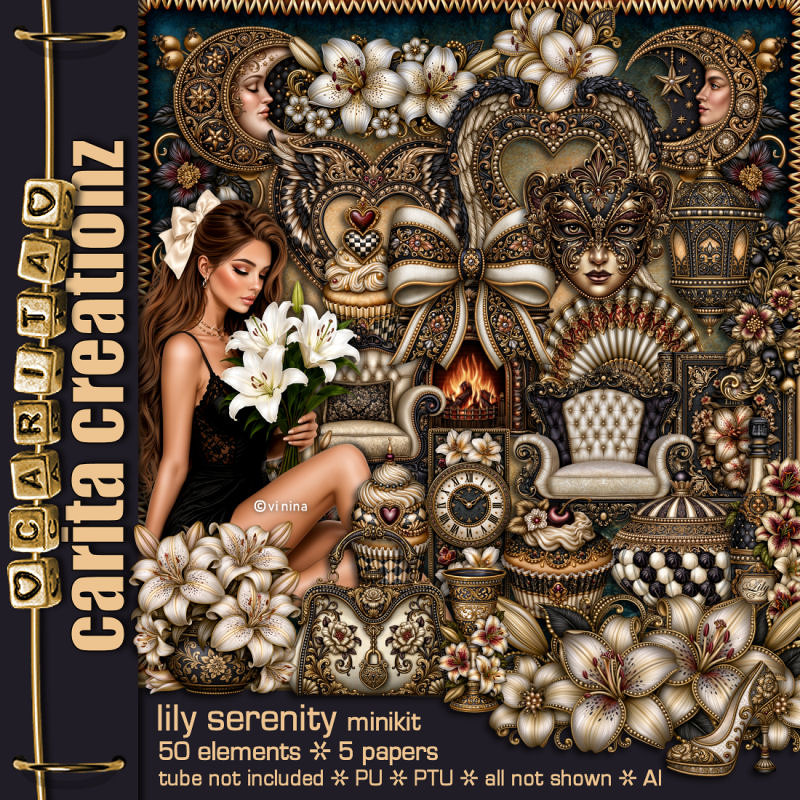

This tut was written August 11th, 2026 for those with a basic knowledge of psp.
I am using the Beautiful tube ©Vi Nina
The tube is called Lily Serenity
The tube is "NOT" included
You need a license to use this tube, please do not use without a license
You can find the tube at Vi Nina Store HERE
Drop shadow as you go is V -2 H 4, 50, 10, or use what you prefer.
Let's get started
*Remember to add your drop shadow as you go along*
Open a new image 800 x 800, paste paper 6, apply your mask,
duplicate, change the blend mode to Multiply, merge down.
Resize frame 4 to 65%, paste, click inside, resize 40 to 45%, paste
below the frame, invert, delete.
Resize 33 to 45%, paste above the frame at the bottom left.
Paste 29 below the frame at the top.
Resize the tube to 40%, paste at the bottom above the chair.
Resize 41 to 35%, paste on the left on the frame.
Resize 43 to 30%, paste below the tube on the bottom right.
Resize 49 to 25%, paste at the bottom above the tube.
Resize 10 to 18%, paste at the bottom above the bottle, duplicate, move over.
Resize 9 to 22%, paste at the bottom right below the tube.
Resize 42 to 20%, paste on the frame on the upper right.
Resize 22 to 20%, paste on the upper right on the circle element, duplicate,
move down and under.
Resize 31 to 25%, paste at the bottom below the shoes.
Resize 50 to 28%, paste at the bottom left.
Resize 48 to 17%, paste at the bottom.
Resize 16 to 35%, paste on the right below the flowers.
Resize 35 to 35%, paste on the bottom left above the chair.
Resize 34 to 30%, mirror, paste at the upper left below the frame.
Resize 28 to 95%, paste on the right below the tree, duplicate, mirror.
Resize 19 to 15%, free rotate to the left at 20, paste in the chair.
Resize 18 to 10%, paste at the bottom.
Resize 7 to 15%, paste at the bottom left.
Resize 17 to 12%, paste at the bottom left.
Resize 32 to 20%, paste at the upper right.
Add any other elements that you would like, make it your own.
Always readjust your mask and elements how you like them before you
merge your tag, resize, sharpen.
Crop your tag to be sure no shadows or lines are on the edges.
Then add your copyright and name.
That's it
Hope you enjoyed doing my tut.
Tag for Nina

No comments:
Post a Comment