Sunday, June 29, 2025

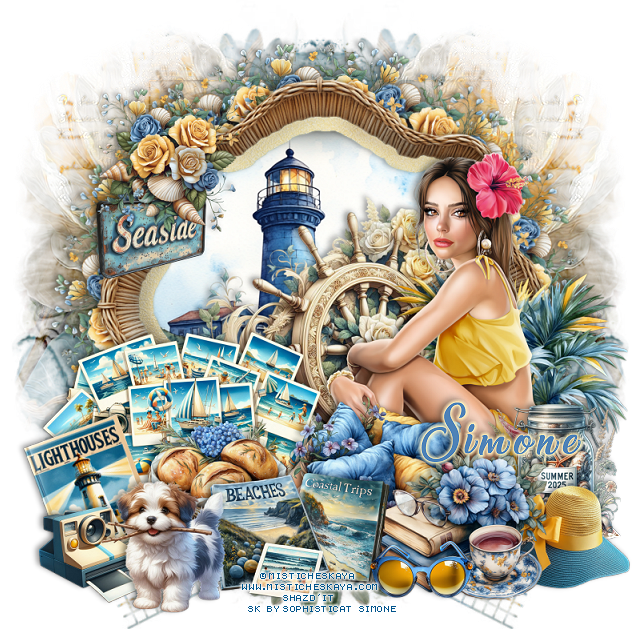
FTU Seaside Cottage

 This tut was written June 29th, 2025 for those with a basic knowledge of psp.

I am using the beautiful tube ©Misticheskaya
Tube is called Inessa and Summer
You need a license to use this tube, please do not use without a license
You can find tubes at her store HERE

I used PSP2020...but any of them should work.
FTU Seaside Cottage by Sophisticat Simone  HERE
Check out the rest of the blog  HERE
Mask of choice, I used MizTeeque Mask 78 HERE
Check out the rest of the blog HERE

Font of choice, I used Sea Balance

Drop shadow is  V-1 H-4 Black, 40, 10, use what you prefer.
Let's get started
*Remember to add your drop shadow as you go along*
 
Open a new image to 800 x 800, paste paper 44, apply your mask, move
to the left, duplicate, mirror.

Resize frame 6 to 60%, paste, click inside, resize frame 7 to 65%, paste
below, invert, delete.
Resize element 216 to 30%, apply Mura Meister Copies-Encircle, first 3
numbers on 14, 55, 55, paste below the frame.
Resize element 197 to 60%, paste on the right above the frame.

Resize the tube to 30%, paste on the bottom right above the wheel.

Resize element 76 to 45%, paste on the right below the tube.
Resize element 91 to 30%, paste on the right above the tube.
Resize element 54 to 25%, paste on the right above the tube.
Resize element 17 to 30%, paste below the books.
Resize element 36 to 20%, paste at the bottom above the books.

Resize element 29 and 30 to 25%, paste at the bottom.
Resize element 12 to 35%, paste on the left below the tube.
Resize element 92 to 25%, paste at the bottom below the  books.
Resize element 5 to 20%, paste at the bottom left.
Resize element 10 to 30%, paste at the bottom.
Resize element 38 to 25%, paste at the bottom right below the cup.
Resize element 118 to 25%, paste at the bottom left.
Resize element 28 to 30%, free rotate to the left at 20, paste on the left
below the camera.
Resize element 216 to 25%, paste on the left on the frame.
Resize element 1 to 20%, paste on the left on the frame below the flowers.

Add any other elements that you would like, make it your own.
Always readjust your mask and elements how you like them before you
 merge your tag, sharpen once.
Crop your tag to make sure no shadows or anything on the edges

 Then add your copyright and name.
That's it
Hope you enjoyed doing my tut.   

Saturday, June 28, 2025

FTU Rockin the 4th


This tut was written June 28th, 2025 for those with a basic knowledge of psp.

I am using Al gen kit Rockin the 4th by Miggins
Al tube Denim and Glory used by Sassy Soul Dezinez HERE
Check out the rest of the blog HERE
Read their TOU on how to credit your tags

I used PSP2020...but any of them should work.
FTU Rockin the 4th by Miggins  HERE
Check out the rest of the blog HERE

Font of choice, I used  Sea Balance (you will have to use a different one for the 4)

Drop shadow is  V-1 H-4 Black, 50, 10, use what you prefer.
Let's get started
*Remember to add your drop shadow as you go along*
 
Open a new image 800 x 800, paste paper 24, apply mask 1 in the kit.

Element 141, resize to 50%, paste at the top.
Element 91, resize to 40%, paste at the upper right below the frames.
Element 9 to 30%, paste on the right below the fireworks element.
Element 155, resize to 40%, mirror, paste at the upper left.
Element 50 to 30%, paste on the left above the frames.

Resize tube of choice, I used tube 1, resized to 65%, paste.
Element 96, resize to 50%, paste above the tube, duplicate the tube, move 
above the star, erase the bottom part on both tubes.
Element 68 to 30%, paste on the left below the tube, duplicate, mirror. 
move down.
Element 67, resize to 30%, paste on the bottom left below the red flowers,
duplicate, mirror.
Element 71, resize to 30%, paste on the right above the star frame.
Element 127 to 35%, paste at the bottom above the tube.
Element 130, resize to 25%, paste at the bottom left below the flowers.

Element 25 to 25%, paste on the bottom right below the tube, duplicate, mirror.
Element 158 to 20%, paste at the bottom.
Element 105 to 20%, mirror, paste at the bottom left.

Add any other elements that you would like, make it your own.
Always readjust your mask and elements how you like them before you
 merge your tag, sharpen once.
Crop your tag to make sure no shadows or anything on the edges

 Then add your copyright and name.
That's it
Hope you enjoyed doing my tut.   

Thursday, June 26, 2025

PTU Backyard Garden


 This tut was written June 26th, 2025 for those with a basic knowledge of psp.

I am using an adorable FTU Al tube of a cow

Al gen by Misty Tucker Designs, look under Cows HERE

I used PSP2020...but any of them should work.
PTU Scrap Backyard Garden by Doodle by Design  HERE
You can find all Doodle by Design kits  HERE 
SC Mask 5 HERE
Check the rest of the blog HERE

Font of choice, I used Yellow Sunflower

Drop shadow as you go is V -2 H 4, 40, 10, or use what you prefer.
Let's get started
*Remember to add your drop shadow as you go along*

Open a new image 800 x 800, paste paper 9, apply your mask, resize larger
to 105%.
Paste paper 20, apply the mask.
Element 28, resize to 75%, paste on the left, duplicate, mirror.
Paste element 19 on the right.
Element 39, resize to 65%, paste on the bottom left above the house.

Resize tube to 90%, paste at the bottom.

Element 24, resize to 30%, paste below the cow on the right.
Element 115, resize to 30%, paste on the bottom right above the barrel.
Element 60, resize to 25%, paste at the bottom right below the flower.
Element 5 and 20, resize to 15%, paste at the bottom right.
Element 4, resize to 20%, paste at the bottom right.
Element 33, resize to 20%, paste at the bottom left.
Element 43, resize to 28%, paste at the bottom left.
Element 21, resize to 15%, paste at the bottom.
Element 34, resize to 30%, paste on the house.
Element 49, resize to 30%, paste on the bottom left below the bowl.
Element 50, resize to 30%, paste on the bottom right above the house, duplicate,
mirror.
Element 35, resize to 10%, paste where you like, duplicate, mirror.
Element 8, resize to 15%, mirror, paste where you like.
Element 27, resize to 30%, paste on the upper left on the lattice.
Element 30, resize to 15%, paste at the bottom left.
Paste element 142 below the cow where you like.

Add any other elements that you would like, make it your own.
Always readjust your mask and elements how you like them before you
 merge your tag, resize, sharpen.

Crop your tag to be sure no shadows or lines are on the edges.
 Then add your copyright and name.
That's it

Hope you enjoyed doing my tut

Friday, June 20, 2025

FTU SD Fruit Kissed P4S Blog Train


  This tut was written June 20th, 2025 for those with a basic knowledge of psp.

I am using an adorable Al kit SD Fruit Kissed
Everything used is included in the kit
Read their TOU on how to credit your tags.

I used PSP2020...but any of them should work.
FTU Al kit SD Fruit Kissed P4S Blog Train for June  HERE
Check out the rest of the blog  HERE
Mask of choice, I used MizTeeque Mask 78 HERE
Check out the rest of the blog HERE

Font of choice, I used Connie

Drop shadow is  V-1 H-4 Black, 40, 10, use what you prefer.
Let's get started
*Remember to add your drop shadow as you go along*
 
Open a new image, 800 x 800, paste paper 1, apply your mask,
move to the left, duplicate, mirror, merge.
Select the mask layer, mirror element 11, paste on the mask layer,
move up some so the house will show more, invert, delete.
You might have to do this a couple of times to get the right look.

Resize element 11 to 50%, paste on the upper left.
Resize element 10 to 35%, paste.
Resize element 2 to 30%, mirror, paste below the girl on the left.
Resize element 3 to 15%, paste below the girl on the left.
Resize element 9 to 22%, paste at the bottom above the girl.
Resize element 8 to 30%, paste below the girl on the right.
Resize element 5 to 15%, paste at the bottom left above the book.
Resize element 4 and 6 to 15%, paste at the bottom.
Duplicate the flower above the book, mirror, move to the right between
the jars.

Resize element 12 to 12%, paste at the bottom left, duplicate, move to 
the right a little more below the flower.

Add any other elements that you would like, make it your own.
Always readjust your mask and elements how you like them before you
 merge your tag, sharpen once.
Crop your tag to make sure no shadows or anything on the edges

 Then add your copyright and name.
That's it
Hope you enjoyed doing my tut.   

Thursday, June 19, 2025

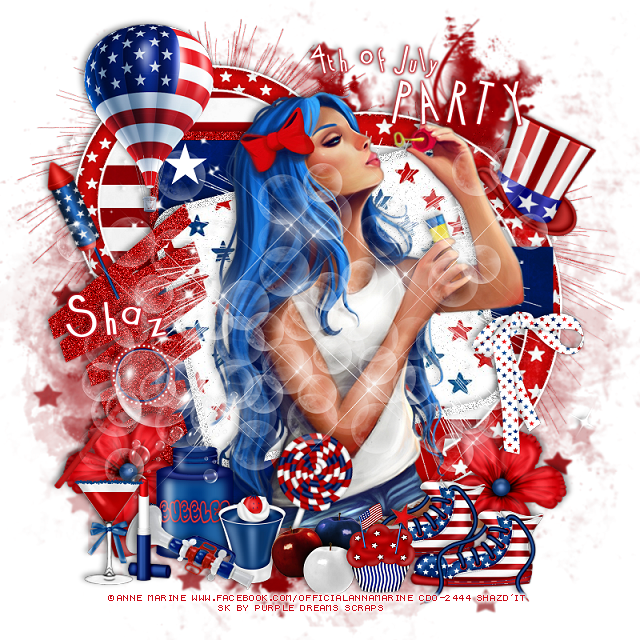
FTU 4th of July Party


This tut was written June 19th, 2025 for those with a basic knowledge of psp.

I am using the 4th of July kit by Purple Dreams Scraps
I am using Anna Marine tube 56-1 from CDO
That store has closed now 
I did not see this tube at DAH store but some of  her other tubes are there.
You can find some of her tubes at DAH now HERE

I used PSP2020...but any of them should work.
FTU Happy 4th of July by Purple Dreams Scraps  HERE
Check out the rest of the blog  HERE
Mask of choice, I used RD Mask 890 HERE
Check out the rest of the blog HERE
4th of July Template 2 by Millie's PSP Madness HERE
If Millie's link to the template does not work try this one (save as)  HERE
This is the zip file for the temp, try this one also HERE
Check out the rest of the blog HERE

Font of choice, I used Cocktail

Drop shadow is  V-1 H-4 Black, 40, 10, use what you prefer.
Let's get started
*Remember to add your drop shadow as you go along*
 
Open the template, resize canvas size to 800 x 800, 
delete the credits, close off the wordart for now.
Paste paper 2 on the bottom layer, resize larger to 110, apply your mask.

Layer 1, resize paper 9 to 75%, paste, invert, delete.
Resize element 21 to 60%, paste above the stripe paper, add a fat white gradient glow.
Layers 2 and 3, add noise at 50%.
Layer 5, resize paper 9 to 75%, paste, invert, delete,
Resize element 21 to 85%%, paste above the circle, add a fat white gradient glow.
Layer 6, paper 1
Layer 7, paper 1
Layer 9, paper 6
Move element 13 to the left more, add noise.

Paste the large tube on the top layer.

Resize element 16 to 50%, paste on the bottom left above the tube.
Resize element 30 to 25%, paste at the bottom by the bubble bottle.
Resize element 27 to 25%, paste at the bottom.
Resize element 31 to 30%, free rotate to the right at 20, paste at the bottom above the tube.
Resize element 35 to 35%, paste at the bottom right below the apples, duplicate, 
move over to the right a little more.
Resize element 12 to 30%, paste on the bottom left below the bubble bottle,
duplicate, mirror.

Resize element 17 to 25%, paste at the bottom above the apples.
Resize element 26 to 35%, mirror, paste at the bottom left.
Resize element 37 to 25%, paste at the bottom left.
Resize element 20 to 30%, paste at the bottom left.
Resize element 36 to 35%, paste on the right by the arm of the tube.
Resize element 18 to 90%, paste below the tube where you like.
Paste element 10 being on the top layer.
Resize element 34 to 35%, free rotate to the left at 25, paste at the upper left.
Resize element 19 to 50%, paste on the upper left.
Paste element 14 on the bottom layer at the upper left, duplicate, move
to the right and down.
Paste element 32 behind the tube.
Resize element 38 to 30%, free rotate to the right at 25, paste on the right below the tube.
Open the wordarts, add a red gradient glow, move where you like.

Add any other elements that you would like, make it your own.
Always readjust your mask and elements how you like them before you
 merge your tag, sharpen once.
Crop your tag to make sure no shadows or anything on the edges

 Then add your copyright and name.
That's it
Hope you enjoyed doing my tut.   

Tag by Pammers, thank you Pammers

sandy


Wednesday, June 18, 2025

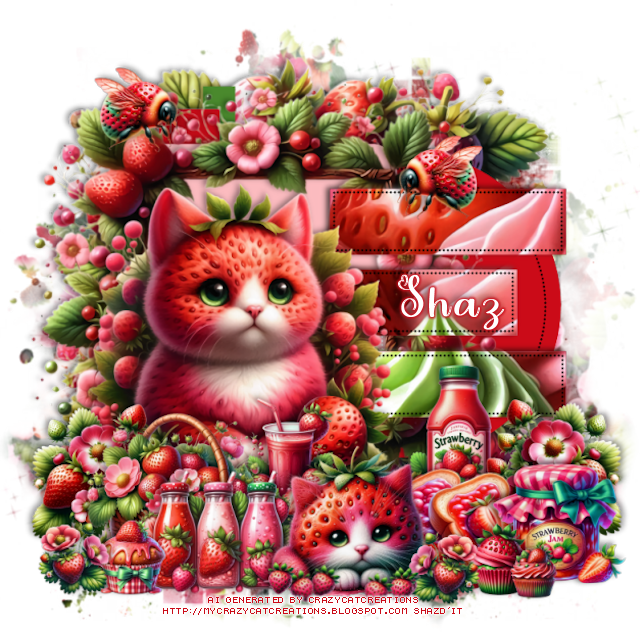
FTU Fruit Kissed P4S Blogtrain


 This tut was written June 18th, 2025 for those with a basic knowledge of psp.

I am using an adorable Al kit by Crazy Cat Creations
Everything used is included in the kit
Read their TOU on how to credit your tags.

I used PSP2020...but any of them should work.
FTU Al kit P4S Fruit Kissed Blog Train for June  HERE
Check out the rest of the blog  HERE
Mask of choice, I used RD Mask 854 HERE
Check out the rest of the blog HERE
Template 103 by MizTeeques HERE
Check out the rest of the blog HERE

Font of choice, I used Love Vale

Drop shadow is  V-1 H-4 Black, 40, 10, use what you prefer.
Let's get started
*Remember to add your drop shadow as you go along*
 
Open the template, delete the credits.
Resize element 22 to 40%, apply Mura Meister Copies, wallpaper (rotate),
change the first number to 26, apply your mask.

Resize element 14 to 60%, paste above the mask.

Layer 1, add a new layer, fill with #cb0b18
Layer 2, add a new layer, fill with #4a892d
Layer 3, add a new layer, fill with #cb0b18
Layer 4, add a new layer, fill with #fbbbbf
Resize element 30 to 50%, paste above the square.
Layer 5, add a new layer, fill with a red gradient, keep selected, paste
element 20, invert, delete.

Resize element 1 to 40%, paste at the bottom left.
Resize element 22 to 20%, paste at the bottom left above the cat, duplicate,
mirror.
Resize element 12 to 20%, paste above the big cat at the bottom.
Resize element 31 to 25%, paste at the bottom left.
Resize element 16 to 23%, paste at the bottom below the basket.
Resize element 23 to 20%, paste at the bottom below the cat.
Resize element 11 to 20%, paste below the cat on the right.
Resize element 21 to 22%, paste at the bottom right below the cat.
Resize element 5 to 17%, paste on the bottom right above the bread.
Resize element 2 to 10%, paste at the bottom above the cat, duplicate, mirror, 
move by the basket.
Resize element 13 to 5%, paste at the bottom above the cat, duplicate a few times,
rotate a couple and move over more.
Resize element 19 to 10%, paste at the bottom left.
Resize element 18 to 10%, paste at the bottom right.
Resize element 6 to 7%, paste at the bottom right.
Resize element 7 to 12%, paste on the upper left, duplicate, mirror.

Add any other elements that you would like, make it your own.
Always readjust your mask and elements how you like them before you
 merge your tag, sharpen once.
Crop your tag to make sure no shadows or anything on the edges

 Then add your copyright and name.
That's it
Hope you enjoyed doing my tut.
   
Tag made by Julie, thank you


Tuesday, June 17, 2025

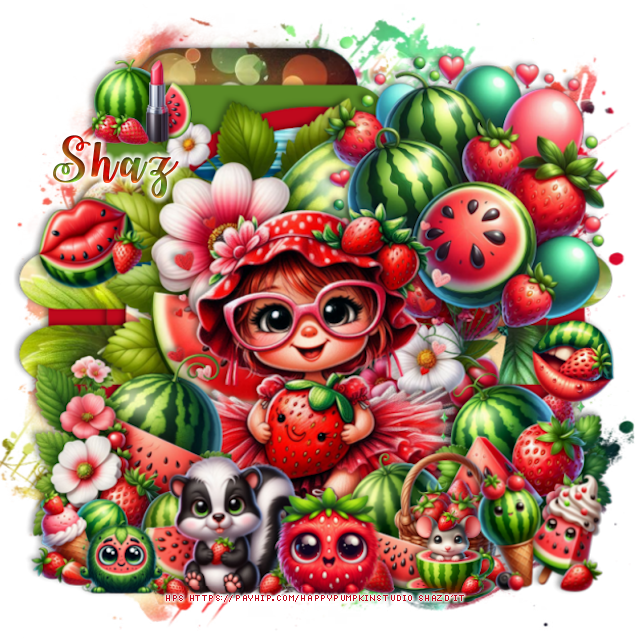
FTU Fruit Kissed PS4 Blogtrain


This tut was written June 17th, 2025 for those with a basic knowledge of psp.

I am using an adorable Al kit by Happy Pumpkin Studio
Everything used is included in the kit
Read their TOU on how to credit your tags.

I used PSP2020...but any of them should work.
FTU Al kit P4S Fruit Kissed Blog Train for June  HERE
Check out the rest of the blog  HERE
Mask of choice, I used RD Mask 897 HERE
Check out the rest of the blog HERE
Template 903 by Millie's PSP Madness HERE
Check out the rest of the blog HERE

Font of choice, I used Watermelon Script

Drop shadow is  V-1 H-4 Black, 40, 10, use what you prefer.
Let's get started
*Remember to add your drop shadow as you go along*
 
Open the template, delete the credits, and layers 11 thru 15.

Layer 1, paper 3
Layer 2, add a new layer, fill with #5a8a26
Layer 3, paper 4
Layer 4, new layer, fill with #bf091d
Layer 5 fill with #bf091d
Merge layers 6, 7, 8 and 9 together, paste paper 8
Layer 10, paper 6

Resize element 67 to 60%, paste above the circle.
Resize element 66 to 40%, paste on the upper right.
Resize element 11 to 40%, paste at the bottom.
Resize element 70 to 30%, paste on the bottom left.
Resize element 55 to 25%, paste on the bottom right.
Resize element 46 to 20%, paste at the bottom.
Resize element 24 to 15%, paste at the bottom right.
Resize element 10 to 20%, paste at the bottom left.
Resize element 27 to 15%, paste at the bottom.
Resize element 33 to 15%, paste at the bottom left.
Resize element 28 to 13%, free rotate to the left at 25, paste on the left.
Resize element 22 to 10%, paste at the bottom left.
Resize element 38 to 12%, free rotate to the right at 20, paste on the right.
Resize element 29 to 12%, paste at the bottom.
Resize element 14 to 12%, paste at the upper left.

Paste paper 1, apply your mask, move to the bottom layer.

Add any other elements that you would like, make it your own.
Always readjust your mask and elements how you like them before you
 merge your tag, sharpen once.
Crop your tag to make sure no shadows or anything on the edges

 Then add your copyright and name.
That's it
Hope you enjoyed doing my tut.