Showing posts with label Forum Set. Show all posts

Wednesday, September 6, 2023

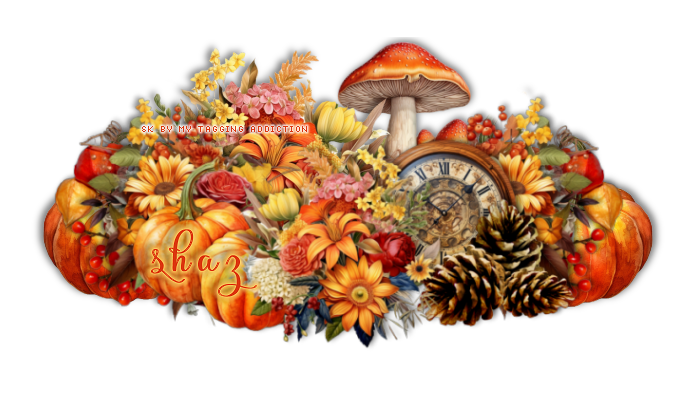
FTU Autumn/3Piece Set


 This tut was written September 6th, 2023 for those with a basic knowledge of psp.

I am using the awesome artwork of ©Verymany
The tube is called Autumn Symphony
You need a license to use this tube, please do not use without a license.
You can find this tube at Verymany store HERE

I used PSP2020...but any of them should work.
FTU Scrap Autumn by My Tagging Addiction HERE  
Check out the rest of the blog  HERE
Mask of choice, I used RD Mask 684 HERE
Check out the rest of the blog HERE
Filter
Mura Meister Copies-Encircle
Font of choice I used Rubynt

Drop shadow is V -2 H -4, 40, 10, Black or use what you prefer.
Let's get started
*Remember to add your drop shadow as you go along*

Open a new image, size 800 x 800, paste paper 8, apply your mask, duplicate,
change the blend mode to Multiply, merge down, flip.

Resize frame 1 to 65%, click inside each of the circles, expand by 3, paste
paper 2, invert, delete, then paste paper 8, delete, select none.
Change the blend mode to Soft Light.
Resize element 64 to 25%, apply Mura Meister Copies-Encircle, first 3
numbers on 18, 55, 55, move below the paper layer.

Resize your tube to 65%, paste below the frame, duplicate, move above, erasing
all the parts on both at the bottom.

Resize element 70 to 45%, paste above the frame at the bottom.
Resize element 64 to 30%, paste on the bottom right below the flower, duplicate,
mirror.
Resize element 29 to 25%, paste at the bottom right, duplicate, mirror.
Resize element 6 to 40%, paste at the bottom right between the flowers.
Resize element 34 to 25%, paste at the bottom left between the flowers.
Resize element 59 to 25%, paste behind the pinecones.
Resize element 12 to 40%, paste at the bottom left below the flowers, duplicate, 
mirror.

Resize element 78 to 95%, paste behind the top tube.
Resize element 2 to 40%, paste on the upper left above the tube, 
duplicate, mirror, move below the tube and down.
Resize element 74 to 75%, paste on the mask layer on the left.

Add any other elements you would like, make it your own.
Crop your tag to be sure no shadows or lines are on the edges.
 Then add your copyright and name.
That's it

Hope you enjoyed doing my tut.    

Thursday, July 14, 2022

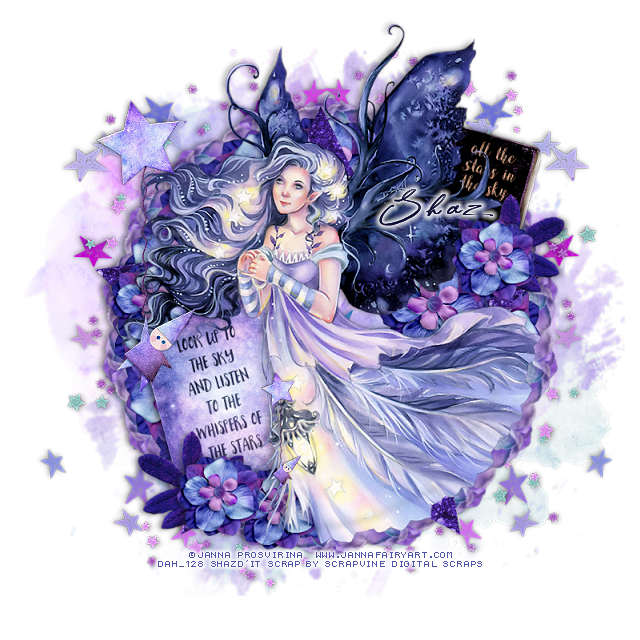
FTU All The Stars 3 Piece Set


 This tut was written July 14th, 2022 for those with a basic knowledge of psp. 

I am using the awesome artwork of Janna Prosvirina
The tube is "The Light Bringer"
You need a license to use this tube, do not use without a license.
You can find this art at DAH Store HERE

I used PSP2020...but any of them should work.
FTU kit All The Stars Digital Scrap booking  HERE

Font of choice, I used The Star in the Midnight

Drop shadow is V -1 H -4, 40, 10, or use what you prefer.
Let's get started
*Remember to add your drop shadow as you go along*

Open a new image 800 x 800, resize element 7 to 75%, paste.

Resize flowers 1 and 2 to 15%, apply Mura Meister Copies to flower 1, the 
first 3 numbers, 18, 55, 55, paste.
Apply Mura Meister Copies-Encircle to flower 2 with the 
numbers at 16, 50, 50, paste.
Resize Star 4 to 50%, paste on the flowers.

Paste your tube, duplicate, close off the top tube, select the first flower 
circle, select all, float, Defloat, invert, delete being on the bottom tube, select none.
Open the top tube, erase the parts of the tube that is past the circles.

Resize journal card 2 element to 18%, free rotate to the left at 15 degrees,
paste on the left below the tube.
Resize all the stars book to 10%, free rotate to the right at 15 degrees, paste on
the upper right below the tube.

Resize leaf 1 to 20%, paste on the bottom of the sign on the left, free 
rotate to the left at 25 degrees, duplicate, mirror, move below the tube at the upper right 
on the sign.
Resize flower 2 to 15%, paste below the tube on the right toward the center more,
duplicate, resize to 75%, paste at the lower left above the sign, duplicate, move over a 
little, duplicate, move to the upper left above the leaf.
Duplicate once more, move to the left below the tube at the top of the sign.

Resize the balloon man to 15%, paste on the left being on the top layer, duplicate,
resize to 40%, move down on the sign and to the right.

Resize scatter 1 to 25%, paste at the top below the flower circles, duplicate, flip, move
down at the bottom.
Resize scatter 2 to 60%, paste below the first scatter to the right, duplicate, mirror,
erase any stars you don't want.

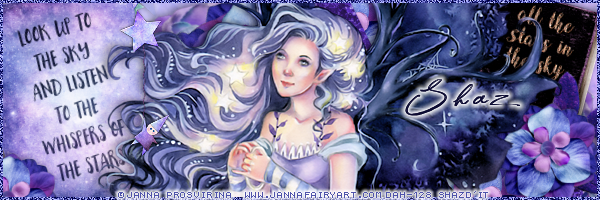
Signature tag
If you want a signature tag, don't merge the tag just yet.
Copy the mask like layer, duplicate, move to each side.
Close the mask like layer off and the sign on the left,
copy merged, pasted move to the right a bit.
Copy the sign paste on the left, go back and copy the tube from the tag, paste above
the sign, merge all visible, add a frame of choice and your copyright and name.

Avatar
Size of choice, I did 180 x 180
Take your eclipse tool draw a circle out with a 3 inch width, click inside with your
magic wand, expand by 2, paste your tag merged, invert, delete, select none,
merge visible.
Add noise and copyright and name.

Add any other elements that you would like, make it your own.
Always readjust your mask and elements how you like them before you
 merge your tag, resize, sharpen.

Crop your tag to be sure no shadows or lines are on the edges.
 Then add your copyright and name.
That's it

Hope you enjoyed doing my tut.        

Friday, January 22, 2021

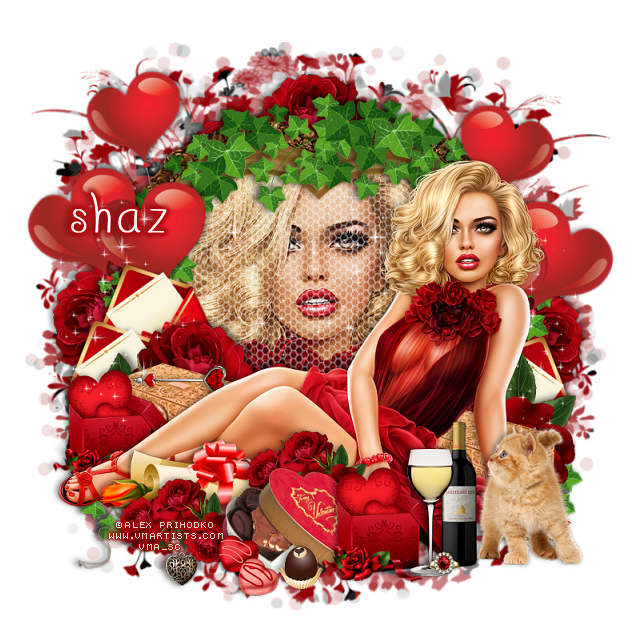
FTU All For Love

This tut was written January 22nd, 2021 for those with a basic knowledge of psp.

I am using the awesome artwork of  Alex Prihodko
The tube is called "Lady in Red" 
You need a license to use this tube, do not use without a license.
You can find this tube at VMArtists store  HERE

I used PSPX...but any of them should work.
FTU kit All For Love by My Tagging Addiction  HERE
Check out the rest of the blog HERE
DD NFM 2015_4  HERE
Check out the rest of the blog HERE

Font of choice,  I used I Love What You Do

Drop shadow is  V-1 H-4, 35, 10, or use what you prefer.
Let's get started
*Remember to add your drop shadow as you go along*

Open a new image 800 x 800 or a size you prefer, can always resize later.
Fill with white.
Paste paper 1 or one of your choice, apply your mask, delete, merge group.

Paste frame 1, click inside with the magic wand, expand by 5, add a new layer,
fill with #af0106, keep selected, paste your close up, delete, select none.
Paste element 7 inside the frame above the close up, resize larger to 120%, then 
take your pick tool to fit better in the heart.
Resize the vine to 85%, paste at the top on the frame.

Resize your tube to 55%, paste at the bottom above the frame.

Resize element 9 to 55%, paste at the top below the paper layer of the frame,
duplicate, move down to the right behind the tube, duplicate, mirror.
Resize the wine to 50%, paste at the bottom above the tube layer.
Resize the wine glass to 45%, paste by the wine bottle.

Resize the ring to 15%, paste at the bottom by the glass.
Resize the heart box to 40%, paste at the bottom below the glass and wine,
duplicate, move to the left below the tube.

Resize the box to 90%, paste on the left below the heart box, duplicate, move to the
right behind the tube.
Resize the kitten to 70%, paste at the lower right below the wine bottle layer.

Resize letter 2 to 50%, paste behind the flower on the left, free rotate 
to the left at 25%, duplicate, move up a little behind the first one, duplicate one 
again, mirror, adjust behind the tube on the right.

Resize candy 3 to 65%, paste at the bottom above the tube.
Resize the candy to 30%, paste at the bottom.
Resize candy 2 to 25%, paste by the other candy.
Resize the letter to 85%, paste above the tube behind the candy boxes.
Resize flower 9 to 25%, paste at the bottom above the rolled letter, duplicate, move
more to the left and down.

Go back to the top flower that is behind the vine, duplicate, move down
on one side so a little shows, duplicate, mirror.
Paste the glitter inside the heart on one side, duplicate, mirror, duplicate a couple 
more times, move below the tube layer on each side.

Resize the balloons to 65%, free rotate to the right at 15 degrees, paste
behind the tube on the right, duplicate, mirror, move below the letters on the left.
Resize element 1 to 50%, paste at the lower left below the flowers.
Resize element 2 to 30%, paste on the gold box on the left below the tube layer.

Add any other elements that you would like, make it your own.
Always readjust your mask and elements how you like them before you
 merge your tag, resize, sharpen once.
Crop your tag to make sure no shadows or anything on the edges

 Then add your copyright and name.
That's it

Hope you enjoyed doing my tut.          

Thursday, January 14, 2021

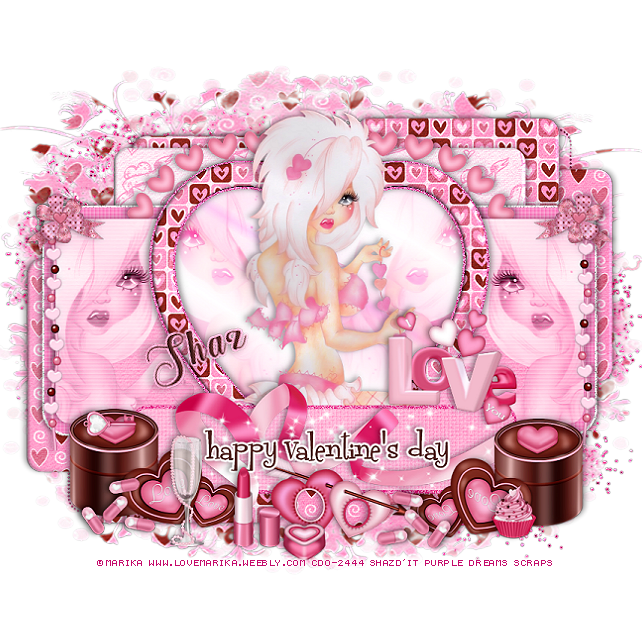
FTU Valentine Babe

This tut was written January 14th, 2021 for those with a basic knowledge of psp.

I am using the awesome artwork of  Marika
The tube is called "16-1" 
You need a license to use this tube, do not use without a license.
You can find this tube at CDO store  HERE

I used PSPX...but any of them should work.
FTU kit Valentine Babe by Purple Dreams Scraps  HERE
Check out the rest of the blog HERE
Template Val 1 by Sylly Creationz HERE
Check out the rest of the blog HERE
DD NFM 2015_4  HERE
Check out the rest of the blog HERE

Font of choice,  I used The Heart of Everything

Drop shadow is  V-1 H-4, 35, 10, or use what you prefer.
Let's get started
*Remember to add your drop shadow as you go along*

Open the template, delete the credits, the text xox right and left and the 
pixel wordart left and right.

Go to Image, Canvas size, change it to 925 x 800, will resize later.
Select all, add a new layer at the bottom above the white background,
Paste paper 7 into selection, select none, apply your mask, delete, merge group.

Merge the dotted rectangle top with the dotted rectangle bottom, select all, float
defloat, fill with a dark pink. If you don't want them just delete.

Merge the small black rectangle right with the left, select all, float, defloat,
paste paper 7, invert delete, paste again on the other one, delete, select none.
Go to Effects, Inner Bevel with these settings
Shape #2, width 4
17, 5, 0, 14 
82, 28, 64, color white

Merge the next 4 layers together, starting with the top one,
pink rectangle top left merge down with the other pink rectangles, select
all, float, defloat, paste paper 11, invert, delete, apply the same bevel settings 
as before.

Large black square, paste paper 8, invert, delete, apply the same bevel settings.
Leave the white noisy layer as is.
Pink rectangle, go to Effects, Textures, Blinds with these settings
5, 25 with both boxes checked and the color white, then apply again uncheck
the top box.
Be sure to watch the sides of any shadowing so you can erase them.

Black rectangle, select, resize paper 3 larger to 105%, paste, invert, delete.
keep selected.
Paste your close up on the left, duplicate the tube, mirror,  adjust  on the 
right, delete, select none., merge the two tubes together.
Change the blend mode to Luminance(L) or one you prefer.
Merge tubed down with paper, apply the Blinds with both boxes checked.

Select the gradient heart, past your close up on the right, duplicate, mirror,
 merge these two together, change the blend mode to Overlay.

Select the heart frame, float, defloat, contract by 3, paste paper l1, invert, 
delete, select none. 
Apply the same bevel settings as before.

Paste your full tube above the heart.

Add noise to the small rectangle border.
Select the small black rectangle, paste paper 3, invert, delete, add the same 
blinds as before and the bevel settings, merge the paper and glitter 
rectangle together, move down where you like and move the wordart also.
Select the wordart, add a new layer and fill with a color of choice, 
I used #512421 and applied a fat white gradient glow.

Paste element heart ribbon 3 below the layer with the tubes on the left so 
just the hearts shows above the heart of the template, duplicate, mirror.
Resize beads 2 element to 75%, paste on the left above the tube, duplicate, mirror,
erase the parts you don't want.

Resize the chocolate hearts to 50$, paste on the lower left being on the top layer,
duplicate, mirror.
Paste the ribbon under the wordart how you like.
Resize the word Love to 40%, paste on the right.
Resize the frame with the arrow to 30%, paste at the bottom below the wordart.
(Optional) Take your free hand tool, draw around the small opening and 
paste a paper of choice, invert, delete, select none.

Resize the pills to 30%, duplicate, place at the bottom where you like.
Resize bow 3 to 30%, paste above the bead on one side, duplicate, mirror.
Resize the glass to 30%, paste at the bottom.
Resize the lipstick to 30%, paste by the glass.
Resize the chocolate to 20%, paste at the bottom by the lipstick.
Resize the cupcake to 15%, paste at the bottom.
Paste the sparkles at the bottom above the ribbon, erase any you don't want.
Resize the key to 15%, free rotate to the left at 90 degrees, place on one of the boxes.

Paste the glitter above the mask at the upper left,  then duplicate,
move down to the right and move both below the mask.

If you want to do the avator,  select the black layer,  fill with a color of choice, 
copy your tag inside the avator template, move it below the frame, resize 
to your liking, merge visible.
Add your copyright and name.

Add any other elements that you would like, make it your own.
Always readjust your mask and elements how you like them before you
 merge your tag, resize, sharpen once.
Crop your tag to make sure no shadows or anything on the edges

 Then add your copyright and name.
That's it

Hope you enjoyed doing my tut.         

Thursday, October 29, 2020

FTU Fall 2020


This tut was written October 29th, 2020 for those with a basic knowledge of psp.

I am using the awesome artwork of Colourbelle
The tube is called "125-3"
You need a license to use this tube, do not use without a license.
You can find this tube at CDO store  HERE

I used PSPX...but any of them should work.
FTU kit Mini Fall 2020 by Tiny Turtle Designs  HERE
You will have to register at her store, while there take a look around. HERE
Mask of choice, I used DBV Mask 72 HERE
Check out the rest of the blog HERE
Filters
EyeCandy 4000-Glass (Optional)

Font of choice,  I used Rockers

Drop shadow is  V-1 H-4 Black, 50, 10, use what you prefer.
Let's get started
*Remember to add your drop shadow as you go along*

Open a new image 800 x 800 or a size you prefer.
Paste paper 3, apply your mask, delete, merge group, duplicate, merge down.

Resize element 4 to 75%, paste.
Resize element 5 to 80%, free rotate to the right at 15 degress, move below the 
frame, duplicate, mirror, move above the top frame.
Click in the bottom frame, expand by 5, paste paper 6, invert, delete. select none.

Paste your tube on the top frame.

Resize element 30 to 55%, paste at the bottom below the tube's paw.
Paste element 35 at the lower left above the sign.
Apply Eye Candy 4000-Glass with these setting to the pumpkin and Autumn sign.
(Optional)
6.97, 75, 
30, 35, 50,  0, 30, 50
Color on white
Resize element 34 to 30%, paste above the sign on the right, duplicate, move 
below the sign and down a little.
Add the glass settings to the flowers if you like.

Resize element 22 to 25%, paste at the lower right below the flower,
duplicate, move up more below the first one, duplicate two more times, 
move to the left one above the pumpkin, the other more left and up and below
the tube layer.

Resize element 32 to 30%, paste at the lower left being on the top layer.
Resize element 28 to 30%, paste on the right below the circles, duplicate, move down 
under the sign, duplicate, mirror, move down under the pumpkin, duplicate,
move to the left behind the circle.

Resize element 1 to 75%, free rotate to the right at 90 degrees, move to the bottom 
below the flowers to the right a little, duplicate, mirror.
Resize element 18 to 40%, paste on the left below the tube, duplicate, 
mirror, move up more on the right.

Resize element 26 to 20%, paste on the hat of the tube, duplicate, move down
where you like.
Resize element 27 to 25%, flip, paste at the bottom below the leaves layer,
duplicate, move over and down more.
Duplicate, flip, move to one side, place where you like, duplicate, mirror, duplicate
once more and move up on the left more.

Resize element 33 to 25%, paste on the right below the circles.
Resize element 25 to 20%, paste on the flower at the lower right.
Resize element 26 to 50%, paste at the upper right behind the tube, duplicate,
flip, mirror, adjust on the left.
Duplicate the one on the right, move to the mask layer and down where
you like, duplicate, mirror.

As always if you are going to to a Signature tag and Avator do not merge your tag yet.

Signature tag
600 x 250 or a size you prefer.
You will take the elements you want from the tag, resize to your liking,
most were 50%, but some may have been a little larger.
Your tube will be sized smaller.
Once happy with the arrangement, merge visible, add copyright and name.

Avator 
Size 180 x 180 or size of choice, draw a circle, width 3 or what you like,
Resize your tag how you like to fit in the circle, select all, expand by 4,
invert, delete, select none.
Add noise to the circle if you like.
Add copyright and name.

Add any other elements that you would like, make it your own.
Always readjust your mask and elements how you like them before you
 merge your tag, sharpen once.
Crop your tag to make sure no shadows or anything on the edges

 Then add your copyright and name.

That's it

Hope you enjoyed doing my tut.   

Wednesday, October 14, 2020

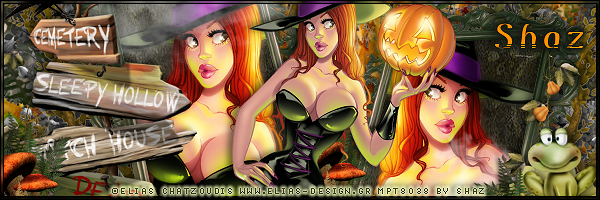
FTU It's Witchy Time


 This tut was written October 14th, 2020 for those with a basic knowledge of psp.

I am using the awesome artwork of Elias Chatzoudis
The tube is called "113-1"
You need a license to use this tube, do not use without a license.
I bought this tube when he was still with MPT, they are closed now.
You can find this tube at CDO store  HERE

I used PSPX...but any of them should work.
FTU kit Little Witch by Graphic of Fantasy  HERE
Mask of choice, I used MizTeeque's Mask 283  HERE
Check out the rest of the blog HERE

Font of choice,  I used  Remo Regular

Drop shadow is  V-1 H-4 Black, 50, 10, use what you prefer.
Let's get started
*Remember to add your drop shadow as you go along*

Open a new image 800 x 800 or a size you prefer.
Select all, new layer, paste paper 7 into selection, apply your mask, delete,
 merge group.

Resize element 31 to 50%, paste to the right, click inside with your magic 
wand, expand by 5, paste paper 2, invert, delete, keep selected,
paste your largest tube in the frame, delete, select none.
Duplicate the tube, go to Adjust. Blur, Gaussian blur, number on 4,
change the blend mode to Overlay or one you prefer.
Merge the frame, tube and paper layer together, duplicate, mirror
move up more on the left.

Paste your tube in the cauldron about center above the frame, adjust the 
frames better now.

Resize element 20 to 85%, paste behind the frame on the left, duplicate,
mirror, duplicate once more, move back toward the center.
Resize element 39 to 55%, paste on the right below the branches toward the top,
 duplicate, mirror.
Paste element 17 on the mask layer at the lower left, duplicate, mirror.
Paste element 22 on the lower left above the bush you just pasted, duplicate,
mirror.
Resize element 57 to 70%, paste on the left above the frame.

Resize element 79 to 50%, paste behind the tube to the right, duplicate, mirror,
move below the frame layers on the left.
Resize element 81 to 50%, paste on the left below the tube, duplicate, move 
to the right below the pumpkin so just the greenery shows.

Resize element 82 to 20%, paste at the lower right being on the top layer.
Paste element 16 at the bottom, move below all the other elements, duplicate,
mirror, adjust.

Resize element 64 to 40%, paste at the bottom below the tube.
Paste element 19 on the mask layer at the top to the right a bit.
Resize element 15 to 35%, paste to the lower left below the cauldron, duplicate,
mirror.
Resize element 65 to 20%, paste at the lower right below the brown branch.

Resize element 72 to 40%, paste at the lower left being on the top layer.
Resize element 71 to 55%, paste on the pumpkin on the right.
Resize element 21 to 40%, paste on the wood signs, duplicate, mirror, move
on the frame edge on the right.
Resize element 35 to 65%, paste above the frame on the left and up, 
duplicate, move to the right and down on the frame.

Paste element 76 on the lower left behind the mushroom, duplicate, move
over more toward the center, above the left frame but below the right frame.
Resize element 13 to 25%, being on the top layer now, move to the bottom by
the pumpkin, duplicate a few times and move around on the bottom.

Resize element 55 to 25%, mirror, paste on the sign posts.
Resize element 1 to 30%, mirror, paste at the lower right.

If you want to do a Signature tag, don't merge your tag just yet.
Open a new image 600 x 200
Close off the mask and tube on the tag, copy and paste.
Go back to the tag, open the tube, copy and paste where you like.
Copy any other elements you want, resize a little.

If needed either fill with a color on the bottom layer or duplicate the tag and 
move to each side to cover anything that is not covered.
Once happy merge, add your copyright and name.

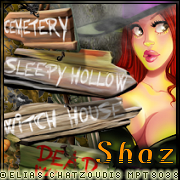
Avator
Size 180 x 180 or a size you prefer
Paste your tag, resize as needed.
Frame of choice.
I liek using the 3AAA Frames- Foto frame
Name and copyright, merge.

Add any other elements that you would like, make it your own.
Always readjust your mask and elements how you like them before you
 merge your tag, sharpen once.
Crop your tag to make sure no shadows or anything on the edges

 Then add your copyright and name.

That's it

Hope you enjoyed doing my tut.