Showing posts with label ChaChaz Creationz. Show all posts

Wednesday, October 31, 2018

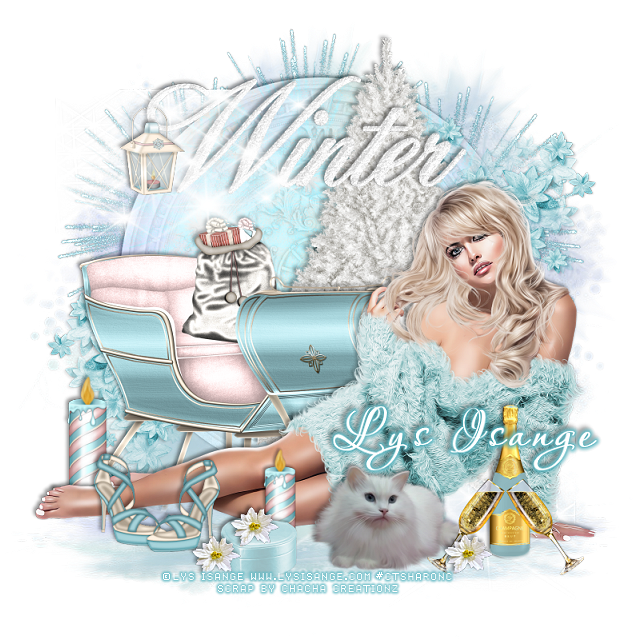
PTU B.B Beauty


This tut was written Oct 31st, 2018, for those with a basic knowledge of psp.
I am using the awesome tube by artist Lys Isange
Tube is called "BB " Exclusive at her store
She comes in 9 different colors
 You need a license to use this art, please do not use without a license.
You can find this tube at her store HERE

I used PSPX...but any of them should work.
I paired it with a PTU kit Glam Winter by ChaCha Creationz at S&CO  HERE
RD Mask 753  HERE
Check out the rest of the blog  HERE

Font of choice,  I used Aquarelle

Drop shadow is usually V-2 H-2 Black, 50, 5, use what you prefer.
Let's get started
*Remember to add your drop shadow as you go along*

Open a new image 800 x 800
Paste paper 6, apply your mask, delete, merge group, duplicate the mask,
take your Pick tool, hold the shift key and drag down the top square 
on one side and then the other to make it flat, move to the bottom.

Resize your tube to 25%, paste on the bottom on the flatten mask.
Paste element 4 on the mask layer, change the blend mode to Luminance(L).

Paste element 19 behind the tube to the left.
Resize element 13 to 40%, paste at the bottom left above the tube.
Paste element 6 below the sleigh a little off center to the right.

Resize element 1 to 40%, paste at the bottom above the tube more to the right.
Resize element 6 to 40%, paste by the cat. 
Resize element 62 to 40%, paste above the champagne bottle. 
Change the color of the champagne bottle to match the tag.

Paste element 34 at the top above the tree layer.
Resize element 45 to 25%, paste on the wordart at the left, erase a little of the hanger part.
Resize element 29 to 25%, paste at the bottom above the shoe layer.
Resize element 14 to 15%, paste on the box, duplicate a couple more times, place
where you like on the bottom.

Paste element 93 on the left below the clock layer, duplicate, mirror, duplicate again,
move to the center and down some.
Paste element 30 oh the lower left above the clock, duplicate, mirror, move
up more behind the tube.

Resize element 39 to 40%, paste on the left behind the feet of the tube, duplicate,
resize to 80%, move above the tube and behind the small box.
Paste element 98 below the tube layer.

Add any other elements you would like.

Once happy with your tag, close off any background, crop your tag to make
sure there are no stray edges, merge visible, resize first.
Add your copyrights and name.

That's it
Hope you enjoyed doing my tut.


Sunday, March 18, 2018

PTU First Easter


This tut was written March 18th, 2018, for those with a basic knowledge of psp.
I am using the awesome tube by artist Lys Isange
Tube is called "First Easter"
 You need a license to use this art, please do not use without a license.
You can find the tube at S&CO store HERE

I used PSPX...but any of them should work.
PTU  kit called Sweet Easter by ChaChaz Creationz HERE
RD Mask 729  HERE
Check out the rest of the blog HERE

Font of choice,  I used White Chocolate Mint

Drop shadow is usually V-2 H-2 Black, 50, 5, use what you prefer.
Let's get started
*Remember to add your drop shadow as you go along*

Open a new image 800 x 800
Paste paper 3, apply your mask, delete, merge group.

Resize your tube to 35%, paste to the left.
I pasted the chicks separate from the tube so I could arrange them how I wanted.

Paste element 38 behind the tube so the basket is not showing.
Paste element 87 behind the tall grass.
Resize element 51 to 95%, paste below the tube on the right, duplicate, mirror.
Resize element 42 to 50%, mirror, paste at the lower right on the grass.
Resize element 3 to 45%, paste at the bottom in front of the tube.

Paste element 64 on the mask layer and move to the right a little.
Resize element 84 to 90%, paste on the right above the wall layer.

Resize element 15 to 20%, paste on the left on the wall below the grass layer.
Resize element 82 to 55%, paste on the lower left above the tube and partly 
behind the kitten.

Resize element 25 to 70%, paste on the left above the wall layer, duplicate, 
mirror, duplicate again, move to the center more and down a little.

Resize element 36 to 70%, paste on the left being on the top layer.
Resize element 80 to 30%, paste on the wall on the right below the birdhouse layer.
Resize element 57 to 50%, paste on the right on the mask layer behind the birdhouse.

Paste element 12 on the mask layer and move up behind the rock wall and
out to the right so some of the yellow flowers shows, duplicate, mirror,
move down on the left some.

Add any other elements that you would like, make it your own.

Once happy with your tag, close off any background, crop your tag to make
sure there are no stray edges, merge visible, resize first.
Add your copyrights and name.

That's it
Hope you enjoyed doing my tut.


Sunday, March 4, 2018

PTU Nymphea Beauty


This tut was written March 4th, 2018 for those with a basic knowledge of psp.
Scraps & Co presents a gorgeous Butterfly Queen Collab. 
Buy products for $8 ONLY and get this Collab pack.
  Lys participated with this gorgeous tube. 
Get it with 12 other products along with
Lys's fantastic tube called "NYMPHEA along with ChaCha Creationz' kit
called Butterfly Queen  HERE

I used PSPX...but any of them should work.
MizTeeques Mask 123  HERE
Check out the rest of the blog HERE

Font of choice,  I used Aulyars

Drop shadow is usually V-2 H-2 Black, 50, 5, use what you prefer.
Let's get started
*Remember to add your drop shadow as you go along*

Open a new image 800 x 800
Paste paper 2, apply your mask, delete, merge group.

Paste element 51 about center and up.
Paste element 22 above the mushroom layer and down a bit.
Paste element 20 below the left tree about center.
Resize element 53 to 75%, paste below the mushrooms on the left, duplicate,
mirror, adjust below the house.

Resize your tube to 40%, paste at the bottom.

Resize element 52 to 50%, paste on the left below the tube layer.
Paste element 32 below the wheel on the left, duplicate, mirror, move
below the pond layer.

Resize element 44 to 50%, mirror, paste on the right below the tube layer
on the grass.
Resize element 2 to 50%, paste on the mask layer on the right and down some,
duplicate, mirror, move down a little more.

Paste element 25 on the mask layer on the left, moving out a little from 
the other tree, duplicate, mirror.
Resize element 45 to 35%, paste at the lower left being on the top layer.
Resize element 13 to 20%, paste at the lower right in front of the small
mushrooms.

Resize element 58 to 30%, paste at the lower left below the hand of the tube.
Resize element 37 to 65%, mirror, paste on the left below the tube layer.
Resize element 28 to 30%, paste at the lower left under the hand of
the tube so it is just touching the leaf, duplicate move above the tube and
to the right a little.

Add any other elements that you would like, make it your own.

Once happy with your tag, close off any background, crop your tag to make
sure there are no stray edges, merge visible, resize first.
Add your copyrights and name.

That's it
Hope you enjoyed doing my tut.