Showing posts with label Marika. Show all posts

Tuesday, April 11, 2023

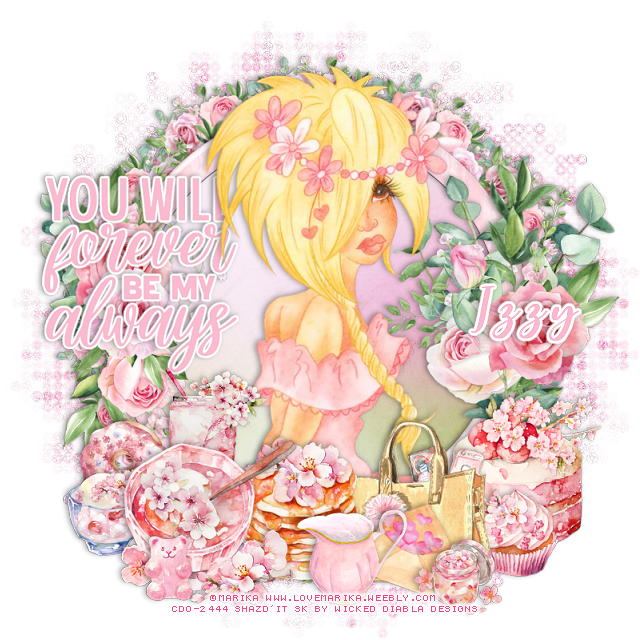
PTU Forever You Will be Mine Always


 This tut was written April 11th, 2023 for those with a basic knowledge of psp. 

I am using the awesome tube by ©Marika

Tube is 135-2
You need a license to use this tube, please do not use without a license.
You can find all this tube at CDO store HERE

I used PSP2020...but any of them should work.
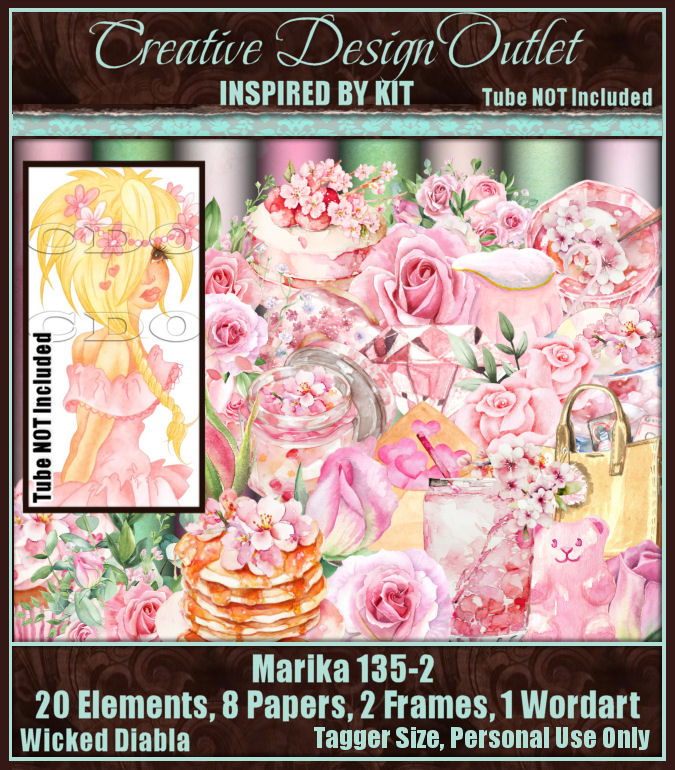
PTU ScrapWD_IB-Marika 135-2  HERE 
 This awesome kit has 20 elements, 8 papers, 2 frames and 1 Wordarts
Mask of choice, I used DD Geo Mask 3 (blog is closed now)
Filter
Mura Meister Copies-Encircle

Font of choice, I used Wingcharm

Drop shadow is V -1 H -4, 40, 10, color black or use what you prefer.
Let's get started
*Remember to add your drop shadow as you go along*

Open a new image, 800 x 800, paste paper 1, apply your mask, delete, 
merge group.
Add noise at 50%.

Resize frame 1 to 60%, paste, click inside with the magic wand, expand, 
paste paper 8, invert, delete, select none.
Resize element 19 to 40%, apply Mura Meister Copies-Encircle, first 3 numbers 
on 12, 55, 55, move below the paper layer.

Resize your tube to 70%, paste above the frame.

Resize element 20 to 75%, paste on the right on the frame.
Resize element 7 to 75%, paste on the left on the frame.
Resize element 1 to 40%, paste at the bottom left above the tube.

Resize element 3 to 30%, paste on the left behind the bowl.
Resize element 2 to 20%, paste below the bowl.
Resize element 5 to 35%, paste at the bottom below the bowl to the right.
Resize element 4 to 20%, paste at the bottom left behind the bowl.
Resize element 24 to 35%, paste at the lower right.
Resize element 6 to 20%, paste at the lower right by the cake.

Resize element 18 to 40%, paste below the pancakes, move the cupcake
below the purse.
Resize element 9 to 25%, paste at the bottom by the pancakes.
Resize the wordart to 25%, paste on the left, add a white gradient glow.
Resize element 8 to 15%, paste at the bottom above the soup bowl.
Resize element 23 to 25%, free rotate to the right by 20, paste below the pitcher 
by the purse.

Add any other elements that you would like, make it your own.
Always readjust your mask and elements how you like them before you
 merge your tag, resize, sharpen.

Crop your tag to be sure no shadows or lines are on the edges.
 Then add your copyright and name.
That's it

Hope you enjoyed doing my tut.  

Thursday, January 14, 2021

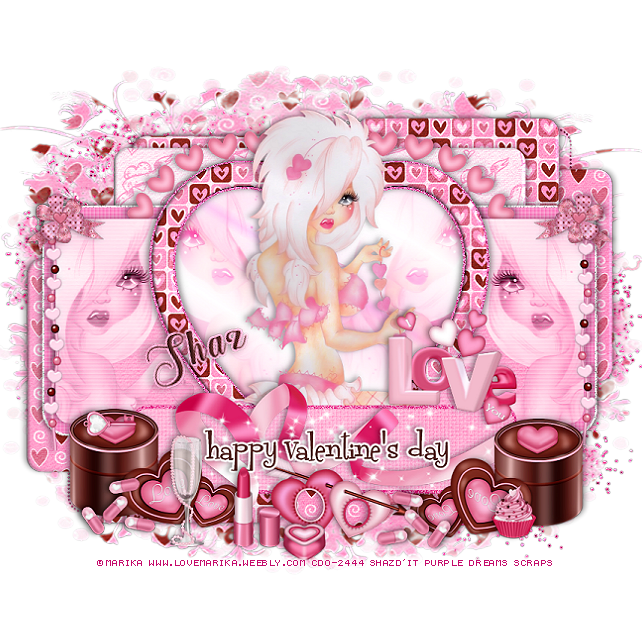
FTU Valentine Babe

This tut was written January 14th, 2021 for those with a basic knowledge of psp.

I am using the awesome artwork of  Marika
The tube is called "16-1" 
You need a license to use this tube, do not use without a license.
You can find this tube at CDO store  HERE

I used PSPX...but any of them should work.
FTU kit Valentine Babe by Purple Dreams Scraps  HERE
Check out the rest of the blog HERE
Template Val 1 by Sylly Creationz HERE
Check out the rest of the blog HERE
DD NFM 2015_4  HERE
Check out the rest of the blog HERE

Font of choice,  I used The Heart of Everything

Drop shadow is  V-1 H-4, 35, 10, or use what you prefer.
Let's get started
*Remember to add your drop shadow as you go along*

Open the template, delete the credits, the text xox right and left and the 
pixel wordart left and right.

Go to Image, Canvas size, change it to 925 x 800, will resize later.
Select all, add a new layer at the bottom above the white background,
Paste paper 7 into selection, select none, apply your mask, delete, merge group.

Merge the dotted rectangle top with the dotted rectangle bottom, select all, float
defloat, fill with a dark pink. If you don't want them just delete.

Merge the small black rectangle right with the left, select all, float, defloat,
paste paper 7, invert delete, paste again on the other one, delete, select none.
Go to Effects, Inner Bevel with these settings
Shape #2, width 4
17, 5, 0, 14 
82, 28, 64, color white

Merge the next 4 layers together, starting with the top one,
pink rectangle top left merge down with the other pink rectangles, select
all, float, defloat, paste paper 11, invert, delete, apply the same bevel settings 
as before.

Large black square, paste paper 8, invert, delete, apply the same bevel settings.
Leave the white noisy layer as is.
Pink rectangle, go to Effects, Textures, Blinds with these settings
5, 25 with both boxes checked and the color white, then apply again uncheck
the top box.
Be sure to watch the sides of any shadowing so you can erase them.

Black rectangle, select, resize paper 3 larger to 105%, paste, invert, delete.
keep selected.
Paste your close up on the left, duplicate the tube, mirror,  adjust  on the 
right, delete, select none., merge the two tubes together.
Change the blend mode to Luminance(L) or one you prefer.
Merge tubed down with paper, apply the Blinds with both boxes checked.

Select the gradient heart, past your close up on the right, duplicate, mirror,
 merge these two together, change the blend mode to Overlay.

Select the heart frame, float, defloat, contract by 3, paste paper l1, invert, 
delete, select none. 
Apply the same bevel settings as before.

Paste your full tube above the heart.

Add noise to the small rectangle border.
Select the small black rectangle, paste paper 3, invert, delete, add the same 
blinds as before and the bevel settings, merge the paper and glitter 
rectangle together, move down where you like and move the wordart also.
Select the wordart, add a new layer and fill with a color of choice, 
I used #512421 and applied a fat white gradient glow.

Paste element heart ribbon 3 below the layer with the tubes on the left so 
just the hearts shows above the heart of the template, duplicate, mirror.
Resize beads 2 element to 75%, paste on the left above the tube, duplicate, mirror,
erase the parts you don't want.

Resize the chocolate hearts to 50$, paste on the lower left being on the top layer,
duplicate, mirror.
Paste the ribbon under the wordart how you like.
Resize the word Love to 40%, paste on the right.
Resize the frame with the arrow to 30%, paste at the bottom below the wordart.
(Optional) Take your free hand tool, draw around the small opening and 
paste a paper of choice, invert, delete, select none.

Resize the pills to 30%, duplicate, place at the bottom where you like.
Resize bow 3 to 30%, paste above the bead on one side, duplicate, mirror.
Resize the glass to 30%, paste at the bottom.
Resize the lipstick to 30%, paste by the glass.
Resize the chocolate to 20%, paste at the bottom by the lipstick.
Resize the cupcake to 15%, paste at the bottom.
Paste the sparkles at the bottom above the ribbon, erase any you don't want.
Resize the key to 15%, free rotate to the left at 90 degrees, place on one of the boxes.

Paste the glitter above the mask at the upper left,  then duplicate,
move down to the right and move both below the mask.

If you want to do the avator,  select the black layer,  fill with a color of choice, 
copy your tag inside the avator template, move it below the frame, resize 
to your liking, merge visible.
Add your copyright and name.

Add any other elements that you would like, make it your own.
Always readjust your mask and elements how you like them before you
 merge your tag, resize, sharpen once.
Crop your tag to make sure no shadows or anything on the edges

 Then add your copyright and name.
That's it

Hope you enjoyed doing my tut.         
Wednesday, January 13, 2021

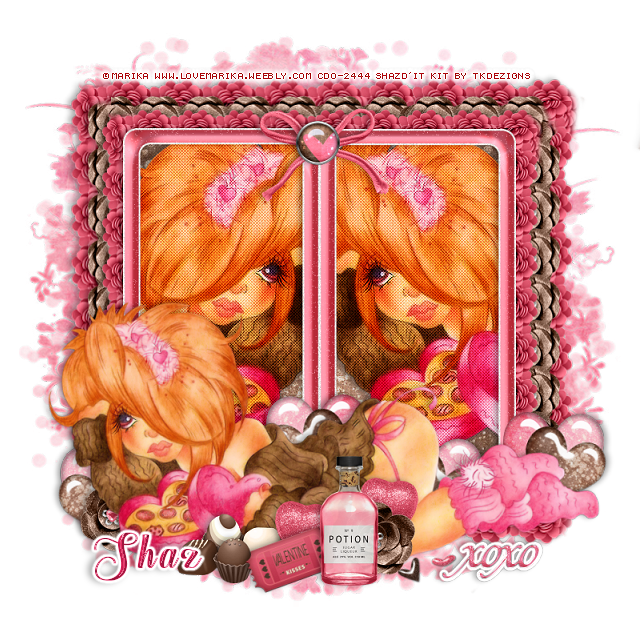
FTU XOXO's

This tut was written January 13th, 2021 for those with a basic knowledge of psp.

I am using the awesome artwork of  Marika
The tube is called "109-2" 
You need a license to use this tube, do not use without a license.
You can find this tube at CDO store  HERE

I used PSPX...but any of them should work.
FTU kit Creative Chicks Valentine (Last one on the page) by TK Dezigns  HERE
Check out the rest of the blog HERE
DD NFM 2015_4  HERE
Check out the rest of the blog HERE
Filters
Screen Works-Light Gauze
Mura Meister Copies-Line

Font of choice,  I used The Heart of Everything

Drop shadow is  V-1 H-4, 50, 10, or use what you prefer.
Let's get started
*Remember to add your drop shadow as you go along*

Open a new image 800 x 800 or a size you prefer.
I always fill with white and delete the white layer at the end. 

Add a new layer, paste paper Valentine solid 1 or one of your choice, apply your mask, 
delete, merge group, duplicate, merge down.

Paste frame 5, resize to 75%, free rotate to the left at 90 degrees, duplicate,
move so the sides are touching, then merge the frames together.
Click inside with your magic wand, expand by5, paste paper of choice, I used
paper 7, moved it down a little, invert, delete, keep selected.
Paste your tube in the frames, delete, duplicate the tube, mirror in the other frame.

Merge the tubes together, duplicate, go to Adjust, Blur, Gaussian blur, number 
on 4, change the blend mode to what you prefer, I used Soft Light.
Be sure to watch for the shadows on the edge of your tag so you can erase them.
Apply Screen Works-Light Gauze, merge down.

Resize element 17 to 40%, apply Mura Meister Copies-Line, first number changed
to 14, move below the paper layer of the frame, line it up how you like,
erase the part paste the frame, duplicate 3 more times, flip one, free rotate the other
two 90 degrees either way left or right, line them all up and erase the parts you
don't want.  Once happy merge these four layers together.

Resize element 19 to 35%, apply the same Mura Meister Copies-Line.
Move below the pink flowers and duplicate and erase like before.
Once happy merge these four layers together.
If you don't have the filter you can line them up one at a time, takes more
time but it can be done that way too.
Go back to the pink flower frame you made, duplicate, resize larger to 115%,
move above the mask layer.

Resize your tube to 80%, paste at the bottom above the frame.

Resize element 40 to 50%, then resize element 41 to 35%, free rotate to the
left at 20 degrees, paste on the pink heart, merge together, paste behind
the tube center, then duplicate three more times, move to each side and one behind
the tube and down more.

Resize element 19 to 40%, paste at the bottom above the tube by her leg, 
duplicate move to the left below the tube.
Resize element 2, 3, 5 and 6 to 30%, paste at the bottom above the tube how
 you prefer to place them.

Resize element 57 to 25%, paste at the bottom above the brown flower.
Resize element 55 to 45%, free rotate to the left at 20 degrees, paste at the bottom
below the bottle.
Resize element 10 to 30%, paste below the ticket, duplicate, move to the right
behind the brown flower.
Resize wordart 1 to 40%, paste at the lower right, apply a fat white gradient glow.
Resize element 32 to 40%, paste at the bottom how you like, erase a heart if needed.

Resize element 22 to 60%, paste at the top on the frame.
Resize element 13 to 40%, paste on the bow.

Add any other elements that you would like, make it your own.
Always readjust your mask and elements how you like them before you
 merge your tag, sharpen once.
Crop your tag to make sure no shadows or anything on the edges

 Then add your copyright and name.
That's it

Hope you enjoyed doing my tut.