Showing posts with label Chaos Priestess. Show all posts

Thursday, July 31, 2025

FTU Sorry


  This tut was written July 31st, 2025 for those with a basic knowledge of psp.

I am using the awesome tube © Jenga Garcia
Tube is called Lonely Star
You need a license to use this tube, please do not use without a license.
You can find the tube at the DAH store HERE

I used PSP2020...but any of them should work.
FTU kit Sorry by Scrap by Chaos Priestess HERE
This is exclusive at her Fan Page on Facebook group
Mask of choice, I used Miz Teeques Mask 54 HERE
and Vivienne's Digital Tagging Mask 18 HERE
Check out the rest of the blogs HERE HERE

Font of choice, I used Atlantis Heart

Drop shadow is  V-1 H-4 Black, 50, 10, use what you prefer.
Let's get started
*Remember to add your drop shadow as you go along*
 
Open a new image 800 x 800, paste paper 8, apply Miz Teeques mask 54.
Paste element 41 above the mask on the upper left, duplicate, mirror,
move down.

Resize element 16 to 115%, paste
Resize element 14 to 165%, paste below the frame at the top, duplicate,
move to the bottom.
Paste element 29 on the bottom layer at the top, duplicate, flip,
move to the bottom.
Paste element 40 above the gears.
Paste element 24 below the gears, resize to fit your tag.

Resize the tube to 80%, paste above the frame, apply mask 18 to the tube.

Paste element 19 at the bottom above the tube on the right, duplicate,
mirror, erase some of the handle.
Resize element 50 to 50%, paste on the left above the tube.
Resize element 3 to 75%, paste on the bottom right below the flower.
Resize element 36 to 45%, paste on the bottom right.
Resize element 37 to 40%, paste on the bottom right.
Resize element 1 to 35%, paste on the bottom right below the glass,
duplicate, mirror.
Resize element 8 to 50%, paste on the bottom right below the bottle.
Resize element 18 to 50%, paste on the bottom right below the bottle,
duplicate, mirror, duplicate, move up on the left below the leaves.
Resize element 49 to 50%, paste on the upper left, duplicate, mirror, move
down on the right.
Paste the wordart at the bottom, add a white gradient.

Add any other elements that you would like, make it your own.
Always readjust your mask and elements how you like them before you
 merge your tag, sharpen once.
Crop your tag to make sure no shadows or anything on the edges

 Then add your copyright and name.
That's it

Hope you enjoyed doing my tut.      

Wednesday, July 30, 2025

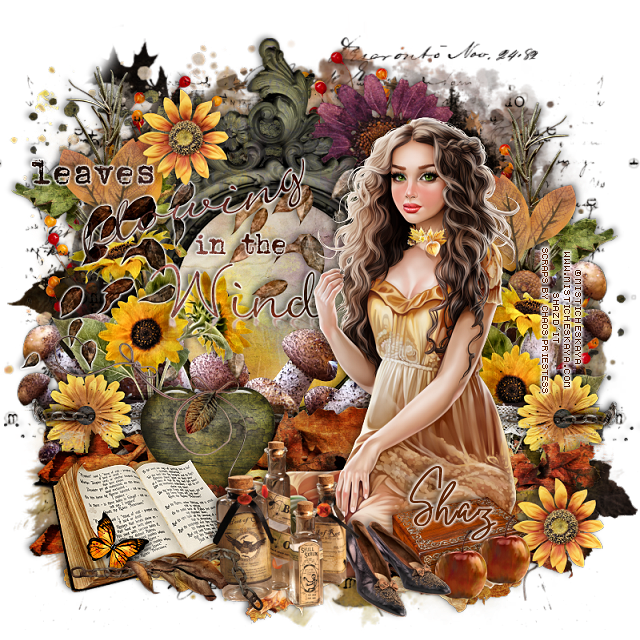
FTU Fall Blessings


 This tut was written July 30th, 2025 for those with a basic knowledge of psp.

I am using the awesome tube © Misticheskaya
Tube is called Autumn
You need a license to use this tube, please do not use without a license.
You can find the tube at the store HERE

I used PSP2020...but any of them should work.
FTU kit Fall Blessings by Scrap by Chaos Priestess HERE
This is exclusive at her Fan Page on Facebook group
Mask of choice, I used RD Mask 720 HERE
Check out the rest of the blog HERE

Font of choice, I used Oxlade

Drop shadow is  V-1 H-4 Black, 50, 10, use what you prefer.
Let's get started
*Remember to add your drop shadow as you go along*
 
Open a new image 800 x 800, paste paper 9, apply your mask.

Resize element 28 to 90%, paste on the right, duplicate, mirror.
Resize frame 4 to 85%, paste, click inside, resize paper 9 to 50%, invert, delete.
Paste element 27 below the mask.
Paste element 37 on the left above the mask, duplicate, mirror, move down 
on the right, duplicate, move to the center more and up.
Paste element 41 on the upper left below the paper layer of the frame, duplicate, 
mirror, move down on the right.
Resize element 39 to 75%, paste above the frame.

Resize the tube to 35%, mirror, paste on the right.

Resize element 34 to 50%, paste on the left above the frame, duplicate,
mirror.
Resize element 29 to 50%, paste below the flower on the left, duplicate,
mirror.
Resize element 30 to 40%, paste on the left above the green leaf, duplicate,
mirror.
Resize element 12 to 40%, paste at the upper left, duplicate, move down
on the right.
Resize element 15 to 50%, paste behind the tube on the bottom right,
duplicate, mirror.
Paste element 8 below the tube, duplicate, move down.
Resize element 14 to 60%, paste at the bottom left above the tube.
Resize element 5 to 60%, paste at the bottom above the book.
Resize wordart 2 to 65, paste on the left, duplicate, change the blend mode
to Multiply, merge down, add a gradient glow.

Resize element 9 to 45%, paste at the bottom below the bottles.
Paste element 18 below the frame at the upper right behind the tube.
Resize element 19 to 50%, paste at the bottom left below the book.
Resize element 48 to 50%, paste on the heart.
Resize element 38 to 40%, paste at the bottom right below the shoes and flower.
Resize element 23 to 35%, paste at the bottom left.
Resize element 21 to 25%, paste at the bottom right above the box, 
duplicate, move over.
Resize element 16 to 75%, duplicate, change the blend mode to Multiply,
merge down, paste above the frame behind the tube, duplicate, move
to the right, duplicate, mirror.

Add any other elements that you would like, make it your own.
Always readjust your mask and elements how you like them before you
 merge your tag, sharpen once.
Crop your tag to make sure no shadows or anything on the edges

 Then add your copyright and name.
That's it

Hope you enjoyed doing my tut.      
Wednesday, July 16, 2025

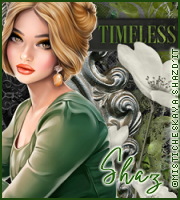
FTU Timeless


 This tut was written July 13th, 2025 for those with a basic knowledge of psp.

I am using the awesome tube © Misticheskaya
Tube is called Lettisia
You need a license to use this tube, please do not use without a license.
You can find the tube at the store HERE

I used PSP2020...but any of them should work.
FTU kit Timeless by Scrap by Chaos Priestess HERE
This is exclusive at her Fan Page on Facebook group
Mask of choice, I used RD Mask 720 HERE
Check out the rest of the blog HERE

Font of choice, I used Oxlade

Drop shadow is  V-1 H-4 Black, 40, 10, use what you prefer.
Let's get started
*Remember to add your drop shadow as you go along*
 
Open a new image 800 x 800, paste paper 1, apply your mask.
Resize frame 2 to 90%, paste.
Paste element 1 below the frame on the left, duplicate, mirror.
Paste element 20 on the left, duplicate, mirror, resize to 85%.

Resize the tube to 37%, mirror, paste.

Resize element 102 to 85%, paste at the bottom above the tube.
Resize the wordart to 85%, paste, add a light green gradient glow.
Resize element 25 to 55%, paste below the wordart on the bottom left, duplicate,
move to the center more.
Resize element 18 to 45%, paste at the bottom above the wordart.
Resize element 107 to 50%, paste above the clock on the right.
Resize element 18 to 50%, paste at the bottom below the wordart, duplicate
twice, mirror, move one to each side.
Paste element 15 below the frame on the left, duplicate, mirror.
Resize element 13 to 60%, paste on the upper left below the flower.
Resize element 24 to 30%, paste at the upper right below the tube,
duplicate, move to the left and down by the tube.

Add any other elements that you would like, make it your own.
Always readjust your mask and elements how you like them before you
 merge your tag, sharpen once.
Crop your tag to make sure no shadows or anything on the edges

 Then add your copyright and name.
That's it

Hope you enjoyed doing my tut.      

Tuesday, August 21, 2018

FTU Forever Dark


This tut was written Aug 21, 2018, 2018 for those with a basic knowledge of psp.
I am using the awesome artwork of Verymany
The tube is "Vampire 5" 
You need a license to use this tube, do not use without a license.
You can find this tube at their store  HERE

I used PSPX...but any of them should work.
FTU kit Forever Dark  by Chaos Priestess HERE
Check out the rest of the blog HERE
MizTeeques Mask 125  HERE
Check out the rest of the blog  HERE

Font of choice,  I used Darks Skyrim

Drop shadow is usually V-2 H-2 Black, 50, 5, use what you prefer.
Let's get started
*Remember to add your drop shadow as you go along*

Open a new image 800 x 800
Paste paper 2, apply your mask, delete, merge group.
Paste element 7 on the mask.

Resize your tube to 45%, paste, adjust more once the tag is done.

Resize element 17 to 80%, paste at the upper left below the tube layer.
Resize element 21 to 80%, paste behind the tube.
Paste element 18 behind the tube, having the heart behind the head.
Paste element 3 below the tube layer at the upper right behind the candles,
duplicate, resize to 60%, move to the lower right, free rotate to the left
at 15 degrees.

Resize element 19 to 50%, paste on the coffin on the left below the butterfly, 
duplicate, move to the center behind the tube, duplicate again mirror,
move to the right.
Resize element 20 to 40%, paste below the tube on the right by her legs, 
duplicate, mirror, adjust behind the tube on the left.

Resize element 6 to 40%, paste below the green leaf on the right, duplicate, mirror.
Resize element 14 to 40%, paste on the right below the skull, duplicate,
move behind the tube above the skull, duplicate again, move to the left above the tube,
duplicate twice more and move both to the right more.

Paste element 11 on the right below the skull layer.
Resize element 10 to 45%, free rotate to the left at 15 degrees, paste below the 
flowers where you like.
Resize element 13 to 40%, duplicate three or four times, mirror a couple of them,
move below the leaves elements and one behind the tube by the skull.

Resize element 4 to 50%, paste at the bottom above the flowers by the mask.
Resize element 1 to 35%, free rotate to the right at 15 degrees, paste it
at the lower right below the flowers.
Resize element 12 to 35%, paste at the lower left below the flower, duplicate, mirror,
move below the tube.

Resize element 5 to 55%, paste at the bottom above the glass layer.
Resize element 8 to 35%, paste at the bottom below the flower.
Resize element 15 to 30%, paste below the red bottle by the glass, duplicate, mirror,
paste by the flower with the skull on it, duplicate once more, move up on the
left above the butterfly.
Resize element 2 to 75%, paste above the mask layer at the top, duplicate, 
flip, move to the bottom.

Add any other elements that you would like, make it your own.
Always readjust your elements how you like them before you merge your tag.

Once happy with your tag, close off any background used, 
crop your tag to make sure no shadows or anything on the edges, merge visible.
Resize your tag first, then add your copyright and name.


That's it
Hope you enjoyed doing my tut.