Showing posts with label MizTeeque. Show all posts

Saturday, March 21, 2026

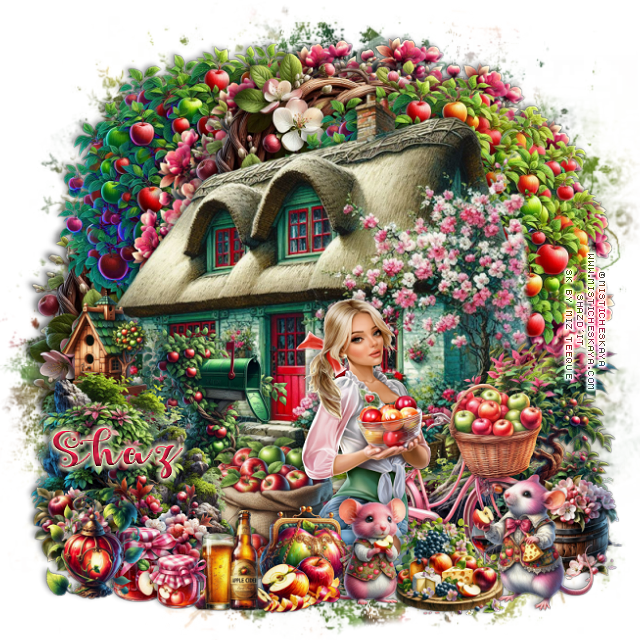
FTU Apple Blossom


 This tut was written March 21st, 2026 for those with a basic knowledge of psp. 

I am using the Beautiful tube ©Misticheskaya
The tube is called Ulla with Apples
The tube is "NOT" included
You need a license to use this tube, please do not use without a license
You can find the tube at Misticheskaya Store HERE

I used PSP2020...but any of them should work.
FTU Scrap Apple Blossom by Miz Teeque HERE
You can find all Miz Teeque's kits  HERE
Miz Teeque's Mask 173 HERE
Filter 
Mura Meister Copies-Encircle 

Font of choice, I used Apples Script

Drop shadow as you go is V -2 H -4, 40, 10, or use what you prefer
Let's get started
*Remember to add your drop shadow as you go along*

Open a new image 800 x 800, paste paper 11, apply your mask.

Resize 42 to 50%, paste at the upper left, duplicate, move to the 
right and down a little.
Resize 34 to 40%, paste at the top between the trees, duplicate, move
down on the left below the tree.
Resize 1 to 15%, apply Mura Meister Copies-Encircle, first 3 numbers
on 16, 60, 60, paste below the top wreath.

Resize 81 to 65%, paste above the trees.
Resize 49 to 20%, mirror, paste on the left above the house.
Resize 51 to 30%, mirror, paste at the bottom right above the house.
Resize 50 to 25%, mirror, paste on the bottom left.

Resize the tube to 22%, paste at the bottom.

Resize 76 to 25%, paste on the bottom right below the tube.
Resize 57 to 15%, paste on the bottom right below the bicycle.
Resize 104 to 15%, mirror, paste at the bottom above the tube.
Resize 63 to 20%, paste at the bottom below the tube.
Resize 128 to 18%, paste at the bottom  right above the tray.
Resize 130 to 15%, mirror, paste at the bottom by the tray.
Resize 56 to 15%, paste on the left below the rock.
Resize 9 to 15%, mirror, paste at the bottom to the left of the tube.

Resize 6 to 12%, paste on the bottom left.
Resize 30 and 31 to 7%, paste at the bottom above the tube.
Resize 89 to 15%, paste at the bottom.
Resize 117 to 12%, paste at the bottom below the mouse and apples.
Resize 141 to 17%, paste at the bottom left.
Resize 131 to 12%, paste at the bottom left below the lantern.
Resize 132 to 10%, paste at the bottom.

Add any other elements that you would like, make it your own.
Always readjust your mask and elements how you like them before you
 merge your tag, resize, sharpen.

Crop your tag to be sure no shadows or lines are on the edges.
 Then add your copyright and name.
That's it

Hope you enjoyed doing my tut      

Saturday, February 21, 2026

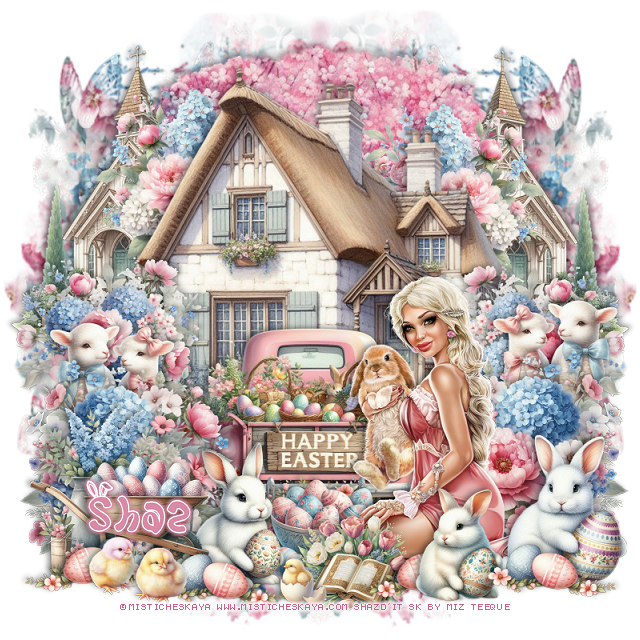
FTU Easter Bunny

  This tut was written February 21th, 2026 for those with a basic knowledge of psp. 
I am using the beautiful tube ©Misticheskaya
Tube is called Lisa
You need a license to use this tube, please do not use without a license.
You can find this tube at her store HERE

I used PSP2020...but any of them should work.
FTU Scrap Easter Bunny  HERE
Kit has 77 elements, 8 papers
Check the rest of the blog HERE
Mask of choice, I used Miz Teeques Mask 246 HERE
Check out the rest of the blog HERE

Font of choice, I used Glorious Easter

Drop shadow as you go is V -2 H 4, 50, 10, or use what you prefer.
Let's get started
*Remember to add your drop shadow as you go along*

Open a new image 800 x 800, paste paper 8, apply your mask, move
to the left, duplicate.

Resize 48 to 55%, paste at the top.
Resize 21 to 80%, paste at the top below the house.
Resize 2 to 28%, paste on the bottom right above the house, duplicate,
mirror.
Resize 3 to 25%, paste on the right below the flower, duplicate, mirror.
Resize 1 to 25%, paste on the left below the house, duplicate, mirror.
Resize 52 to 40%, paste on the upper left below the flower, duplicate,
mirror.
Resize 31 to 30%, paste at the bottom below the flowers.

Resize your tube to 22%, paste at the bottom right above the flowers.

Resize 39 to 20%, paste on the right below the first flowers,
duplicate, mirror.
Resize 71 to 15%, paste at the bottom below the tube by the truck.
Resize 57 to 15%, paste at the bottom above the tube.
Resize 19 to 20%, paste on the bottom right above the tube.
Resize 17 to 20%, mirror, paste at the bottom left above the bowl of eggs.
Resize 13 to 25%, paste on the bottom left above the rabbit.
Resize 20 to 20%, paste at the bottom above the tube, duplicate 3 times, 
mirror 2 of them and place on the bottom how you like.

Resize 44 and 45 to 8%, paste on the bottom left.
Resize 66 to 8%, paste at the bottom by the book.
Resize 16 to 15%, paste at the bottom to the right.

Add any other elements that you would like, make it your own.
Always readjust your mask and elements how you like them before you
 merge your tag, resize, sharpen.
Crop your tag to be sure no shadows or lines are on the edges.
 Then add your copyright and name.
That's it

Hope you enjoyed doing my tut.       

Thursday, February 19, 2026

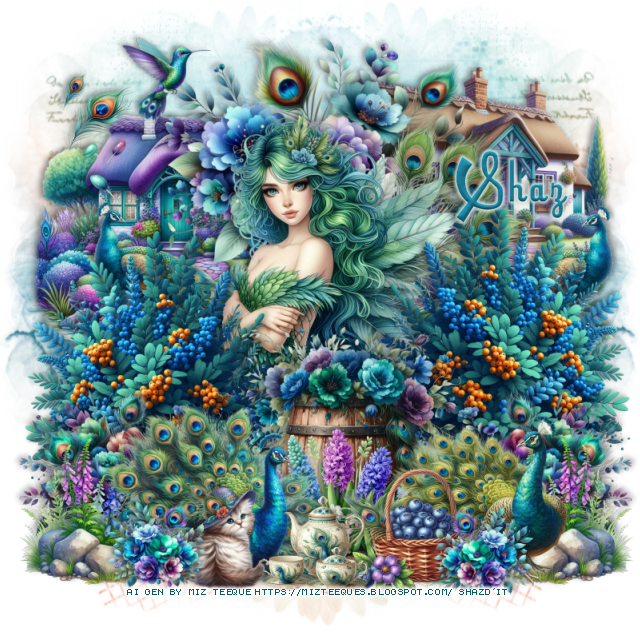
FTU Peacock

  This tut was written February 19th, 2026 for those with a basic knowledge of psp. 

I am using the beautiful Peacock kit Al gen by Miz Teeque
Tubes are included in the kit
Read the TOU how to credit your tags.

I used PSP2020...but any of them should work.
PTU Scrap Peacock  HERE
Kit has 113 elements, 10 papers, 5 frames and 8 tube
Check the rest of the blog HERE
Mask of choice, I used Miz Teeques Mask 78 HERE
Check out the rest of the blog HERE

Font of choice, I used UT Hollywood

Drop shadow as you go is V -2 H 4, 50, 10, or use what you prefer.
Let's get started
*Remember to add your drop shadow as you go along*

Open a new image 800 x 800, paste paper 5, apply your mask, move to
the left, duplicate, mirror.

Resize 17 to 40%, paste at the top.
Resize 87 to 40%, paste on the left below the flowers.
Resize 88 to 40%, paste on the right below the flowers.
Resize tube 3 to 35%, paste above the flowers.

Resize 32 to 35%, paste on the right above the tube, duplicate, mirror.
Resize 1 to 30%, paste on the right below the bush, duplicate, mirror.
Resize 11 to 35%, mirror, paste at the bottom above the bushes.
Resize 26 to 20%, paste on the bottom above the barrel.
Resize 6 to 25%, paste on the bottom right above the barrel.
Resize 7 to 28%, paste on the bottom left above the barrel.
Resize 18 to 25%, paste on the bottom left below the peacock, duplicate,
mirror.
Resize 61 to 20%, paste on the bottom.
Resize 109 to 15%, paste on the bottom.
Resize 76 to 15%, paste on the bottom.
Resize 103 to 20%, paste at the upper left above house.
Resize 78 to 12%, paste at the upper left above house.
Resize 24 to 20%, paste on the bottom right below the peacock, 
duplicate, mirror.
Resize 15 to 13%, paste on the bottom left, duplicate, mirror.

Add any other elements that you would like, make it your own.
Always readjust your mask and elements how you like them before you
 merge your tag, resize, sharpen.
Crop your tag to be sure no shadows or lines are on the edges.
 Then add your copyright and name.
That's it

Hope you enjoyed doing my tut.