
Showing posts with label Mechanic. Show all posts

Sunday, June 23, 2024

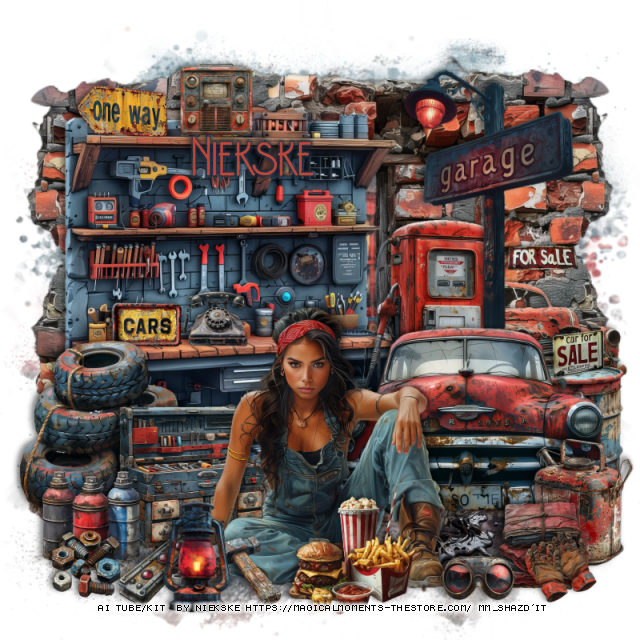
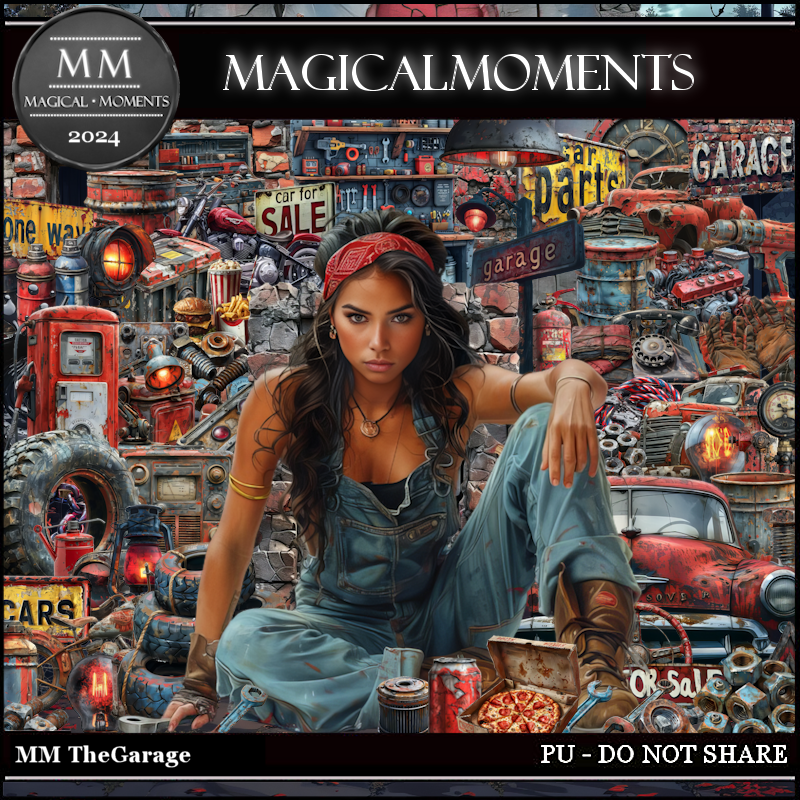
PTU The Garage


 This tut was written June 22nd, 2024 for those with a basic knowledge of psp. 

AI generated tubes and kit by Niekske
The tube are included in the kit
Read the TOU on how to credit your tags

I used PSP2020...but any of them should work.
PTU Scrap The Garage by Magical Moments HERE  
Mask of choice, I used RD Mask 756 HERE
Check out the rest of the blog HERE

Font of choice, I used Brodo Thin Grunge

Drop shadow is V -2 H 4, 50, 10, color Black or use what you prefer.
Let's get started
*Remember to add your drop shadow as you go along*

Open a new image 800 x 800, resize paper 3 to 80%, apply your mask.
Resize element 52 to 50%, paste on the left.
Resize element 48 to 65%, paste on the right above the mask, duplicate,
mirror.
Resize element 69 to 25%, paste at the bottom left.
Resize element 65 to 20%, paste on the left above the tires.
Resize element 5 to 35%, paste on the right.
Resize element 32 to 10%, mirror, paste under the car.

Resize your tube to 18%, paste at the bottom.

Resize element 31 to 18%, paste at the bottom above the tube.
Resize element 38 to 15%, paste at the bottom left.
Resize element 12 to 10%, paste on the work bench.
Resize element 43 to 10%, paste on the work bench.
Resize element 24 to 30%, paste on the right below the car.
Resize element 35 to 35%, paste on the right above the gas pump.
Resize element 7 to 20%, paste at the bottom right above the car.

Resize element 55 to 30%, mirror, paste on the right below the gas pump.
Resize element 26 to 10%, paste at the bottom left.
Resize element 18 to 10%, paste at the bottom left below the tube.
Resize element 17 to 10%, paste at the top on the work bench.
Resize element 44 to 13%, paste at the top on the work bench.
Resize element 64 to 10%, paste at the bottom.
Resize element 14 to 15%, paste at the bottom left.
Resize element 39 to 12%, paste at the bottom right.
Resize element 49 to 20%, paste at the bottom right below the car.
Resize element 51 to 10%, paste on the barrel on the right.
Resize element 15 to 10%, paste at the bottom right.
Resize element 4 to 15%, paste on the right on the rock wall.
Resize element 40 to 10%, paste at the bottom right.

Add any other elements that you would like, make it your own.
Always readjust your mask and elements how you like them before you
 merge your tag, resize, sharpen.

Crop your tag to be sure no shadows or lines are on the edges.
 Then add your copyright and name.
That's it

Hope you enjoyed doing my tut.   

Sunday, August 5, 2018

FTU Want Your Oil Checked


This tut was written August 5th, 2018 for those with a basic knowledge of psp.
I am using the awesome artwork of Keith Garvey
The tube is "Quart Low" 
You need a license to use this tube, do not use without a license.
You can find this tube at his store  HERE
Once his store closes not sure where you will be able to buy his tubes again.

I used PSPX...but any of them should work.
FTU kit Dirty Mechanic by True Taggin Love  HERE
Check out the rest of the blog HERE
RD Mask 754 HERE
Check out the rest of the blog  HERE
Filters
xero-Artworx

Font of choice,  I used Impact and Pacific Again

Drop shadow is usually V-2 H-2 Black, 50, 5, use what you prefer.
Let's get started
*Remember to add your drop shadow as you go along*

Open a new image 800 x 800
Paste paper 8, apply your mask, delete, merge group, apply the mask again,
delete, merge group.

Resize frame 2 to 70%, paste on the right, duplicate, mirror, merge down,
click inside each one with your magic wand, expand by 5, paste paper 1,
invert, delete, change the blend mode to Luminance(L), keep selected.
Paste your middle size tube on one side, then mirror and paste in the other side,
delete, select none, merge down.
Duplicate, go to Adjust, blur, Gaussian blur, number on 4, change the blend mode
to Overlay.  
Apply the xero filter-Artworx, default settings, merge down.

Resize your tube to 85%, paste above the frame about center.

Resize the gear cluster to 75%, paste below the tube to the right, change 
the color by going to Adjust, Hue and Saturation, colorize, both numbers on 0,
duplicate, mirror.

Resize the tire to 70%, paste below the tube to the right a bit.
Resize oil spill 2 to 35%, take your Pick tool, hold the shift key and drag the 
top square down on one side then the other until flat, paste above
the tube at the leg edge, duplicate, move to the left more.
Resize oil spill one to 40%, take the Pick tool and do the same until flat, move
under the gears on the right, duplicate, mirror.

Resize tires to 50%, paste below the tube to the left.
Resize the coupling to 30%, paste at the lower right above the oil spill, duplicate,
move over a little.

Resize the screwdriver to 40%, paste at the lower right on the coupling.
Resize wrench 1 to 30%, paste at the lower left above the oil, free rotate to the 
left at 5 degrees.
Resize wrench 2 to 30%, paste above the first wrench.

Resize the metal barrel to 55%, paste below the tire on the right, duplicate, move
below the gears on the left.
Resize the chain to 35%, paste at the bottom between the oil spills to help
cover the straight edge of the legs, duplicate the chain, move to the 
top of the frame, duplicate, mirror, move both below the tube layer.

Resize the line of washers and nuts to 45%, free rotate to the left at 90 degrees,
paste below the paper layer of the frame at the lower left, duplicate, mirror.

Resize RPM gage to 30%, paste on the right below the coupling.
Resize the headlight to 20%, paste on the left.
Resize grease rag to 25%, paste on the tire below the tube on the right.

Paste the wire fencing below the mask, resize to 95%.

I used Impact for Want Your Oil then Pacific Again.
I resize oil spill 2 to 50%, and place down at the bottom in a couple
of places on each side of the wordart once done.

Add any other elements that you would like, make it your own.

Once happy with your tag, close off any background used, 
crop your tag to make sure no shadows or anything on the edges, merge visible.
Resize your tag first, then add your copyright and name.


That's it
Hope you enjoyed doing my tut.