
Wednesday, October 31, 2018

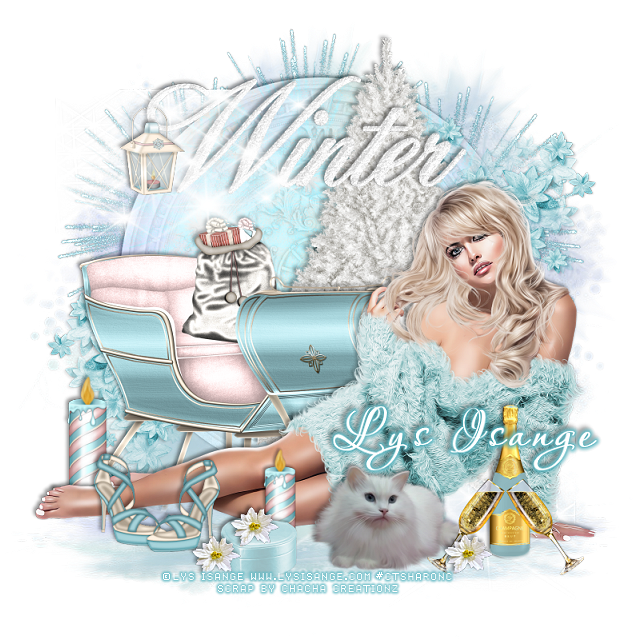
PTU B.B Beauty


This tut was written Oct 31st, 2018, for those with a basic knowledge of psp.
I am using the awesome tube by artist Lys Isange
Tube is called "BB " Exclusive at her store
She comes in 9 different colors
 You need a license to use this art, please do not use without a license.
You can find this tube at her store HERE

I used PSPX...but any of them should work.
I paired it with a PTU kit Glam Winter by ChaCha Creationz at S&CO  HERE
RD Mask 753  HERE
Check out the rest of the blog  HERE

Font of choice,  I used Aquarelle

Drop shadow is usually V-2 H-2 Black, 50, 5, use what you prefer.
Let's get started
*Remember to add your drop shadow as you go along*

Open a new image 800 x 800
Paste paper 6, apply your mask, delete, merge group, duplicate the mask,
take your Pick tool, hold the shift key and drag down the top square 
on one side and then the other to make it flat, move to the bottom.

Resize your tube to 25%, paste on the bottom on the flatten mask.
Paste element 4 on the mask layer, change the blend mode to Luminance(L).

Paste element 19 behind the tube to the left.
Resize element 13 to 40%, paste at the bottom left above the tube.
Paste element 6 below the sleigh a little off center to the right.

Resize element 1 to 40%, paste at the bottom above the tube more to the right.
Resize element 6 to 40%, paste by the cat. 
Resize element 62 to 40%, paste above the champagne bottle. 
Change the color of the champagne bottle to match the tag.

Paste element 34 at the top above the tree layer.
Resize element 45 to 25%, paste on the wordart at the left, erase a little of the hanger part.
Resize element 29 to 25%, paste at the bottom above the shoe layer.
Resize element 14 to 15%, paste on the box, duplicate a couple more times, place
where you like on the bottom.

Paste element 93 on the left below the clock layer, duplicate, mirror, duplicate again,
move to the center and down some.
Paste element 30 oh the lower left above the clock, duplicate, mirror, move
up more behind the tube.

Resize element 39 to 40%, paste on the left behind the feet of the tube, duplicate,
resize to 80%, move above the tube and behind the small box.
Paste element 98 below the tube layer.

Add any other elements you would like.

Once happy with your tag, close off any background, crop your tag to make
sure there are no stray edges, merge visible, resize first.
Add your copyrights and name.

That's it
Hope you enjoyed doing my tut.


Sunday, October 28, 2018

PTU Dark Glamour


This tut was written Oct 28th, 2018, for those with a basic knowledge of psp.
I am using the awesome tube by artist Lys Isange
Tube is called "Dark Glamor " Exclusive at her store
 You need a license to use this art, please do not use without a license.
You can find this tube at her store HERE

I used PSPX...but any of them should work.
I paired it with a PTU kit Gothika by LMB at S&CO  HERE
RD Mask 753  HERE
Check out the rest of the blog  HERE
xero-Bad Dream

Font of choice,  I used Stalemate

Drop shadow is usually V-2 H-2 Black, 50, 5, use what you prefer.
Let's get started
*Remember to add your drop shadow as you go along*

Open a new image 800 x 800
Paste paper 11, apply your mask, delete, merge group.

Resize your tube to 23%, paste to the right more.

Resize element 44 to 90%, paste behind the tube to the left, click inside
with the magic wand, expand by 5, paste paper 1, invert, delete, keep selected.
Mirror your close up tube, resize to 80%, paste, delete, select none.
Apply the xero filter-Bad Dream, then change the blend mode to Luminance(L).

Resize element 31 to 75%, paste on the right behind the tube at the bottom,
duplicate, move above the tube, resize to 75%, duplicate again and move over more.

Paste element 88 at the bottom below the wheel on the right, duplicate, mirror.
Paste element 81 on the right below the paper layer of the frame, duplicate, mirror.

Resize element 34 to 50%, paste on the right below the grass layer, 
duplicate, mirror.
Resize element 62 to 25%, paste at the lower left below the tube by the foot,
duplicate, move to the right more above the tube.
Resize element 38 to 50%, free rotate to the left at 90 degrees, paste on the right
below the black flowers, duplicate, mirror.
Resize element 29 to 40%, paste at the bottom above the grass layers.

Resize element 72 to 75%, paste on the right below the wheel layer.
Paste element 87 below the mask layer and move up so some shows at the top,
duplicate, move over more, duplicate both trees, move each one to the edge on each side.

Once happy with your tag, close off any background, crop your tag to make
sure there are no stray edges, merge visible, resize first.
Add your copyrights and name.

That's it
Hope you enjoyed doing my tut.


Monday, October 22, 2018

FTU Smell the Autumn Breeze


This tut was written Oct 22nd, 2018 for those with a basic knowledge of psp.
I am using the awesome artwork of Maryline Cazenave
The tube is "49-3" 
You need a license to use this tube, do not use without a license.
You can find this tube at CDO store  HERE

I used PSPX...but any of them should work.
FTU kit Colorful Autumn by Elves of Rosegarden  HERE
Check out the rest of the blog HERE
RD Mask Set 133-2  HERE
Check out the rest of the blog HERE
Wordart by Millie PSP Madness  HERE
Check out the rest of the blog HERE

Font of choice,  I used AR Christy

Drop shadow is usually V-2 H-2 Black, 50, 5, use what you prefer.
Let's get started
*Remember to add your drop shadow as you go along*

Open a new image 800 x 800
Resize paper 1 to 115%, paste, apply your mask, delete, merge group.

Resize element 32 to 95%, paste on the mask layer.
Paste element 10 on the flower.

Paste element 28 on the mask to the right, duplicate, mirror, resize to
80%, adjust on the left, erase the trunk showing at the bottom on both.

Being on the top layer now, paste your tube about centered.

Resize element 20 to 25%, paste below the tube on the left, duplicate, mirror.
Resize element 2 to 15%, paste on the right below the tube at the bottom of 
the mushroom, duplicate, mirror, duplicate once more, 
move above the tube at the bottom.

Resize element 21 to 15%, paste by the leaf at the lower left.
Resize element 47 to 20%, paste at the bottom below the nuts and leaf.

Resize element 44 to 25%, paste below the mushroom on the right, duplicate, mirror.
Resize element 4 to 20%, paste at the lower left below the nuts and leaf,
duplicate, resize to 90%, move to below and to the right of the yellow flower.

Resize element 36 to 10%, duplicate a couple of times and place at the bottom how you like.
Resize element 43 to 25%, paste at the bottom left being on the top layer.

Paste your wordart, select all float, defloat, add a new layer and either
fill with a color or paste a paper, delete, select none, delete the wordart below.

Add any other elements that you would like, make it your own.
Always readjust your elements how you like them before you merge your tag.

If you want to do a Signature tag, don't merge your tag yet.
Open a new image 600 x 250
Go back to your tag and take the elements you want to use and paste,
resizing to your liking and place. 
Most of the elements I resized between 50% and 60%, just resize how you prefer.
Add your copyright and name.

Avator open a size you prefer, mine is 200 x 200, paste your signature tag,
resize if need, then add a frame of choice.
Add copyright and name.

Once happy with your tag, close off any background used, 
crop your tag to make sure no shadows or anything on the edges, merge visible.
Resize your tag first, then add your copyright and name.

That's it
Hope you enjoyed doing my tut.