Showing posts with label Laguna. Show all posts

Tuesday, January 7, 2025

PTU Pet Valentine


 This tut was written January 7th, 2025 for those with a basic knowledge of psp. 

I am using the adorable tube ©Laguna

Tube is called Valentine Piggy with bag of Hearts
You need a license to use this tube, please do not use without a license
I bought my tube at PFD when they were selling there
You can find their tubes at their store HERE

I used PSP2020...but any of them should work.
PTU Scrap Pet Valentine by Portuguese Girl Designs  HERE 
You can find all Portuguese Girl Designs  HERE
 RD Mask 904 HERE
Check the rest of the blog HERE

Font of choice, I used Ambrosia Cap

Drop shadow as you go is V -2 H 4, 40, 10, or use what you prefer.
Let's get started
*Remember to add your drop shadow as you go along*

Open a new image 800 x 800, paste paper 12, apply your mask.

Resize element 83 to 90%, paste, click inside with the magic wand, 
resize element 98 to 50%, invert, delete.
Duplicate the frame, free rotate to the right at 20, move below the top frame.
Resize element 40 to 45%, paste on the frame at the top.
Resize element 84 to 25%, paste above the arrow over the hearts,
merge the heart, arrow with the frame and paper, move to the left,

Resize your tube to 23%, paste on the bottom right.

Resize element 53 to 50%, paste on the arrow on the right.
Resize element 101 to 30%, paste below the wordart tag.
Resize element 64 to 70%, paste on the left above the frame.
Resize element 11 to 50%, paste at the bottom below the pig.
Resize bonus 5 to 40%, paste on the bottom left.
Resize element 14 to 45%, paste at the bottom left, duplicate, mirror, 
move below the tube.
Resize element 10 to 35%, paste at the bottom above the tube layer.

Resize element 34 to 30%, paste below the kitten.
Resize element 30 to 30%, paste on the bottom right.
Resize element 2 to 30%, paste on the bottom left below the chocolates.
Resize element 12 to 25%, mirror, paste at the bottom right.
Resize element 8 to 20%, paste at the bottom right below the cat.
Resize element 89 to 75%, paste on the right behind the pig.
Resize element 97 to 30%, paste on the left above the calendar element.
Paste element 56 at the bottom being on the top layer, duplicate, flip.

Add any other elements that you would like, make it your own.
Always readjust your mask and elements how you like them before you
 merge your tag, resize, sharpen.

Crop your tag to be sure no shadows or lines are on the edges.
 Then add your copyright and name.
That's it

Hope you enjoyed doing my tut  

Saturday, April 13, 2024

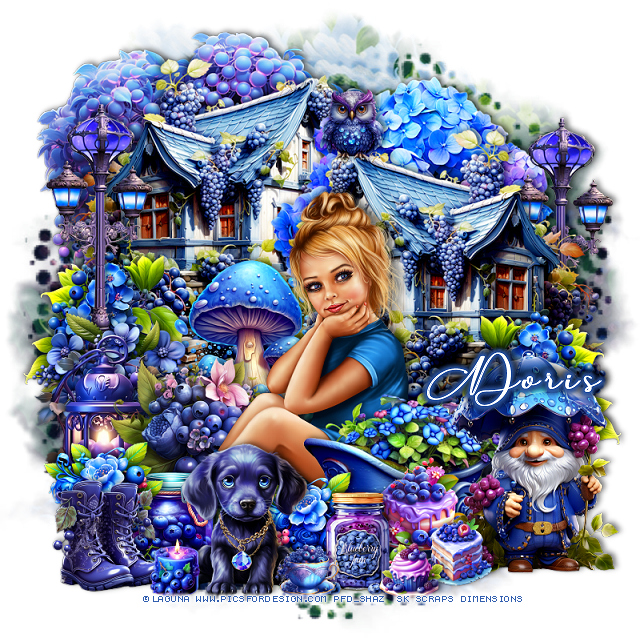
PTU Blueberry Joy


This tut was written  April 13th, 2024 for those with a basic knowledge of psp. 

I am using the adorable tube by ©Laguna 
The tube is called Christmas Elf Girl and Mouse
You need a license to use this tube, please do not use without a license
You can find this tube at PFD HERE

I used PSP2020...but any of them should work.
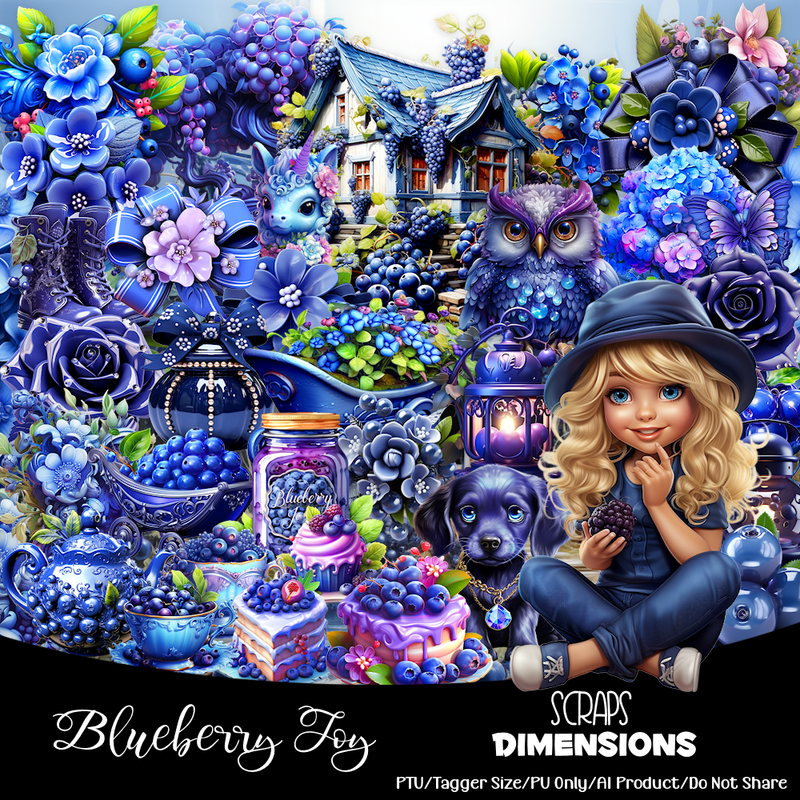
PTU Scrap Blueberry Joy by Scraps Dimensions  HERE
Check her blog to see what stores her kits are in and check out 
all of her kits.
Mask of choice, I used Miz Teeques Mask 70 HERE  
Check out the rest of the blog HERE

 Font of choice, I used Anything Script

Drop shadow as you go is V -2 H -4, 50, 10, or use what you prefer.
Let's get started
*Remember to add your drop shadow as you go along*

Open a new image 800 x 800, paste paper 7, apply your mask.

Resize element 16 to 75%, paste at the upper left.
Resize element 20 to 70%, paste on the right and down, duplicate, 
mirror, move up above the tree and below the first house.
Resize element 30 to 75%, paste between the houses.
Resize element 44 to 40%, paste at the bottom above the houses.

Resize your tube to 30%, mirror, paste to the right of the mushrooms.

Resize element 49 to 65%, paste on the left, duplicate, mirror, move below
the house on the right.
Resize element 21 to 55%, paste at the bottom above the tube.
Resize element 31 to 40%, paste behind the tube on the left.
Resize element 12 to 35%, mirror, paste at the bottom above the wheel barrel.

Resize element 47 to 25%, paste behind the dog on the left.
Resize element 26 to 25%, paste at the bottom left above the jar, duplicate,
move to the right behind the dog.
Resize element 37 to 40%, paste on the left above the street light.
Resize element 10 to 40%, paste on the left above the flower.
Resize element 27 to 40%, paste on the right above the house, duplicate, mirror,
move below the street light on the left.

Resize element 19 to 50%, paste on the bottom right above the wheel barrel.
Resize element 15 to 25%, paste at the bottom left.
Resize element 60 to 25%, paste at the bottom to the right of the dog.
Resize element 35 to 23%, paste at the bottom below the jar.
Resize element 36 and 40 to 17%, paste at the bottom.
Resize element 25 and 52 to 15%, paste at the bottom.
Resize element 14 to 15%, paste at the top on the house.

Add any other elements that you would like, make it your own.
Always readjust your mask and elements how you like them before you
 merge your tag, resize, sharpen.
Crop your tag to be sure no shadows or lines are on the edges.
 Then add your copyright and name.
That's it

Hope you enjoyed doing my tut.     

Tuesday, January 9, 2024

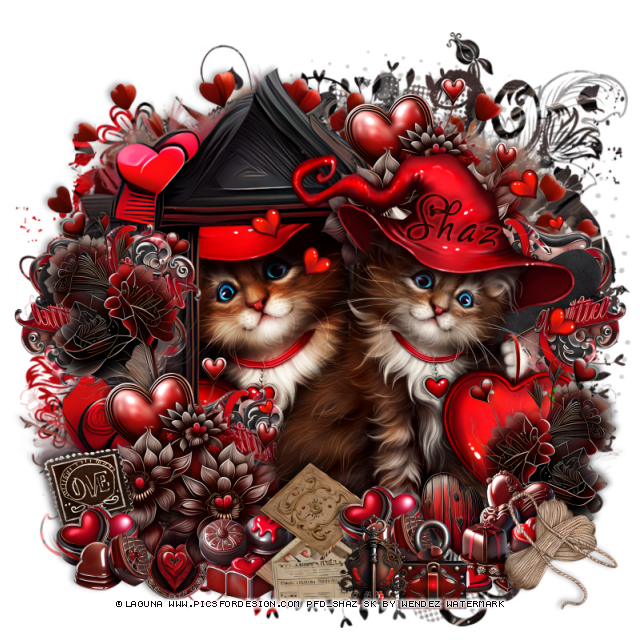
FTU Valentine Cat


 This tut was written January 9th, 2024 for those with a basic knowledge of psp.

I am using the awesome artwork of ©Laguna
The tube is called Valentine Kitty in Red Hat
You need a license to use this tube, please do not use without a license.
You can find this tube at PFD store HERE

I used PSP2020...but any of them should work.
FTU Scrap Valentine-AI generated kit  by Wendez Watermark HERE  
Check out the rest of her blog HERE
Mask of choice, I used DD Mask NVM_4 (Blog closed now)

Font of choice I used Gaby

Drop shadow is V -2 H -4, 50, 10, Black or use what you prefer.
Let's get started
*Remember to add your drop shadow as you go along*

Open a new image 800 x 800, paste paper 9, apply your mask.

Resize frame 1 to 80%, paste, click inside with the magic wand,
Paste paper 3, invert, delete, keep selected,
resize the tube to 30%, paste below the frame, delete, select none.
Duplicate the tube, go to Adjust, Blur, Gaussian blur, number on 8,
change the blend mode to Overlay.
Resize element 98 to 90%, paste behind the frame.

Resize your tube to 25%, mirror, paste above the frame on the right,
erase the heart on the nose.

Resize element 91, 92, 93 and 94 to 20%, paste at the bottom.
Resize element 79 to 35%, paste at the bottom left above the frame, 
duplicate, move to the upper right behind the tube.
Resize element 2 to 15%, paste at the bottom behind the candies.
Resize element 80 to 35%, paste on the left above the frame, duplicate,
mirror, move at the bottom above the tube.

Resize element 33 to 27%, paste at the bottom below some of the candies.
Resize element 4 to 15%, paste at the bottom left below the flowers,
go back to one of the candies, duplicate, move to the left.
Resize element 100 to 15%, paste on the left below the candy.
Resize element 52 and 62 to 15%, paste at the bottom being on the top layer.
Resize element 98 to 20%, free rotate to the right at 20, paste at the bottom right.

Resize element 23 to 30%, paste on the right behind the tube, duplicate, mirror,
move down behind the tube, duplicate again, move to the left behind the flower.

Add any other elements you like, once happy, add your name
and copyright.
Crop your tag to be sure no stray shadows or lines or on the edges.

That's it

Hope you enjoyed doing my tut.    

Set for Wendy


Tuesday, January 2, 2024

PTU Mardi Gras Vibes


 This tut was written  January 1st, 2024 for those with a basic knowledge of psp. 

I am using an awesome tube by ©Laguna
Tube is called Mardi Gras (Leprechaun) Girl with Teddy Bear
You need a license to use this tube, please do not use without a license.
You can find the tube at PFD HERE

I used PSP2020...but any of them should work.
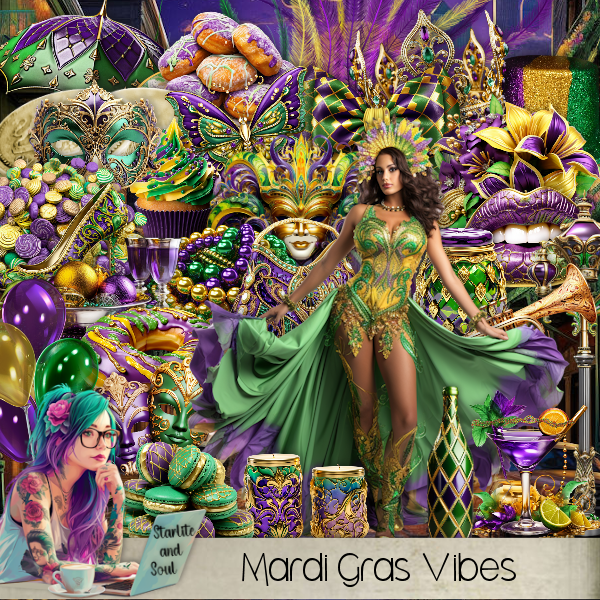
PTU Mardi Gras Vibes by Starlite and Soul  HERE
Check her store out to see all her other kits HERE
Filters
Mura Meister Copies-Encircle

 Font of choice, I used Mardi Gras

Drop shadow as you go is V -2 H -4, 50, 10, or use what you prefer.
Let's get started
*Remember to add your drop shadow as you go along*

Open a new image 800 x 800
Paste element 129, adjust to fit your tag later.

Resize frame 6 to 75%, paste, click inside with the magic wand, resize
paper 6, to 75%, paste, invert, delete.
Resize element 103 to 25%, apply Mura Meister Copies-Encircle,
first 3 numbers on 16, 55, 55, move below the paper layer.
Paste element 26 below the flower circle at the top, duplicate, flip, move
to the bottom.
Resize wordart 3 to 30%, paste in the frame, add a bevel, glass or texture
to it.

Resize your tube to 30%, paste above the frame on the right.

Resize element 60 to 85%, paste behind the tube.
Resize element 134 to 70%, paste on the frame on the left.
Resize element 97 to 35%, paste behind the tube on the right, duplicate,
mirror.
Resize element 103 to 30%, paste at the bottom above the tube,
duplicate, mirror, move above the swirl element.
Resize element 48 to 75%, paste on the left behind the swirl.
Resize element 4 to 30%, paste on the right behind the tube.
Resize element 5 to 25%, paste on the drums.

Resize element 25 to 40%, paste at the bottom above the flower.
Resize element 11 to 35%, paste at the bottom.
Resize element 26 to 30%, paste at the bottom.
Resize element 101 to 15%, paste at the bottom.
Resize element 1 to 25%, paste behind the tube to the left.
Resize element 67 to 30%, mirror, paste on top of the jar.
Resize element 46 to 25%, paste at the bottom right.
Resize element 50 to 25%, paste at the bottom left below the flower.
Resize element 31 to 25%, paste at the bottom left.
Resize element 44 to 20%, paste at the bottom, duplicate, move to the right.

Add any other elements that you would like, make it your own.
Always readjust your mask and elements how you like them before you
 merge your tag, resize, sharpen.

Crop your tag to be sure no shadows or lines are on the edges.
 Then add your copyright and name.
That's it

Hope you enjoyed doing my tut.      

Tuesday, December 12, 2023

FTU Christmas on the Farm


This tut was written December 12th, 2023 for those with a basic knowledge of psp.

I am using the awesome artwork of ©Laguna
I used 2 tubes called Little Cow with Lollipop and Christmas tree 
and
Christmas Girl Cow for Love
You need a license to use this tube, please do not use without a license.
You can find these tube at PFD store HERE and HERE

I used PSP2020...but any of them should work.
FTU Scrap Christmas on the Farm by Raspberry Road Designs HERE  
You will have to register at the store to get the kit.
Mask of choice, I used DD 2019Xmas1  (blog closed now)
Millis's PSP Madness Template 804 HERE
Check out the rest of the blog HERE

Font of choice I used megaibeilya

Drop shadow is V -2 H -4, 50, 10, Black or use what you prefer.
Let's get started
*Remember to add your drop shadow as you go along*

Open the template, duplicate, close the original.
Go to Image, Canvas size, 800 x 800.
Delete the credits, wordart and layer 10.

Resize paper 1 to 25%, paste on the bottom, apply your mask,

Merge layer 1 and 2 together, 
select all, float, defloat, resize paper 4 to
20%, paste, invert, delete, duplicate, change the blend mode to Multiply,
duplicate 3 more times, merge these layers together, delete, the template.

Merge layer 3 and 4 together,
 select all, float, defloat, resize paper 2, paste, invert, delete.

Merge layer 5 and 6 together,
 select all, float, defloat, add a new layer, fill with a color of choice.

Merge layer 7 and 8 together, 
select all, float, defloat, resize paper 1 to 20%, paste, invert, delete.

Layer 9, resize paper 4 to 20%, paste, invert, delete.

Resize element 1 to 30%, paste on the top layer.
Resize element 9 to 20%, paste at the bottom on the sign, duplicate,
resize to 60%, move to the upper left on the sign.

Resize the Cow girl with love tube to 20%, paste on the left at
the bottom of the sign.
Resize the tube little cow with the lollipop to 28%, paste on the right.
Resize element 10 to 30%, paste on the upper left above the mask, 
duplicate, mirror, move down on the right, duplicate, flip, move
down to the bottom.

Resize element 7 to 30%, paste above the greenery.
Resize element 3 to 20%, paste at the bottom below the girl cow, duplicate,
resize to 75%, move to the right more behind the standing cow.
Resize element 2 to 15%, mirror, paste on the sign at the upper left, erase the
wire hanger, duplicate, mirror.
Resize element 16 to 20%, paste at the upper left above the mittens.
Resize element 14 to 45%, paste on the top layer.
Resize element 15 to 20%, duplicate 3 or 4 times, paste where you like.

Add any other elements you like, once happy, add your name
and copyright.
Crop your tag to be sure no stray shadows or lines or on the edges.

That's it

Hope you enjoyed doing my tut.     

Sunday, April 30, 2023

FTU Purrr-fect Mom's Day


This tut was written April 30th, 2023 for those with a basic knowledge of psp.

I am using the awesome artwork of ©Laguna
The tube is called Cat Mommy
You need a license to use this tube, please do not use without a license.
You can find this tube at PFD Store HERE

I used PSP2020...but any of them should work.
FTU Flowers for Mom by MTA HERE  
Check out the rest of the blog HERE
Mask of choice, I used Miz Teeque's Mask 345 HERE
Check out the rest of the blog HERE
Filters
Mura Meister Copies-Encircle

Font of choice I used Brush Script

Drop shadow is V -1 H -4, 50, 10, Black or use what you prefer.
Let's get started
*Remember to add your drop shadow as you go along*

Open a new image 800 x 800, select all, new layer, paste paper 4 into selection,
apply your mask.

Resize frame 3 to 60%, paste, click inside with the magic wand, clicking in
all the little openings on the frame as well, expand by 5,
paste paper 1 how you like for the colors, invert, delete, select none.

Resize element 23 to 55%, paste below the paper layer on the right, duplicate,
mirror, merge down.
Resize element 13 to 15%, apply Mura Meister Copies-Encircle, change the first
3 numbers to 30, 67, 63, move below the flower circle.
Resize element 51 to 55%, paste below the flowers, pull out the sides a little 
with your Pick tool.

Resize your tube to 40%, paste below the frame, duplicate, move above the 
frame, erase the bottom part outside the frame.

Resize elements 1, 2, 8, 9, 10, 11 and 13 to 15%, paste at the bottom how you like,
duplicate some of them.
Resize element 28 to 75%, paste below the top flower, duplicate, mirror, move 
over and down more.
Resize element 31 to 70%, flip paste at the bottom behind the flowers.

Resize element 15 to 20%, mirror, paste at the upper right below the tube.
Resize element 73 to 10%, mirror, paste on the birdhouse, erase the flowers,
duplicate, move to the top of the house.
Resize element 3 to 10%, paste at the bottom left on the green vine,
duplicate, mirror.

Add any other elements you would like, make it your own.
Crop your tag to be sure no shadows or lines are on the edges.
 Then add your copyright and name.
That's it

Hope you enjoyed doing my tut.  

Sunday, April 23, 2023

FTU Don't Worry Bee Happy


 This tut was written April 23rd, 2023 for those with a basic knowledge of psp.

I am using the awesome artwork of ©Laguna
The tube is called Honey Bear
You need a license to use this tube, please do not use without a license.
You can find this tube at PFD Store HERE

I used PSP2020...but any of them should work.
FTU Digi Express Blog Train-Step Into Summer by Miggins HERE  
Check out the rest of the blog HERE
Mask of choice, I used Vivienne's Digital Tagging Mask 60 HERE
Check out the rest of the blog HERE

Font of choice I used Herrfoch Trash

Drop shadow is V -1 H -4, 40, 10, Black or use what you prefer.
Let's get started
*Remember to add your drop shadow as you go along*

This is a Quickie 

Open a new image 800 x 800, resize paper 2 to 22%, paste, apply your mask,
resize a little smaller to 85%.

Resize element 16 to 20%, paste to the left.
Resize element 12 to 20%, paste to the right, take your free hand tool, draw around
the frame, getting all the small openings too, resize paper 2 to 20%, paste, 
invert, delete, select none.
I gave the frame a gradient glow using Eye Candy 4000-Gradient Glow with 
these settings 
Color #e8b388, Width 10, Soft Corner 25, Overall Opacity 100%.

Resize your tube to 27%, paste above the frame.
Resize the close up Bee to 15%, mirror, paste on the left.

Resize element 23 to 25%, paste at the bottom left below the bear.
Resize element 3 to 20%, paste at the bottom left above the card.
Resize element 5 to 20%, paste on the right below the bear, duplicate, resize smaller 
to 75%, mirror, move below the card, duplicate again, move behind the bear,
duplicate as many times as you like and move around.

Resize element 11 to 5%, paste at the bottom above the bear, duplicate, move over
a little, duplicate 2 more times and move to each side.
Resize element 15 to 10%, paste at the bottom.
Resize element 17 to 10%, paste at the top behind the bear, duplicate, move down 
on the left above the card.
Resize element 2 to 10%, mirror, paste at the lower left by the flower.
Add any words you would like.

Add any other elements you would like, make it your own.
Crop your tag to be sure no shadows or lines are on the edges.
 Then add your copyright and name.
That's it

Hope you enjoyed doing my tut.