This tut was written Nov 28th, 2019, for those with a basic knowledge of psp.
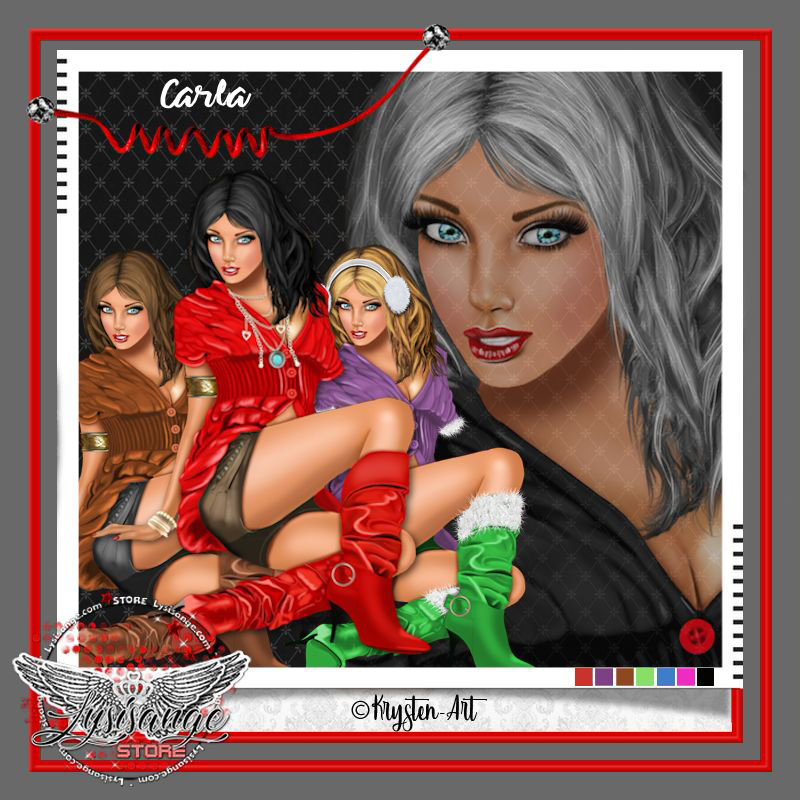
I am using the awesome tube by artist Krysten-Art
Tube is called "Carla" she comes in several colors.
You need a license to use this art, please do not use without a license.
Please do not use without a license.
You can find this tube at LysIsange store HERE
Drop shadow is usually V-2 H-2 Black, 50, 5, use what you prefer.
Let's get started
*Remember to add your drop shadow as you go along*
Open a new image 800 x 800
Paste paper 11, apply your mask, delete, merge group.
Resize your tube to 20%, paste center, duplicate, go to Adjust,
Blur, Gaussian blur, number on 4, change the blend mode to
Soft Light or one you prefer.
Resize element 4 to 85%, paste.
Paste element 91 behind the tube, click inside with your magic wand,
expand by 15, paste paper 10, invert, delete, select none.
Resize element 90 to 40%, apply Mura Meister Copies-Encircle,
first number on 28, move to the mask layer.
Resize element 54 to 40%, paste below the tube at the lower left.
Resize element 23 to 60%, paste under the tube to the left, duplicate, mirror.
Resize element 58 to 75%, paste on the right below the greenery layer.
Resize element 55 to 40%, paste at the bottom above the tube.
Resize element 25 to 50%, paste at the lower right being on the top layer,
duplicate, mirror, erase a couple of the ornaments.
Resize element 1 to 20%, paste on the basket at the bottom.
Resize element 89 to 10%, paste on the right above the tree.
Resize element 53 to 40%, paste on the right below the brown gift.
Resize element 80 to 50%, mirror, paste at the bottom left below the greenery,
duplicate, mirror.
Resize element 56 to 25%, paste on the green bag on the right, duplicate,
move to the lower left.
Resize element 90 to 10%, paste on the bow on the wreath on the left,
duplicate, move on the bow on the right below the tree.
Paste element 18 above the green frame wreath.
Resize your tube to 20%, paste center, duplicate, go to Adjust,
Blur, Gaussian blur, number on 4, change the blend mode to
Soft Light or one you prefer.
Resize element 4 to 85%, paste.
Paste element 91 behind the tube, click inside with your magic wand,
expand by 15, paste paper 10, invert, delete, select none.
Resize element 90 to 40%, apply Mura Meister Copies-Encircle,
first number on 28, move to the mask layer.
Resize element 54 to 40%, paste below the tube at the lower left.
Resize element 23 to 60%, paste under the tube to the left, duplicate, mirror.
Resize element 58 to 75%, paste on the right below the greenery layer.
Resize element 55 to 40%, paste at the bottom above the tube.
Resize element 25 to 50%, paste at the lower right being on the top layer,
duplicate, mirror, erase a couple of the ornaments.
Resize element 1 to 20%, paste on the basket at the bottom.
Resize element 89 to 10%, paste on the right above the tree.
Resize element 53 to 40%, paste on the right below the brown gift.
Resize element 80 to 50%, mirror, paste at the bottom left below the greenery,
duplicate, mirror.
Resize element 56 to 25%, paste on the green bag on the right, duplicate,
move to the lower left.
Resize element 90 to 10%, paste on the bow on the wreath on the left,
duplicate, move on the bow on the right below the tree.
Paste element 18 above the green frame wreath.
Add any other elements you would like, make it your own.
Always remember to adjust the elements before merging to get them like you like.
Once happy with your tag, close off any background, crop your tag to make
sure there are no stray edges, merge visible, resize first.
Add your copyrights and name.
That's it
That's it
Hope you enjoyed doing my tut.