Showing posts with label Andy Cooper. Show all posts

Saturday, August 24, 2024

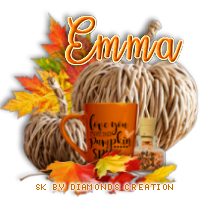
FTU Pumpkin Spice and All Things Nice


This tut was written August 24th, 2024 for those with a basic knowledge of psp. 

I am using an adorable tube by © Andy Cooper
The tube is called Autumn Pumpkin
You need a license to use this tube, please do not use without a license
Not sure where he is selling now, I bought when he was at S&CO
S&CO store is closed and has been for awhile now.

I used PSP2020...but any of them should work.
FTU Scrap Pumpkin Spice and All Things Nice by Diamond Creations HERE 
Check out the rest of the blog HERE
Mask of choice, I used Miz Teeques Mask 93 HERE
Check out the rest of the blog HERE
Filters  
Mura Meister Copies-Encircle.

Font of choice, I used Sunflowers

Drop shadow as you go is V -2 H 4, 40, 10, or use what you prefer.
Let's get started
*Remember to add your drop shadow as you go along*

Open a new image 800 x 800, paste paper 15, apply your mask.

Resize element 32 to 85%, free rotate to the left at 20, paste,
click inside with the magic wand, paste paper 9, invert, delete.
Go to Effects, 3D Effect, Inner Bevel, with these setting,
Width 30
3, 4, 35, 40
302, 35, 40
color #fec48c
Resize element 64 to 75%, paste on the upper right above the mask,
duplicate, move down on the left.
Resize element 16 to 25%, apply Mura Meister Copies-Encircle,
first 3 numbers 18, 55, 55, move below the frame.
Resize element 37 to 20%, apply Mura Meister Copies-Encircle,
first 3 numbers 28, 63, 60, move below the leaves circle.

Resize the tube to 55%, paste.

Resize element 58 to 75%, paste behind the tube on the left, duplicate,
mirror.
Resize element 7 to 55%, paste behind the leaves on the left, duplicate, 
mirror.
Resize element 62 to 50%, paste on the left below the tube, duplicate,
mirror, duplicate, move above the tube to the center.
Resize element 56 to 40%, paste on the bottom right.
Resize element 18 to 25%, paste on the bottom left below the tube.
Resize element 8 to 22%, paste at the bottom left above the tube.
Resize element 66 to 35%, paste at the right, duplicate, mirror, move below
the pumpkins on the left.
Resize element 37 to 25%, paste at the bottom above the pumpkin.
Resize element 37 to 25%, paste on the bottom right.
Resize element 5 to 30%, paste on the bottom below the leaves.
Resize element 48 to 30%, paste at the bottom.
Resize element 38 to 30%, paste on the bottom left above the foot of 
the tube, duplicate, move to the right more to the right, duplicate once more
move to the right below the pumpkins.
Resize element 14 to 40%, free rotate to the left at 20, paste in the frame.
Resize element 60 to 50%, paste on the right above the mask layer,
duplicate, mirror, move to the upper left.

Add any other elements you would like, resize.
Crop your tag to be sure no shadows or lines are on the edges.
 Then add your copyright and name.
That's it

Hope you enjoyed doing my tut   


Tuesday, March 12, 2019

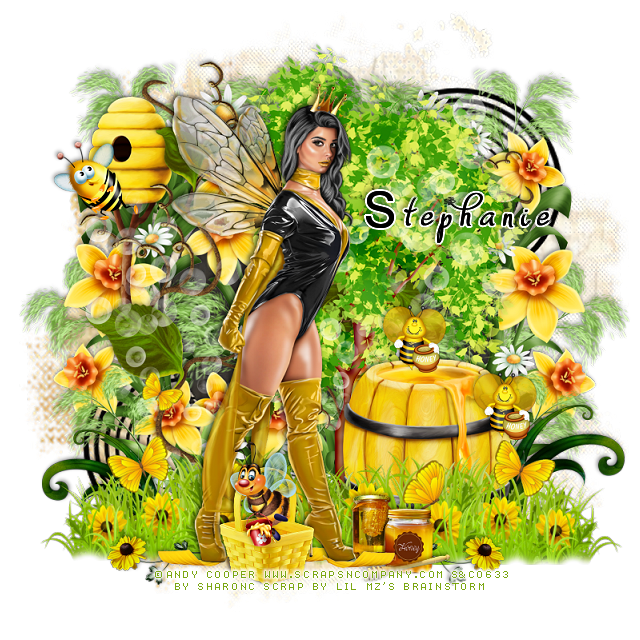
PTU Honey Queen


This tut was written March 12th, 2019, for those with a basic knowledge of psp.
I am using the awesome tube by artist  Andy Cooper
Tube is called "Honey Queen"
 You need a license to use this art, please do not use without a license.
You can get this tube at the S&CO store HERE

I used PSPX...but any of them should work.
PTU matching kit Honey Queen by LMB  S&CO  HERE
MizTeeques Mask 234  HERE
Check out the rest of the blog HERE

Font of choice,  I used Dafodyl

Drop shadow is usually V-2 H-2 Black, 50, 5, use what you prefer.
Let's get started
*Remember to add your drop shadow as you go along*

Open a new image 800 x 800
Paste paper 6, apply your mask, delete, merge group, duplicate, merge down.
Resize larger to about 110%.
Paste element 83 on the mask layer.
Paste element 103 above this layer and move to the right more, duplicate, mirror.
Paste element 98 on top of this flower frame.

Resize your tube to 60%, paste a little to the left.

Resize element 106 to 75%, paste at the bottom below the tube, duplicate, mirror.
Take your eraser and tap the edge so it is not so straight across.

Paste element 90 behind the tube a little off center to the right.
Resize element 28 to 40%, paste below the grass layer to the right.


Resize element 27 to 50%, paste on the left below the vine layer.
Resize element 69 to 15%, paste by the honey barrel, duplicate, move up more.
Resize element 110 to 20%, mirror, paste by the bee hive at the left.

Resize element 16 to 15%, paste at the bottom being on the top layer.
Resize element 39 to 25%, paste below the honey jar on the grass, duplicate, mirror,
move below the foot of the tube.
Resize element 3 to 15%, paste at the bottom, duplicate, mirror.
Resize element 93 to 25%, paste at the lower right below the honey barrel, 
duplicate, mirror.

Resize element 17 to 15%, paste below the honey jar at the bottom.
Resize element 23 to 20%, paste at the bottom in front of the jars.
Resize element 88 to 25%, paste at the bottom above the tube layer.
Resize element 72 to 25%, paste over the basket.
Paste element 53 on the tree layer, mirror, adjust.

Add any other elements you would like, make it your own.
Always remember to adjust the elements and the mask before merging 
to get them like you like. I always use my Pick tool to pull the mask out
more to fit the tag better.

Once happy with your tag, close off any background, crop your tag to make
sure there are no stray edges, merge visible, resize first.
Add your copyrights and name.

That's it
Hope you enjoyed doing my tut.

Friday, July 13, 2018

PTU Farm House


This tut was written July 13th, 2018 for those with a basic knowledge of psp.
I am using the awesome artwork of  Andy Cooper
Tube is called "Denim Overol"
You need a license to use this tube, do not use without a license.
I bought this tube when he was selling at S&CO HERE
You can find his art at Arthur Crowe's Store now  HERE
I don't know if this tube is still available or not, if not just use one that you like.

I used PSPX...but any of them should work.
PTU Flower Fae by Irish Princess Designs  HERE, HERE, HERE
RD Mask 673 HERE
Check out the rest of the blog  HERE
Filters
Screen Works-Light Gauze

Font of choice,  I used Harvest Barn

Drop shadow is usually V-2 H-2 Black, 50, 5, use what you prefer.
Let's get started
*Remember to add your drop shadow as you go along*

Open a new image 800 x 800
Select all, paste paper 23 into selection, apply your mask, delete, merge group.
Then add a new layer, select all, paste paper 2 into selections, apply your
mask, delete, merge group, merge down.

Resize element 13 to 80%, paste on the mask layer.
Click inside with your magic wand, expand by 5, paste your close up off
to the right more, invert, delete, select none.
Duplicate the tube, go to Adjust, Blur, Gaussian blur, first number on 4,
change the blend mode to Screen. Apply the Screen Works filter-Light Gauze,
merge down.

Resize element 149 to 90%, paste at the bottom.

Resize your tube to 65%, paste on the grass off center to the left.

Resize element 35 to 35%, paste on the grass behind the tube.
Resize element 28 to 40%, paste on the right below the grass layer.
Resize element 145 to 45%, paste at the lower right above the grass layer, duplicate,
mirror, duplicate, flip, duplicate, mirror, adjust on top of the frame.

Resize element 98 to 10%, paste on the wooden crate in different areas and erase 
the part hanging over, do this several times.
Resize element 90 to 30%, paste on the lower right below the red flowers.
Resize element 131 to 50%, paste on the left below the red flower layer.
Resize element 72 to 25%, paste on the wagon on the left.

Resize element 45 to 30%, paste below the chickens on the grass.
Resize element 34 to 15%, paste at the lower right by the bucket.
Resize element 157 to 40%, paste on the right on the frame, duplicate, resize
to 75%, move over and down a little.

Resize element 9 to 25%, paste on the wagon behind the tube, erase the rope part.
Resize element 126 to 40%, paste below the frame on the left and out some, duplicate,
mirror, move below the two red flowers on the right.
Resize element 50 to 10%, paste on the rope coil.
Resize element 159 to 80%, paste on the left below the tube.
Resize element 139 to 15%, paste on the bucket handle.

Add any other elements that you would like, make it your own.

Once happy, close off any background you had.
 Crop your tag to get rid of any stray edges, merge visible.
Resize, sharpen, add your Copyright and name.

That's it
Hope you enjoyed doing my tut.


Sunday, October 22, 2017

PTU Joan BDay Bash Collab 2


This tut was written Oct 21th, 2017 for those with a basic knowledge of psp.
I am using the awesome artwork of Andy Cooper.
Joan BDay Bash Collab Tube by Andy Cooper.
You need a license to use this art work. Please do not use without a license.
 You can find this art at S&CO store  HERE  
You can add this Collab to your cart if you spend $13.50
as a free gift.

I used PSPX...but any of them should work.
Kit by Chili Designs is part of the
Joan BDay Bash Collab Pack 2  HERE
Clusters made by TK Dezigns is also part of the
Joan  BDay Bash Collab
WSL_ 535  HERE

Filters
Font of choice,  I used Whisperer

Drop shadow is usually V-2 H-2 Black, 50, 5, use what you prefer.
Let's get started
*Remember to add your drop shadow as you go along*

Open a new image 800 x 800
Paste paper 7, apply your mask, delete, merge group.

Paste your close up tube, resize to 60%, paste to the left.

Resize frame 2 to 60%, paste behind the tube to the right, click inside
with your magic wand, expand by 5, paste paper 6, invert, delete, then paste
your close up, delete, select none.
Resize kitten 2 to 90%, mirror, paste behind the tube on the right.

Paste cluster 3, which is also a part of the collab, at the bottom in front
of the tube.
Paste lamp two behind the tube on the left.
Paste polish 2 on the right below the hand of the tube.
Resize the crass to 65%, paste behind the lamp on the left.
Paste sparkle 5 on the lamp on the left below the tube.


Add any other elements that you would like, make it your own.


Once happy with your tag, close off any background, crop your tag to make
sure there are no stray edges, merge visible, resize first.
Add your copyrights and name.

I also made a tag using one of the other Clusters in the collab.

That's it
Hope you enjoyed doing my tut.


Friday, October 20, 2017

PTU Evil Fantasy


This tut was written Oct 20th, 2017 for those with a basic knowledge of psp.
I am using the awesome artwork of Andy Cooper.
Tube is called "Evil Fantasy"
You need a license to use this art work. Please do not use without a license.
 You can find this art at S&CO store  HERE  

I used PSPX...but any of them should work.
PTU matching kit Evil Fantasy by Rieneke Designs  HERE
RD Mask 162_4  HERE
Check out the rest of the blog HERE


Font of choice,  I used Lucchetto

Drop shadow is usually V-2 H-2 Black, 50, 5, use what you prefer.
Let's get started
*Remember to add your drop shadow as you go along*

Open a new image 800 x 800
Paste paper 6, apply your mask, delete, merge group.

Paste element 61 at the bottom, below the mask layer, duplicate, mirror.
Paste element 60 on top of these leaves in the center above the mask layer.

Resize your tube to 60%, paste on the leaves.

Paste element 4 behind the tube, sharpen a couple of times
Resize element 33 to 75%, paste below the leaves in the center.
Resize element 7 to 75%, paste on the lower left.

Paste element 20 on the right on the mask layer, duplicate, mirror.
Resize element 43 to 75%, paste on the mask layer on the left and move
down some, duplicate, mirror.

Resize element 13 to 40%, paste to the left of the tube behind the laying dragon.
Resize element 12 to 25%, paste on the gate post, duplicate, mirror.

Resize element 22 to 35%, paste at the bottom below the dragon by the feet of the tube.
Resize element 21 to 35%, paste by the other bottle.
Resize element 29 to 35%, paste on the left below the dragon, duplicate twice,
move each one up a little more.

Paste your full tube on the mask layer behind the tree on the right,
duplicate, move over and down on the left so the eyes shows,
click on the mask, select all, float, defloat, invert, click on each tube,
delete, select none, change the blend mode to Hard light.

Resize element 5 to 50%, paste at the upper left.
Resize element 2 to 35%, paste on the lower right by the gate post.
Resize element 34 to 35%, paste by the skulls at the bottom.
Resize element 69 to 25%, mirror, paste on the pumpkin, duplicate,
move down on the leaves.

Resize element 46 to 25%, paste at the upper right, duplicate, move over.
Resize element 73 to 65%, paste below the bright red bush to the left.
Resize element 24 to 30%, paste on the right on the skull.

Add any other elements that you would like, make it your own.

Once happy with your tag, close off any background, crop your tag to make
sure there are no stray edges, merge visible, resize first.
Add your copyrights and name.

That's it
Hope you enjoyed doing my tut.