Showing posts with label TK Dezigns. Show all posts

Friday, August 28, 2026

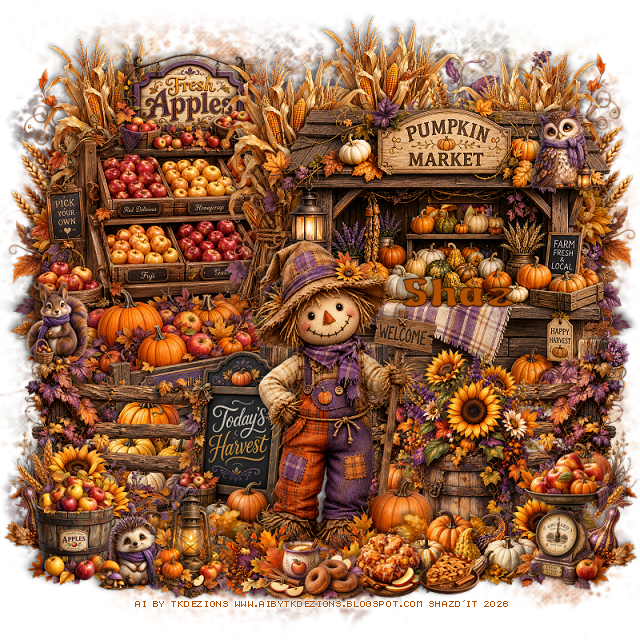
FTU Twilight Orchard

 This tut was written August 28th, 2026 for those with a basic knowledge of psp. 

I am using the awesome Al kit by TK Designs
Everything is included in the kit, this is part of the Twilight Orchard Blogtrain
Please read the TOU on how to credit your tags.

I used PSP2020...but any of them should work.
FTU Scrap Twilight Orchard by TK Dezigns  HERE
Check her store out to see all her other kits and tubes HERE
Miz Teeques Mask 52 HERE
Check the blog Here

Font of choice, I used Apple to Apple

Drop shadow as you go is V -2 H 4, 50, 10, or use what you prefer.
Let's get started
*Remember to add your drop shadow as you go along*

Open a new image 800 x 800, resize paper 2 to 75%, apply your mask,
erase parts that stick out to far.

Resize 57 to 50%, paste on the upper left.
Resize 55 to 20%, paste on top of the apple bin.
Resize 56 to 50%, paste on the upper right.
Resize 24 to 40%, paste on the left below the apple bin, duplicate, 
mirror, duplicate again, move back to the center a little.
go back to the left one, duplicate, move above the sign and
apple bin.
Resize 27 to 50%, paste on the bottom layer on the upper left, 
duplicate, mirror.

Resize 58 to 35%, paste on the left.
Resize 48 to 20%, paste at the bottom above the wagon.
Resize 26 to 40%, paste at the bottom above the pumpkins, duplicate, mirror.
Resize 31 to 30%, paste at the bottom right above the fence.
Resize 28 to 25%, paste at the bottom right, duplicate, mirror.
Resize 43 to 25%, paste at the bottom.
Resize 52 to 42%, paste at the bottom above the sign.
Resize 49 to 20%, paste at the bottom to the right of the scarecrow, 
duplicate, mirror.
Resize 51 to 18%, paste at the bottom right.

Resize 13 to 15%, paste at the bottom to the left.
Resize 4 to 8%, paste at the upper right on the pumpkin stand.
Resize 37 to 15%, paste at the bottom left.
Resize 39 to 20%, paste at the bottom above the scarecrow, duplicate, mirror.
Resize 2 to 8%, paste on the left on the fence post.
Resize 22 to 15%, paste at the bottom above the leaves.
Resize 32 to 10%, paste at the bottom below the coffee and donut tray.
Resize 5 to 8%, paste at the bottom left below the lantern.
Resize 46 to 8%, paste on the bottom right.

Add any other elements that you would like, make it your own.
Always readjust your mask and elements how you like them before you
 merge your tag, resize, sharpen.
Crop your tag to be sure no shadows or lines are on the edges.
 Then add your copyright and name.
That's it

Hope you enjoyed doing my tut.       

Friday, July 24, 2026

FTU Sparkle and Sass

  This tut was written July 24th, 2026 for those with a basic knowledge of psp. 

I am using the Beautiful tube ©Vi Nina
The tube is called Morgana Shade
The tube is "NOT" included
You need a license to use this tube, please do not use without a license
You can find the tube at Vi Nina Store HERE

I used PSP2020...but any of them should work.
FTU Scrap Sparkle and Sass by TK Dezigns  HERE
Check her store out to see all her other kits and tubes HERE
DBV Mask 72 HERE
Check the blog Here

Font of choice, I used Beauty Mountains

Drop shadow as you go is V -2 H 4, 50, 10, or use what you prefer.
Let's get started
*Remember to add your drop shadow as you go along*

Open a new image 800 x 800, paste paper 20, apply your mask,
move to the left, duplicate, mirror.

Resize frame 6 to 55%, paste, click inside, paste paper 22, invert, delete.
Resize meter 3 to 25%, paste on the bottom right of the frame.
Resize chair 1 to 40%, paste on the bottom left of the frame.
Resize flower 18 to 25%, apply Mura Meister Copies-Encircle, first 3 numbers
on 12, 50, 50, paste below the frame.
Resize flower 20 to 25%, apply Mura Meister Copies-Encircle, first 3 numbers
on 12, 55, 55, paste below the flower circle.
Resize feather 2 to 65%, paste on the left below the flower circles, duplicate, mirror.

Resize the tube to 35%, paste at the bottom.

Resize box 2 to 20%, paste at the bottom right above the tube.
Resize flower 15 to 30%, paste at the bottom above the box.
Resize 14 to 25%, paste on the right below the box, duplicate, move to
the left below the tube above the chair.
Resize flower 8 to 20%, paste on the left below the chair, duplicate, mirror.
Resize heels 2 to 17%, paste on the bottom left.
Resize jewelry box 2 to 20%, paste at the bottom below the shoes.
Resize perfume 5 to 15%, paste at the bottom to the left.
Resize remote control 1 to 15%, paste at the bottom left.
Resize soda 6 to 13%, paste at the bottom to the right.

Resize bullpup 1 to 20%, mirror, paste at the bottom right.
Resize spell book 1 to 18%, paste at the bottom.
Resize purse 1 to 15%, paste at the bottom by the book.
Resize candy bar 1 to 12%, paste on the left on the black box.
Resize cocktail 1 to 15%, paste at the bottom left.
Resize sunglasses 1 to 10%, paste in the chair.

Resize fairy dust 3 to 15%, paste at the bottom right.
Resize books 2 to 20%, paste on the bottom left above the chair.
Resize brush 1 to 15%, paste at the bottom left.
Resize butterflies 1 to 25%, paste at the upper left, duplicate, mirror.
Resize Wand broken 1 to 15%, paste at the bottom above the book.
Resize wordart 3 to 20%, paste on the upper right

Add any other elements that you would like, make it your own.
Always readjust your mask and elements how you like them before you
 merge your tag, resize, sharpen.
Crop your tag to be sure no shadows or lines are on the edges.
 Then add your copyright and name.
That's it

Hope you enjoyed doing my tut.       


Saturday, March 21, 2026

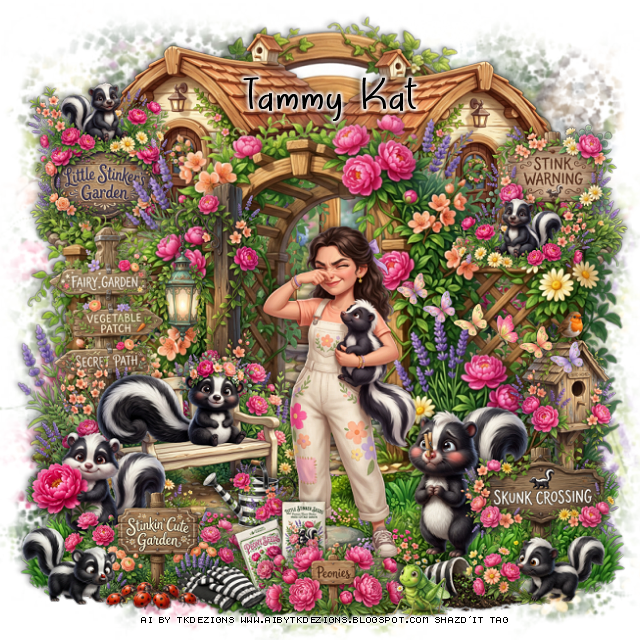
FTU Little Stinker

  This tut was written March 21st, 2026 for those with a basic knowledge of psp. 

I am using the Awesome Cute Al kit Little Stinker
Everything used is included in the kit.
Read the TOU on how to credit your tags

I used PSP2020...but any of them should work.
FTU Scrap Little Stinker by Al by TK Dezigns HERE
You can find all TK's kits  HERE
Miz Teeque's Mask 52 HERE
Check the rest of the blog HERE

Font of choice, I used April Flowers 

Drop shadow as you go is V -2 H -4, 40, 10, or use what you prefer
Let's get started
*Remember to add your drop shadow as you go along*

Open a new image 800 x 800, paste paper 7, apply your mask, 
erase a little on the edges if needed.

Resize trellis 1 to 65%, paste, move up a little.
Resize shed 1 to 43%, paste below the trellis on the upper left, duplicate, 
mirror, erase the part showing in the arch of the trellis.
Resize sign 2 and 5 to 20%, paste 2 on the left below the trellis above the house,
and 5 on the right below the trellis above the house.
Resize skunk 8 to 15%, paste on the left sign on top, duplicate, mirror,
move down on the trellis.
Resize gate 1 to 75%, paste below the houses at the top center.

Resize grass patch 3 to 40%, paste at the bottom right below the trellis, duplicate, 
mirror,
Resize grass patch 2 to 40%, paste at the bottom above the grasses
below the trellis in the center.
Resize bench 1 to 40%, paste on the bottom left above the trellis.
Resize watering can 1 to 13%, paste below the tube on the left.

Resize tube 1 to 35%, paste above the bench to the right.

Resize watering can 1 to 13%, mirror, paste below the tube on the left.
Resize skunk 7 to 18%, paste on the bench.
Resize lantern 1 to 30%, paste behind the bench.
Resign sign 3 to 30%, paste below the bench on the left.
Resize Skunk 4 to 20%, mirror, paste on the bottom right below the tube.
Resize sign 6 to 20%, paste on the bottom right.
Resize skunk 6 to 15%, paste at the bottom right above the sign.
Resize sign 4 to 25%, paste on the bottom left.
Resize skunk 5 to 20%, paste on the bottom left below the sign.
Resize flowers 9 to 15%, paste at the bottom above the tube.
Resize flower seeds 2 to 10%, free rotate to the left at 20, paste at the bottom
below the flowers.
Resize flower seeds 3 to 10%, paste at the bottom by the other seed pack.
Resize gloves 2 to 12%, paste at the bottom to the left of the flowers.

Resize skunk 3 to 15%, paste at the bottom left above the sign.
Resize ladybugs1 to 13%, paste at the bottom left.
Resize flowerpot 1 to 15%, mirror, paste at the bottom right, move the 
skunk above the pot.
Resize butterflies 1 to 20%, mirror, paste on the right on the trellis.
Resize birdhouse 1 to 20%, paste on the right below the butterflies.
Resize grasshopper 2 to 15%, paste at the bottom right by the pot.

Add any other elements that you would like, make it your own.
Always readjust your mask and elements how you like them before you
 merge your tag, resize, sharpen.

Crop your tag to be sure no shadows or lines are on the edges.
 Then add your copyright and name.
That's it

Hope you enjoyed doing my tut