
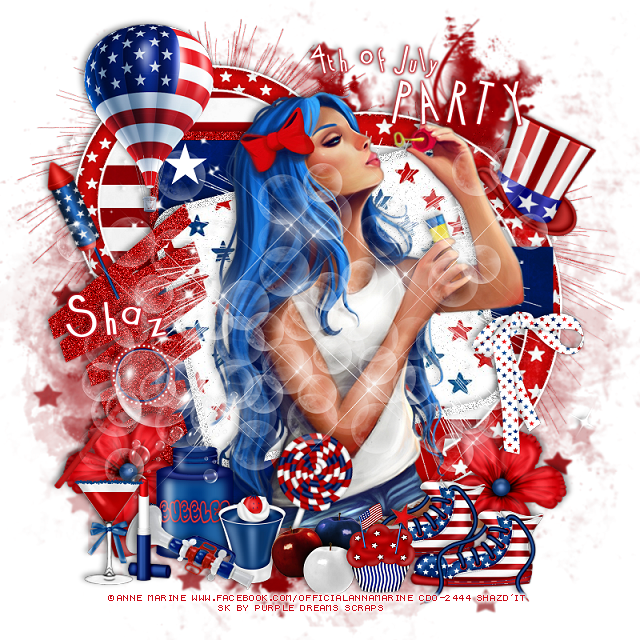

This tut was written June 19th, 2025 for those with a basic knowledge of psp.
I am using the 4th of July kit by Purple Dreams Scraps
I am using Anna Marine tube 56-1 from CDO
That store has closed now
I did not see this tube at DAH store but some of her other tubes are there.
You can find some of her tubes at DAH now HERE
I used PSP2020...but any of them should work.
FTU Happy 4th of July by Purple Dreams Scraps HERE
Check out the rest of the blog HERE
4th of July Template 2 by Millie's PSP Madness HERE
If Millie's link to the template does not work try this one (save as) HERE
This is the zip file for the temp, try this one also HERE
Check out the rest of the blog HERE
Font of choice, I used Cocktail
Drop shadow is V-1 H-4 Black, 40, 10, use what you prefer.
Let's get started
*Remember to add your drop shadow as you go along*
Open the template, resize canvas size to 800 x 800,
delete the credits, close off the wordart for now.
Paste paper 2 on the bottom layer, resize larger to 110, apply your mask.
Layer 1, resize paper 9 to 75%, paste, invert, delete.
Resize element 21 to 60%, paste above the stripe paper, add a fat white gradient glow.
Layers 2 and 3, add noise at 50%.
Layer 5, resize paper 9 to 75%, paste, invert, delete,
Resize element 21 to 85%%, paste above the circle, add a fat white gradient glow.
Layer 6, paper 1
Layer 7, paper 1
Layer 9, paper 6
Move element 13 to the left more, add noise.
Paste the large tube on the top layer.
Resize element 16 to 50%, paste on the bottom left above the tube.
Resize element 30 to 25%, paste at the bottom by the bubble bottle.
Resize element 27 to 25%, paste at the bottom.
Resize element 31 to 30%, free rotate to the right at 20, paste at the bottom above the tube.
Resize element 35 to 35%, paste at the bottom right below the apples, duplicate,
move over to the right a little more.
Resize element 12 to 30%, paste on the bottom left below the bubble bottle,
duplicate, mirror.
Resize element 17 to 25%, paste at the bottom above the apples.
Resize element 26 to 35%, mirror, paste at the bottom left.
Resize element 37 to 25%, paste at the bottom left.
Resize element 20 to 30%, paste at the bottom left.
Resize element 36 to 35%, paste on the right by the arm of the tube.
Resize element 18 to 90%, paste below the tube where you like.
Paste element 10 being on the top layer.
Resize element 34 to 35%, free rotate to the left at 25, paste at the upper left.
Resize element 19 to 50%, paste on the upper left.
Paste element 14 on the bottom layer at the upper left, duplicate, move
to the right and down.
Paste element 32 behind the tube.
Resize element 38 to 30%, free rotate to the right at 25, paste on the right below the tube.
Open the wordarts, add a red gradient glow, move where you like.
Add any other elements that you would like, make it your own.
Always readjust your mask and elements how you like them before you
merge your tag, sharpen once.
Crop your tag to make sure no shadows or anything on the edges
Crop your tag to make sure no shadows or anything on the edges
Then add your copyright and name.
That's it
Hope you enjoyed doing my tut.
Tag by Pammers, thank you Pammers


No comments:
Post a Comment