
Sunday, August 28, 2022

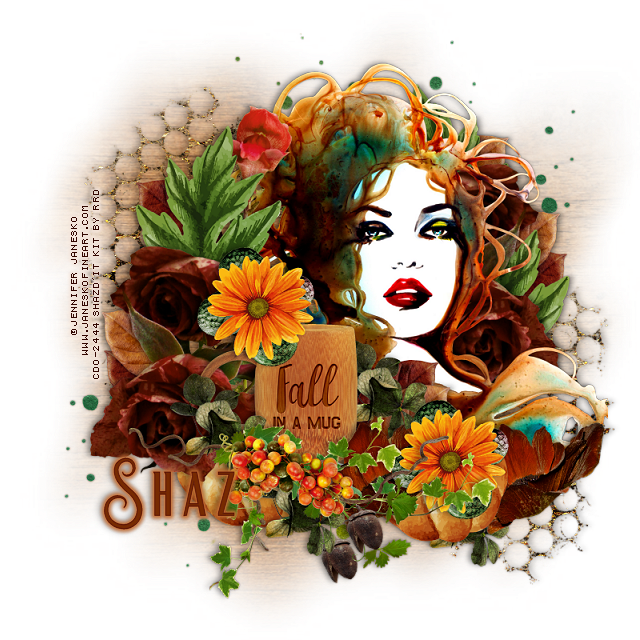
FTU Fall in a Mug


 This tut was written August 28th, 2022 for those with a basic knowledge of psp. 

I am using the awesome artwork of Jennifer Janesko
The tube is "172-1"
You need a license to use this tube, do not use without a license.
You can find this art at CDO Store HERE

I used PSP2020...but any of them should work.
FTU kit Autumn Evenings Freebie at Raspberry Road Designs  HERE
You will have to sign up to the store.
Mask of choice, I used Vivienne's Digital Tagging Mask 18 HERE
Check out the rest of the blog HERE

Font of choice, I used Beauty Sleep

Drop shadow is V -1 H -4, 40, 10, or use what you prefer.
Let's get started
*Remember to add your drop shadow as you go along*

Open a new image 800 x 800, resize paper 3 to 25%, paste, apply your mask, delete, 
merge group.
Resize larger to 110%.

Resize element 5 to 25%, paste on the left and up a little, duplicate,
mirror, move down on the right.

Paste your tube on the right.

Resize element 11 to 25%, mirror, paste to the left of the tube, erasing the 
green stem on the tube.
Duplicate, mirror, move below the tube on the right.
Resize element 18 to 15%, paste on the left below the flowers, duplicate, mirror,
duplicate again and move up on the right.
Resize element 13 to 20%, paste on the left behind the green leaf and move up.

Resize element 4 to 20%, paste above the flower to the left of the tube.
Resize element 20 to 10%, paste at the bottom right, duplicate, move to the left below
the flowers and cup.
Resize element 12 to 15%, paste at the bottom by the cup above the pumpkin,
duplicate, move to the right and below the pumpkin.

Resize element 15 to 25%, paste at the bottom on the bottom of the cup being 
on the top layer.
Resize element 17 to 10%, paste to the right below the grape vines, duplicate, move 
to the left and up on the cup.

Resize element 8 to 15%, paste on the handle of the cup, duplicate, move down
below the grape vines.
Resize element 21 and 22 to 15%, paste where you like on your tag.
Resize element 10 to 50%, paste under one of the orange flowers, duplicate, move
under the other flower.
Resize element 3 to 10%, duplicate, paste both at the bottom where you like.

Resize element 14 to 40%, mirror, move to the upper right, erase the part showing
at the lower left, duplicate, mirror, flip.

Add any other elements that you would like, make it your own.
Always readjust your mask and elements how you like them before you
 merge your tag, resize, sharpen.

Crop your tag to be sure no shadows or lines are on the edges.
 Then add your copyright and name.
That's it

Hope you enjoyed doing my tut.          

Friday, August 26, 2022

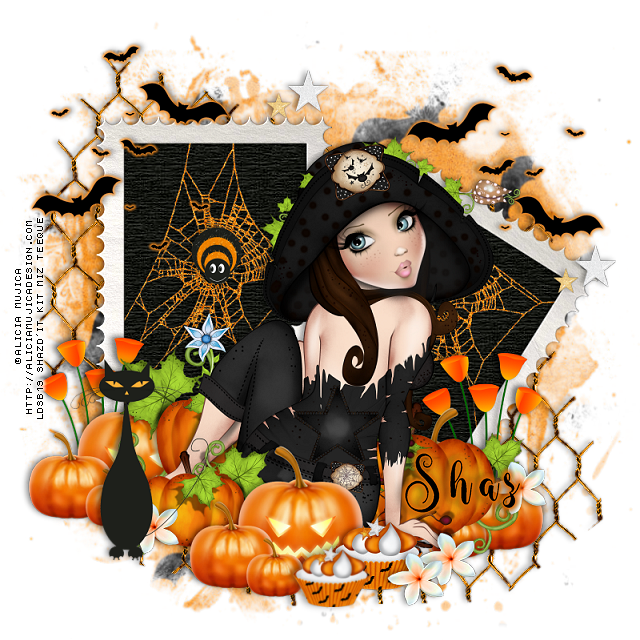
FTU Going Batty


This tut was written August 26th, 2022 for those with a basic knowledge of psp. 

I am using the awesome artwork of Alicia Mujica
The tube is "Circe 2016"
You need a license to use this tube, do not use without a license.
You can find this art at Alicia Mujica Store HERE

I used PSP2020...but any of them should work.
FTU kit Boo! by Miz Teeque  HERE
Scroll down a little
Check out the rest of the blog HERE
Mask of choice, I used RD Mask 718 HERE
Check out the rest of the blog HERE

Font of choice, I used Wingcharm 

Drop shadow is V -1 H -4, 40, 10, or use what you prefer.
Let's get started
*Remember to add your drop shadow as you go along*

Open a new image 800 x 800, paste paper 3, apply your mask, delete, merge 
group.
Paste element 12, click inside with the magic wand, expand by 5, paste
paper 6, invert, delete select none.
Paste element 13 on the mask layer.
Go to Effects, 3D Effects, Inner Bevel with these settings for the frame
Shape2, width 2,
0, 2, 5, 7
272, 50, 30 
color white.
Resize element 2 to 75%, paste inside the left frame, erase the parts outside the frame.
Duplicate, move to the other frame.
Resize element 7 to 25%, paste on the spider web on the left.

Resize your tube to 25%, paste above the frames.

Resize element 8 to 25%, paste on the right below the tube, duplicate, mirror.
Resize element 6 to 35%, paste below the tube to the right, duplicate, mirror, 
duplicate, move above the tube and down.
Resize element 9 to 15%, paste at the bottom, duplicate, resize to 85%, move down.
Resize element 3 to 40%, paste on the left.

Resize element 1 to 40%, paste at the upper right below the tube, duplicate,
mirror. Add an orange glow.
Resize element 4 to 20%, paste at the top, duplicate, move to the right and
down.
Resize element 11 to 10%, paste at the bottom by the cupcake, duplicate move 
over a little, duplicate, move up on the right on the pumpkin, duplicate once
more move below the cat.

Add any other elements that you would like, make it your own.
Always readjust your mask and elements how you like them before you
 merge your tag, resize, sharpen.

Crop your tag to be sure no shadows or lines are on the edges.
 Then add your copyright and name.
That's it

Hope you enjoyed doing my tut.          
Wednesday, August 24, 2022

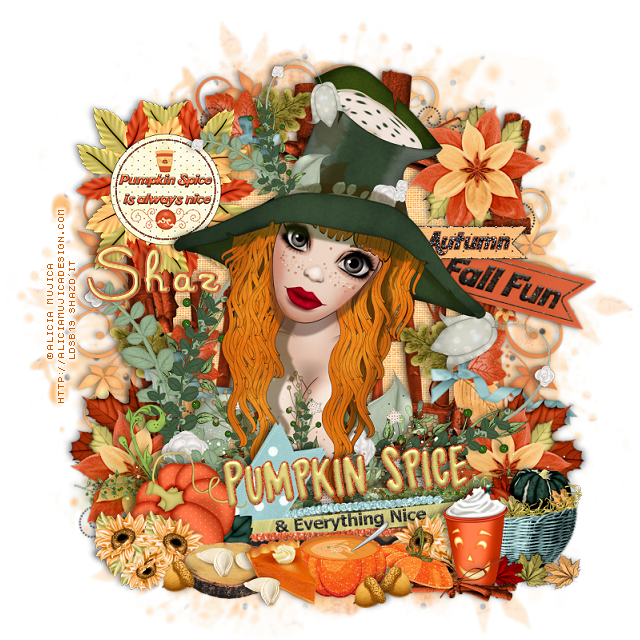
FTU Pumpkin Spice


This tut was written August 24th, 2022 for those with a basic knowledge of psp. 

I am using the awesome artwork of Alicia Mujica
The tube is "Cadhla 2019"
You need a license to use this tube, do not use without a license.
You can find this art at Alicia Mujica Store HERE

I used PSP2020...but any of them should work.
FTU kit Pumpkin Spice Pixel Scrapper Blog Train
by Mersija's Majestic Design  HERE
Check out the rest of the blog HERE
Mask of choice, I used RD Mask 685 HERE
Check out the rest of the blog HERE

Font of choice, I used Marguerita

Drop shadow is V -1 H -4, 40, 10, or use what you prefer.
Let's get started
*Remember to add your drop shadow as you go along*

Open a new image 800 x 800, paste paper 3, apply your mask, delete, merge 
group.

Paste Pumpkin Spice frame, resize to 90%.
Paste frame black 2, resize larger to 110%, paste, take your free hand tool, draw 
draw around the frame, paste paper 7, invert, delete, select none, move the 
paper below the frame.

Paste the cinnamon fence below the paper layer of the frame, duplicate, 
move in the frame, resize to 50%, move to the right, duplicate, mirror.
Paste wordart 1 at the bottom, erase the black swirls on the bottom.

Resize your tube to 30%, paste below the wordart.

Resize flower 1 to 50%, paste at the upper right on the frame, duplicate, mirror.
Duplicate both flowers, flip and place below the tube on the bottom how you like.
Resize leaf 1 to 35%, free rotate to the left at 90 degrees, paste at the lower left 
below the flower, duplicate, mirror.
Resize the autumn basket to 35%, mirror, paste at the lower right being on the top layer.

Resize the pumpkin latte to 25%, paste at the bottom.
Resize sunflowers to 15%, paste at the bottom.
Resize the pumpkin soup to 40%, paste at the bottom by the latte.
Resize the acorn to 10%, paste by the soup.
Resize pumpkin pie piece to 30%, past by the soup.
Resize cinnamon sticks to 30%, paste below the soup by the latte cup.

Resize pumpkin seeds on wood to 25%, paste at the bottom below the slice of pie.
Resize the pumpkin seeds to 20%, paste at the bottom.
Go back to the acorn, duplicate a couple of times, mirror, move one to the wood
piece and the other one by the first one.

Resize the wordart to 75%, paste at the upper left below the tube on the flower.
Resize wordart 2 to 75%, paste on the right below the tube.
Resize wordart 3 to 50%, paste above the wordart 2.

Add any other elements that you would like, make it your own.
Always readjust your mask and elements how you like them before you
 merge your tag, resize, sharpen.

Crop your tag to be sure no shadows or lines are on the edges.
 Then add your copyright and name.
That's it

Hope you enjoyed doing my tut.