Wednesday, May 3, 2023

PTU Seaside Date


This tut was written  May 3rd, 2023 for those with a basic knowledge of psp. 

I am using the awesome tube by ©Amber

The tube is called Seaside Date
You need a license to use this tube, please do not use without a license.
You can find the tube at VMA HERE

I used PSP2020...but any of them should work.
PTU Scrap Seaside Shindig by Wicked Princess Scraps  HERE
"Tube is NOT included"
You can find all Wicked Princess Scraps kits HERE
Mask of choice, I used Miz Teeque's Mask 179 HERE
Check out the rest of the blog HERE

 Font of choice, I used Pretty Summer

Drop shadow as you go is V -1 H -4, 40, 10, or use what you prefer.
Let's get started
*Remember to add your drop shadow as you go along*

Open a new image 800 x 800, paste paper 2, apply your mask, delete, merge.

Resize frame 7 to 60%, paste to the right and up.
Click inside with the magic wand, expand by 5, resize paper 15 to 35%,
paste below the frame, invert, delete, select none.
Resize frame 1 to 95%, paste behind the paper layer of the other frame.
Paste flower 22 below the paper layer of the frame.

Resize your tube to 35%, paste on the left above the frame.

Resize flower 16 to 15%, paste at the bottom above the tube.
Resize the Amber lights to 75%, paste on the left behind the paper layer of 
the frame.
Resize flower 19 to 20%, paste on the frame at the top behind the tube, duplicate,
move down on the right.
Resize leaf 2 to 40%, paste at the bottom below the white flower layer,
duplicate, mirror, move down, duplicate again, move up.
Resize torch 1 to 35%, paste at the upper left behind the flower.

Resize the bag to 30%, paste on the left behind the tube.
Resize the dog to 30%, paste at the bottom left above the tube.
Resize flower 9 to 25%, paste at the bottom below the red flower and dog.

Resize candle 1 to 25%, paste at the bottom below the flower to the right.
Resize flower 7 to 25%, paste at the top left behind the tube, duplicate, move 
down to the right behind the candle.
Resize torch 2 to 20%, paste at the bottom being on the top layer.
Resize flower 27 to 20%, paste at the top below the torch, duplicate, 
move down above the tube.

Resize flower 10 to 15%, paste at the bottom left above the dog.
Resize cupcake 3 and 4 to 15%, paste on the right.
Resize teapot 1 to 25%, paste at the bottom right.
Resize goblet 1 to 35%, paste on the right behind the other elements.

Resize border 3 to 75%, mirror, paste above the mask on the left, erase some of the 
top part.
Resize the butterflies to 40%, paste at the upper left being on the top layer,
duplicate, mirror, move down.

Add any other elements that you would like, make it your own.
Always readjust your mask and elements how you like them before you
 merge your tag, resize, sharpen.

Crop your tag to be sure no shadows or lines are on the edges.
 Then add your copyright and name.
That's it

Hope you enjoyed doing my tut.  

Tag for Shani 

Tuesday, May 2, 2023

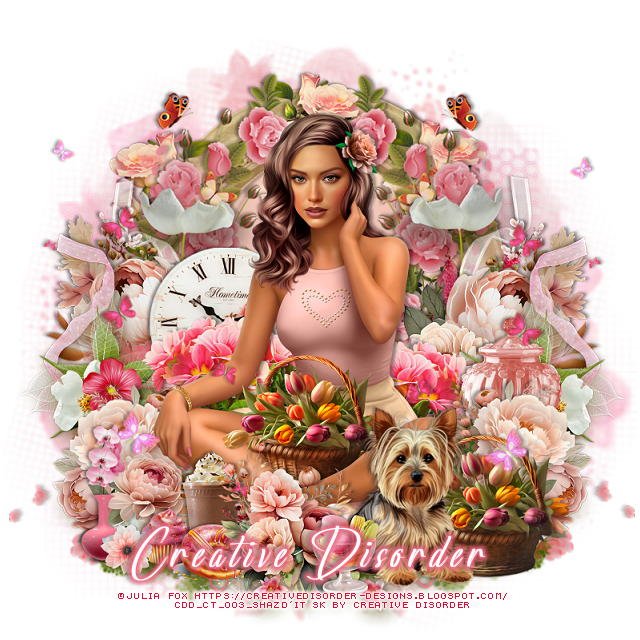
PTU One Fine Day


This tut was written May 2nd, 2023 for those with a basic knowledge of psp. 

I am using the awesome artwork of ©Julia Fox
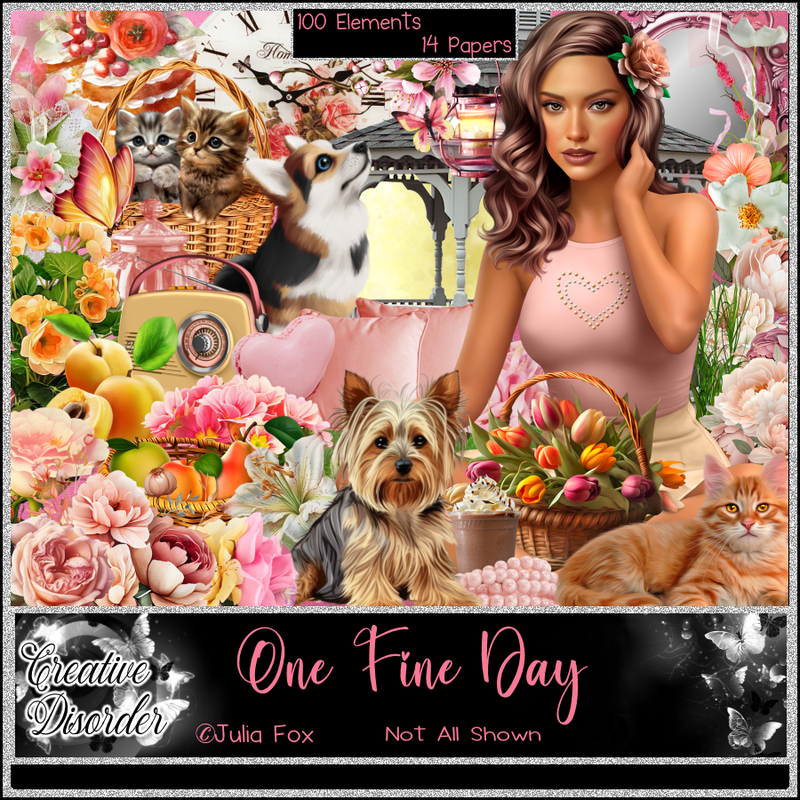
"The tube is included in the kit"
You need a license to use this tube, do not use without a license.
Use the license where you buy the kit.

I used PSP2020...but any of them should work.
PTU One Fine Day by Creative Disorder  HERE  HERE HERE
Beautiful kit it contains 100 elements and 14 papers and
1 Tube by Julia Fox
Check out her blog HERE
Mask of choice I used Miz Teeque's Mask 84 HERE
Check out the rest of the blog HERE

Font of choice, I used Lack Luster

Drop shadow is V -1 H -3, 40, 10, or use what you prefer.
Let's get started
*Remember to add your drop shadow as you go along*

Open a new image 800 x 800, paste paper 7, apply your mask, delete, merge 
group.
Resize element 95 to 55%, paste, click inside with the magic wand, expand
by 5, paste paper 11, invert, delete, select none.
Resize element 61 to 35%, paste at the top on the frame, duplicate twice, 
move one to each side.
Resize element 10 to 85%, paste on the roses on the left, duplicate, mirror.
Resize element 20 to 25%, paste on the right, duplicate, mirror.
Resize element 91 to 60%, paste on the frame on the right, erase the top yellow
butterfly, duplicate, mirror.

Resize your tube to 20%, paste above the flowers.

Resize element 3 to 50%, paste on the left, duplicate, mirror.
Resize element 69 to 50%, paste behind the tube on the left, duplicate, mirror.
Resize element  2 to 30%, paste on the left behind the pink flowers.
Resize element 28 to 30%, paste at the bottom above the tube.
Resize element 33 to 30%, paste at the bottom left below the tube, duplicate,
mirror.
Resize element 81 to 30%, paste on the right below the flower.
Resize element 94 to 35%, paste at the lower right above the tube.

Resize element 39 to 30%, paste at the bottom above the basket.
Paste element 100 on the left being on the top layer, duplicate, mirror.
Resize element 78 to 25%, paste at the bottom by the dog.

Resize element 21 to 25%, paste at the bottom to the left below the flower.
Resize element 18 and 19 to 17%, paste at the bottom.
Resize element 62 to 30%, paste at the bottom left.
Resize element 59 to 20%, paste at the bottom left by the vase.

Add any other elements that you would like, make it your own.
Always readjust your mask and elements how you like them before you
 merge your tag, resize, sharpen.

Crop your tag to be sure no shadows or lines are on the edges.
 Then add your copyright and name.
That's it

Hope you enjoyed doing my tut.          

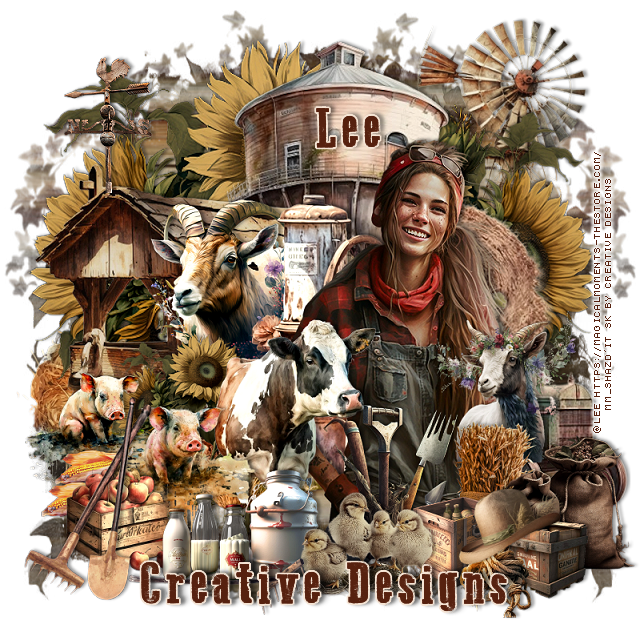
PTU Farmer Girl


This tut was written May 2nd, 2023 for those with a basic knowledge of psp. 

I am using the awesome artwork of @Lee
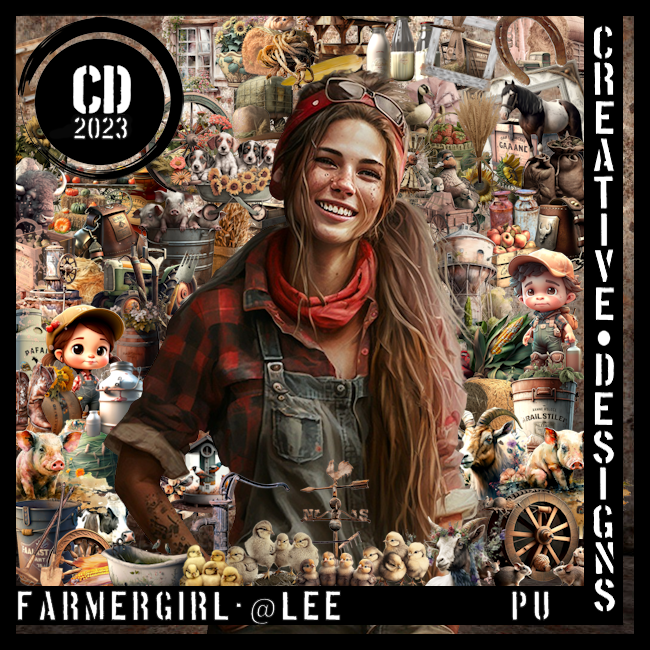
"The tube is included with the kit"
You need a license to use this tube, do not use without a license.
Read TOU how to use with a license

I used PSP2020...but any of them should work.
PTU Farmer Girl by Creative Designs  HERE  
This awesome kit  has 80 elements, 10 papers and a beautiful tube @Lee
This kit is no longer available at this time
Mask of Choice, I used Miz Teeques 194 HERE
Check out the rest of the blog HERE

Font of choice, I used Go To Old Western

Drop shadow is V -1 H -4, 50, 10, Black or use what you prefer.
Let's get started
*Remember to add your drop shadow as you go along*

Open a new image 800 x 800, select all, new layer, paste paper 8, apply 
your mask, delete, merge group, duplicate, mirror.

Resize element 17 to 90%, paste toward the top.
Resize element 28 to 85%, paste at the top right.
Paste element 46 on the mask layer toward the left, duplicate, resize to 80%,
mirror, move down a little.

Resize element 71 to 75%, paste to the left.
Resize element 27 to 50%, mirror, paste behind the building.
Resize element 8 to 35%, paste above the wood building you just pasted.
Resize element 78 to 20%, paste on top of the building.
Paste element 23 to the right of the animal.

Resize your tube to 50%, paste to the right.

Resize element 24 to 35%, paste above the tube.
Resize element 46 to 35%, paste behind the tube to the left.
Resize element 9 to 40%, paste above the tube to the left.
Mirror element 69, paste on the right above the flower layer, so some of the
truck shows.

Resize element 4 and 5 to 30%, being on the top layer now, paste both 
on the left.
Resize element 65 to 15%, paste at the bottom left by the pigs, duplicate, move
over a little.
Resize element 7 to 30%, paste above the tube to the right a bit.
Resize element 43 and 44 to 30%, paste above the goat.
Resize element 19 to 25%, paste above the cow at the bottom.
Resize element 53 to 20%, paste at the lower right above the bags.
Resize element 30 to 20%, paste at the bottom behind the bags.
Resize element 22 to 20%, paste at the bottom right above the box.

Resize element 29 to 30%, paste on the bottom left above the pigs.
Resize element 36 to 30%, paste at the bottom being on the top layer.
Resize element 61 to 25%, free rotate to the left at 20, paste on the boxes.
Resize element 49 to 20%, paste at the bottom left above the apples.
Resize element 75 to 35%, paste at the bottom.
Resize element 70 to 30%, paste on the left.

Add any other elements you would like, make it your own.
Crop your tag to be sure no shadows or lines are on the edges.
 Then add your copyright and name.
That's it

Hope you enjoyed doing my tut.