Monday, June 16, 2025

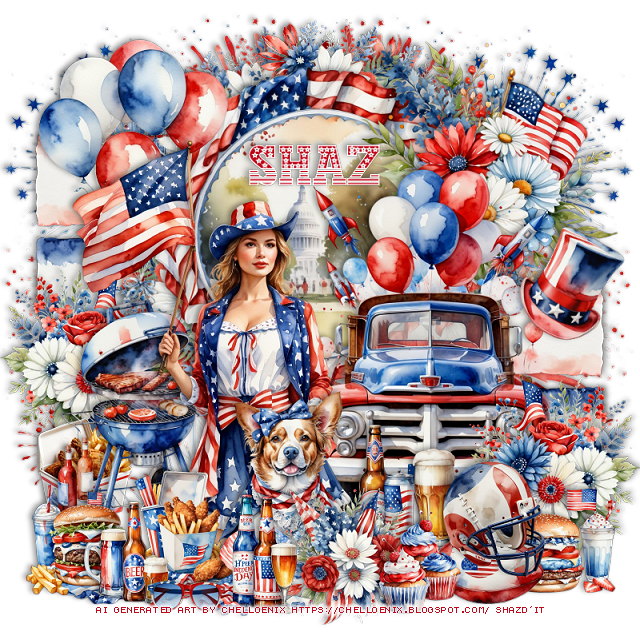
FTU US Independence Day


   This tut was written June 16th, 2025 for those with a basic knowledge of psp.

I am using the awesome Al kit US Independence Day
The kit and tubes are Al generated by Chelloenix
Credit your tags with their credits

I used PSP2020...but any of them should work.
FTU Al  kit US Independence Day by Chelloenix HERE
Check out the rest of the blog HERE

Font of choice, I used USA Nation

Drop shadow is  V-1 H-4 Black, 50, 10, use what you prefer.
Let's get started
*Remember to add your drop shadow as you go along*
 
Open a new image 800 x 800 

Resize frame 13 to 45%, paste at the top, click inside, resize paper 43
to 65%, paste, invert, delete.
Resize element 13 to 25%, apply Mura Meister Copies-Encircle, first 3 
numbers on 12, 40, 49, move below the frame.
Resize element 78 to 40%, paste on the right above the frame.
Resize element 3 to 40%, paste on the upper right below the truck.

Resize tube 0009 from tube pack 1 to 50%, paste above the truck to the left.

Resize element 91 to 30%, paste below the tube on the left.
Resize element 95 to 15%, paste at the bottom left.
Resize element 99 to 15%, paste at the bottom.
Resize element 101 and 103 to 17%, paste at the bottom.
Resize element 39 to 40%, paste on the bottom layer on the left, duplicate, 
mirror, move down on the right.
Resize element 84 to 20%, paste at the bottom above the tube.
Resize element 15 to 20%, paste at the bottom above the tube.
Resize element 68 to 15%, paste at the bottom below the flowers.
Resize element 65 to 25%, paste below the helmet.
Resize element 102 to 17%, paste below the ball and helmet.
Resize element 10 to 25%, paste on the left below the bar b que, duplicate, 
mirror, move down on the right above the truck.
Resize element 100 to 15%, paste behind the bar b que.
Resize element 55 to 35%, paste on the upper left above the frame.

Resize element 108 to 15%, paste at the bottom above the flowers.
Resize element 62 to 12%, paste at the bottom.
Resize element 93 to 15%, paste on the bottom right below the helmet and ball.
Resize element 60 to 30%, free rotate to the right at 30, paste on the right.
Resize element 32 to 65%, paste on the upper left on the bottom layer, duplicate,
mirror.

Add any other elements that you would like, make it your own.
Always readjust your mask and elements how you like them before you
 merge your tag, sharpen once.
Crop your tag to make sure no shadows or anything on the edges

 Then add your copyright and name.
That's it

Hope you enjoyed doing my tut.     

Friday, June 6, 2025

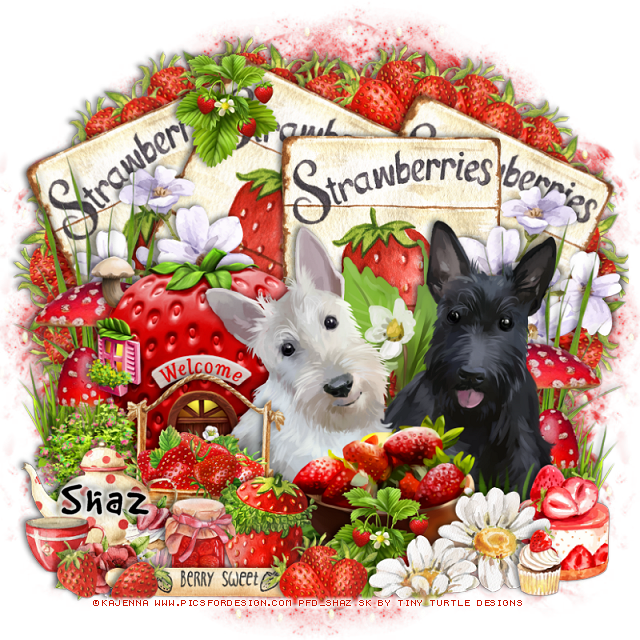
PTU Strawberry Harvest


 This tut was written June 6th, 2025 for those with a basic knowledge of psp. 

I am using the awesome tube by © Kajenna

Tube is called Strawberry
You need a license to use this tube, please do not use without a license
I bought mine at PFD HERE

I used PSP2020...but any of them should work.
PTU Scrap Strawberry Harvest by Tiny Turtle Designs  HERE
You can find all Tiny Turtle Designs Scraps kits  HERE
Lori's PSP Graphics Mask 1226 HERE
Check the rest of the blog HERE
Filter
Mura Meister Copies-Encircle

Font of choice, I used Good Dog Cool

Drop shadow as you go is V-2 H-4, 40, 10, color black or use what you prefer.
Let's get started

*Remember to add your drop shadow as you go along*

Open a new image 800 x 800, paste paper 13, apply your mask.

Resize element 100 to 50%, paste at the top, duplicate, free rotate to the right
at 20, move below the first sign, duplicate, move to the right more.
Duplicate the top one, free rotate to the left at 20, move to the left below
the other signs.
Resize element 78 to 30%, apply Mura Meister Copies-Encircle, first 3 numbers
on 16, 60, 60, move below the signs on the left, duplicate, mirror.
Resize element 203 to 75%, paste on the bottom left.

Resize the tube to 25%, paste at the bottom.

Resize element 98 to 35%, paste on the bottom left above the tube.
Resize element 210 to 65%, paste below the house on the left, duplicate, mirror.
Resize element 47 and 48 to 25%, paste at the bottom above the tube.
Resize element 118 to 50%, paste below the house, duplicate, mirror.
Resize element 185 to 35%, paste at the bottom left above the box of strawberries.

Resize element 206 to 25%, paste at the bottom between the flowers, duplicate, move
to the top on the signs.
Resize element 137 to 25%, paste on the bottom right below the flowers.
Resize element 78 to 25%, paste at the bottom above the flowers.
Resize element 105 to 25%, paste at the bottom below the strawberries.
Resize element 139 to 15%, paste at the bottom right.
Resize element 58 to 20%, paste at the bottom left.
Resize element 80 to 25%, paste at the bottom.
Resize element 86 to 50%, paste at the bottom, move the strawberries above the 
rolling pin.

Add any other elements that you would like, make it your own.
Always readjust your mask and elements how you like them before you
 merge your tag, resize, sharpen.

Crop your tag to be sure no shadows or lines are on the edges.
 Then add your copyright and name.
That's it

Hope you enjoyed doing my tut


Thursday, June 5, 2025

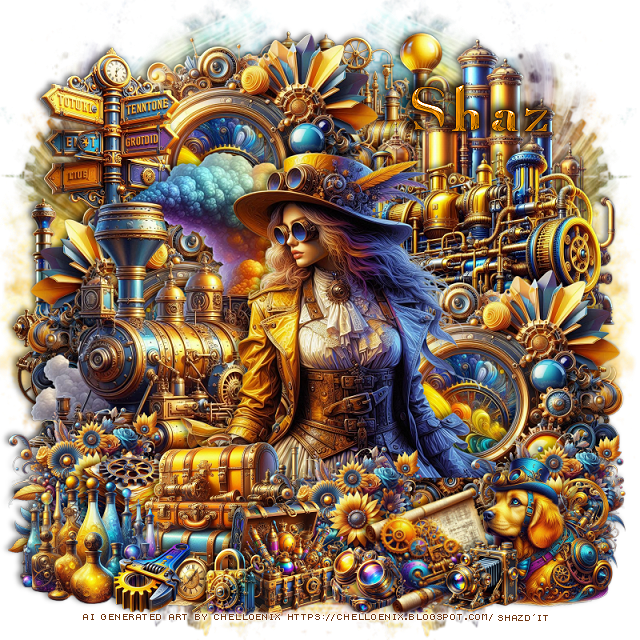
FTU The Luminarium Steampunk


  This tut was written June 5th, 2025 for those with a basic knowledge of psp.

I am using the awesome Al kit The Luminarium Steampunk
The kit and tubes are Al generated by Chelloenix
Credit your tags with their credits

I used PSP2020...but any of them should work.
FTU Al  kit The Luminarium Steampunk by Chelloenix HERE
Be sure to download all 12 links
Check out the rest of the blog HERE
Mask of choice, I used Vivienne's Digital Tagging Mask 66 HERE
Check out the rest of the blog HERE

Font of choice, I used Angelized

Drop shadow is  V-1 H-4 Black, 50, 10, use what you prefer.
Let's get started
*Remember to add your drop shadow as you go along*
 
Open a new image 800 x 800, paste paper 23, apply your mask, move to
the right, duplicate, mirror.

Resize frame 16 to 40%, paste at the upper left, click inside with the magic
wand, resize paper 23 to 40%, paste in the frame how you like, invert, delete, 
merge the frame and paper together.
Duplicate the frame, mirror, move down on the left, duplicate, mirror.
Resize Transportation element 37 to 50%, paste on the left above the frames.
Mirror Industrial element 62, resize to 30%, paste at the upper right below the frame.
Resize Industrial element 96 to 40%, paste to the right.
Resize Industrial element 37 to 35%, paste on the right.
Mirror Industrial element 49, resize to 35%, paste on the left below the frame.
Resize transportation element 3 to 25%, paste on the upper below the frame and train.

Being on the top layer, resize tube 21 to 40%, paste above the train 
where you like.

 (Books, Papers, Bottles, Bags and Boxes)
Resize PBBB element 0012 to 25%, paste at the bottom above the tube.
Resize BPBBB element 0032 to 15%, paste below the suitcase on the left.
Resize Labels, Flowers and Hearts element 0001 to 20%, paste at the bottom
 right, duplicate, move by the suitcase, duplicate, move to the left above the train.
Resize Industrial element 0004 to 15%, free rotate to the left at 20, paste at the bottom right.
Resize Creature element 0001 to 20%, paste at the bottom right.
Resize BPBBB element 0038 to 20%, paste at the bottom left.
Resize Industrial 0003 to 10%, paste at the bottom.
Resize Personal Object 0007 to 10%, paste at the bottom.
Resize House Object 0019 to 10%, paste at the bottom by the dog.
Resize BPBBB element 0019 to 15%, paste at the bottom below the goggles.
Resize Industrial 0043 to 10%, paste at the bottom.

Add any other elements that you would like, make it your own.
Always readjust your mask and elements how you like them before you
 merge your tag, sharpen once.
Crop your tag to make sure no shadows or anything on the edges

 Then add your copyright and name.
That's it

Hope you enjoyed doing my tut.