
This tut was written April 27th, 2019 for those with a basic knowledge of psp.
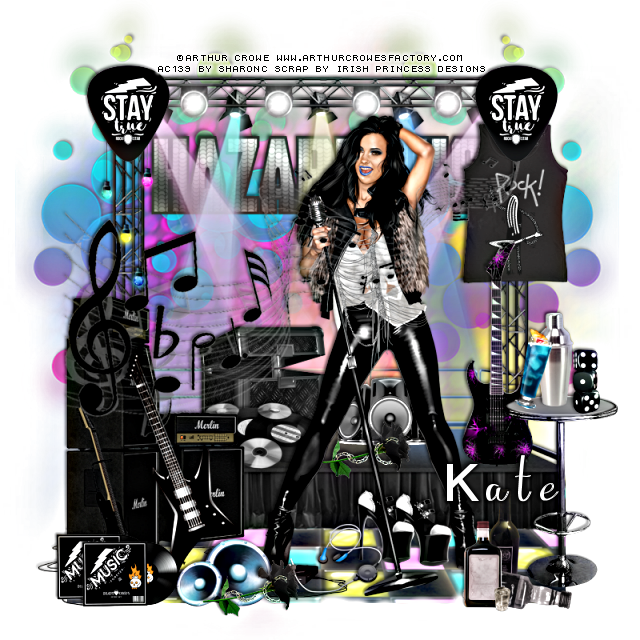
I am using the awesome artwork of Arthur Crowe
The tube is "Micro Skull Girl"
You need a license to use this tube, do not use without a license.
You can find this art at Crowe's Store HERE
Drop shadow is usually V-2 H-2 Black, 50, 5, use what you prefer.
Let's get started
*Remember to add your drop shadow as you go along*
Open a new layer 800 x 800
Select all, add a new layer, paste paper 3, into selection, apply your mask.
Resize element 132 to 80%, paste on the mask layer.
Resize element 131 to 78%, paste under the stage, erase the parts showing at the
back on each side.
Resize your tube to 65%, paste in front of the stage to the right.
Resize element 2 to 50%, paste to the left in front of the stage.
Resize element 38 to 20%, paste on the stage behind the speakers how you like.
Resize element 24 to 15%, paste at the lower left being on the top layer, duplicate, move
up and over a little.
Resize element 14 to 55%, paste below the stage behind the lights where you like.
Resize element 49 to 30%, paste at the right on the floor.
Resize element 140 to 35%, paste on the stage to the right of the tube.
Resize element 93 to 90%, paste on the mask on the right, duplicate, mirror,
erase any overlapping showing behind the stage.
Resize element 119 to 20%, paste on the stage below the records.
Resize element 23 to 15%, paste at the upper left on the stage, duplicate, move
to the right.
Resize element 123 to 75%, paste above the speakers that are on the left.
(Option, leave above the tube or move the tube above the music notes)
Resize element 31 to 25%, paste at the upper right below the sign.
Resize element 87 to 20%, paste at the lower right above the table.
Resize element 122 to 15%, paste on the table at the right.
Resize element 50 to 15%, paste behind the glass layer.
Resize element 35 to 10%, paste on the table by the drink.
Resize element 13 to 15%, paste at the bottom above the tube layer.
Resize element 16 to 40%, paste to the left of the tube on the speakers being above
the music notes.
Resize element 12 to 20%, paste on the stage behind the tube.
Resize element 13 to 15%, paste at the bottom being on the top layer.
Resize element 111 to 15%, paste on the floor below the tube, duplicate, move over
a bit and up.
On the edge of the floor I tapped my eraser on the edge a little bit to break it up some.
Resize element 88 to 40%, paste on the left under the sign, erase any strings showing
at the top.
Resize element 76 to 15%, free rotate to the right at 90 degrees, paste at the bottom
above the blue speakers, duplicate, move below the tube on the stage.
Resize element 132 to 80%, paste on the mask layer.
Resize element 131 to 78%, paste under the stage, erase the parts showing at the
back on each side.
Resize your tube to 65%, paste in front of the stage to the right.
Resize element 2 to 50%, paste to the left in front of the stage.
Resize element 38 to 20%, paste on the stage behind the speakers how you like.
Resize element 24 to 15%, paste at the lower left being on the top layer, duplicate, move
up and over a little.
Resize element 14 to 55%, paste below the stage behind the lights where you like.
Resize element 49 to 30%, paste at the right on the floor.
Resize element 140 to 35%, paste on the stage to the right of the tube.
Resize element 93 to 90%, paste on the mask on the right, duplicate, mirror,
erase any overlapping showing behind the stage.
Resize element 119 to 20%, paste on the stage below the records.
Resize element 23 to 15%, paste at the upper left on the stage, duplicate, move
to the right.
Resize element 123 to 75%, paste above the speakers that are on the left.
(Option, leave above the tube or move the tube above the music notes)
Resize element 31 to 25%, paste at the upper right below the sign.
Resize element 87 to 20%, paste at the lower right above the table.
Resize element 122 to 15%, paste on the table at the right.
Resize element 50 to 15%, paste behind the glass layer.
Resize element 35 to 10%, paste on the table by the drink.
Resize element 13 to 15%, paste at the bottom above the tube layer.
Resize element 16 to 40%, paste to the left of the tube on the speakers being above
the music notes.
Resize element 12 to 20%, paste on the stage behind the tube.
Resize element 13 to 15%, paste at the bottom being on the top layer.
Resize element 111 to 15%, paste on the floor below the tube, duplicate, move over
a bit and up.
On the edge of the floor I tapped my eraser on the edge a little bit to break it up some.
Resize element 88 to 40%, paste on the left under the sign, erase any strings showing
at the top.
Resize element 76 to 15%, free rotate to the right at 90 degrees, paste at the bottom
above the blue speakers, duplicate, move below the tube on the stage.
Add any other elements that you like, make it your own.
Remember to always adjust all the elements how you like on your tag,
then resize your mask if needed before merging your tag.
then resize your mask if needed before merging your tag.
Once happy, close off any background you had.
Crop your tag to get rid of any stray edges, merge visible.
I used xero Clarity on the merged tag before adding the name and copyright.
I used xero Clarity on the merged tag before adding the name and copyright.
Resize, sharpen, add your Copyright and name.
That's it
Hope you enjoyed doing my tut.