
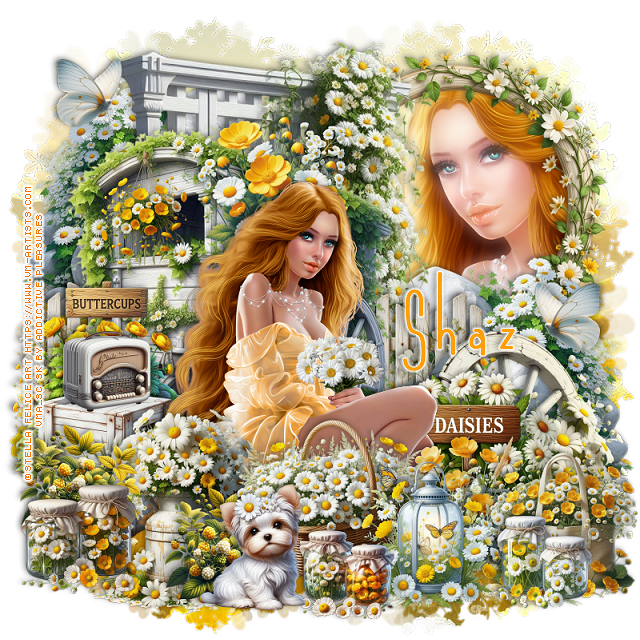

This tut was written May 24th, 2025 for those with a basic knowledge of psp.
I am using the beautiful tube ©Stella Felice Art
The tube is called Adelina
You need a license to use this tube, please do not use without a license
You can find the tube at VMA HERE
Drop shadow is V-1 H-4 Black, 40, 10, use what you prefer.
Let's get started
*Remember to add your drop shadow as you go along*
Open a new image 800 x 800, paste paper 6, apply your mask.
Resize trellis 2 to 65%, paste toward the top.
Resize frame 9 to 40%, mirror, paste on the upper right below the trellis,
click inside, paste paper 5, invert, delete, keep selected, resize the
tube to 40%, mirror, paste in the frame, delete. select none.
Duplicate the tube, go to Adjust, Blur Gaussian blur, number on 10,
change the blend mode to Screen, apply xero filter, Porcelain.
Resize rock 3 to 35%, paste on the right above the frame, duplicate, mirror,
move to the top more on the left.
Resize cart 3 to 50%, being on top, paste to the left and down.
Resize wheel 3 to 35%, mirror, paste at the bottom right above the rocks.
Resize the daisy sign to 25%, paste on the bottom right above the wheel.
Resize the tube to 20%, paste above the sign.
Resize flowers 10 to 20%, paste at the bottom above the tube.
Resize fence 2 to 30%, paste on the left below the cart, duplicate, move to the
right behind the cart.
Resize the basket to 25%, paste at the bottom above the tube.
Resize crates 3 to 25%, paste on the left below the tube.
Resize bag 3 to 20%, paste on the bottom right.
Resize lantern 3 to 20%, paste at the bottom by the basket.
Resize glass jars 3 to 12%, paste at the bottom right.
Resize glass jars 2 to 12%, paste at the bottom.
Resize puppy 2 to 18%, paste at the bottom.
Resize radio 3 to 12%, paste on the left on the crates.
Resize hanging flowers 2 to 15%, paste on the left on the cart.
Resize milk churn 3 to 30%, paste on the bottom left below the dog.
Resize glass jars to 15%, paste at the bottom left.
Resize blackberries to 15%, paste on the bottom left below the jars, duplicate,
move to the right behind the dog.
Resize buttercup sign 3 to 20%, paste on the left behind the radio.
Resize flowers 13 to 20%, paste behind the head of the tube.
Resize butterfly 3 to 10%, paste at the upper left, duplicate, mirror, move down.
Add any other elements that you would like, make it your own.
Always readjust your mask and elements how you like them before you
merge your tag, sharpen once.
Crop your tag to make sure no shadows or anything on the edges
Crop your tag to make sure no shadows or anything on the edges
Then add your copyright and name.
That's it
Hope you enjoyed doing my tut.

No comments:
Post a Comment