Saturday, April 24, 2021

FTU Mom


This tut was written April 24th, 2021 for those with a basic knowledge of psp.

I am using the awesome artwork of  Verymany
The tube is called "Mother's Day" 
You need a license to use this tube, do not use without a license.
You can find this tube at Verymany Store  HERE

I used PSPX6...but any of them should work.
FTU kit  For Mom by Elfairy  HERE
Scroll Down
Check out the rest of the Blog  HERE
RD Mask Set 162_2  HERE
Check out the rest of the blog HERE

Font of choice,  I used Quantine

Drop shadow is  V -1 H -4, 40, 10, or use what you prefer.
Let's get started
*Remember to add your drop shadow as you go along*

Open a new image 800 x 800 or a size you prefer, can always resize later.
Select all, add a new layer, paste background 1223235 into selection,  select none,
apply your mask, delete, merge group, mirror.

Resize element 31 to 50%, paste, duplicate, resize smaller to 90%.
Duplicate the larger heart, on the copy go to Effects, Texture Effects,
Mosaic Glass with these settings
50, 50,
50. 0, 2, 50
Symmetric checked, ok.
On the larger frame add noise at 40%.

Click inside the frame, expand by 5, paste paper 1896980, invert, delete, keep
selected, resize your tube to 70%, mirror, paste, delete, select none.
Merge the mosaic glass, the two frames, paper and tube inside the frame together,
move to the left more.

Resize your tube to 40%, paste on the right.

Resize element 48 to 50%, paste at the bottom below the frame layer.
Apply a light drop shadow.

Resize element 12 to 20%, paste below the tube on the left.
Resize element 53 to 20%, paste on the left above the frame at the bottom.
Resize element 54 to 13%, paste at the lower left, duplicate, move down more.
Resize element 9 to 15%, paste by the shoes.
Resize element 44 to 10%, paste at the bottom above the tube.
Resize element 46 to 18%, paste by the cup.
Resize element 41 to 4%, paste at the bottom, take your free hand tool, draw 
around to frosting, add noise at 40%.
Resize element 8 to 10%, paste at the bottom below the cupcake.
Resize element 43 to 7%, paste by the cupcake.

Resize element 26 to 10%, paste at the lower right below the tea kettle.
Resize element 10 to 10%, paste below the heart cake.
Resize element 14 to 10%, paste at the lower left.
Resize element 17 to 10%, paste on the left below the compact.
Resize element 23 to 10%, paste at the bottom being on the top layer now.
Resize element 32 to 5%, paste on the tea kettle.
Resize element 27 to 10%, paste at the lower right by the camera.

Resize element 51 to 25%, paste behind the tube on the right, duplicate, 
move to the left behind the large pink flower.

Add any other elements that you would like, make it your own.
Always readjust your mask and elements how you like them before you
 merge your tag, resize, sharpen.

 Then add your copyright and name.
That's it

Hope you enjoyed doing my tut.   

Friday, April 23, 2021

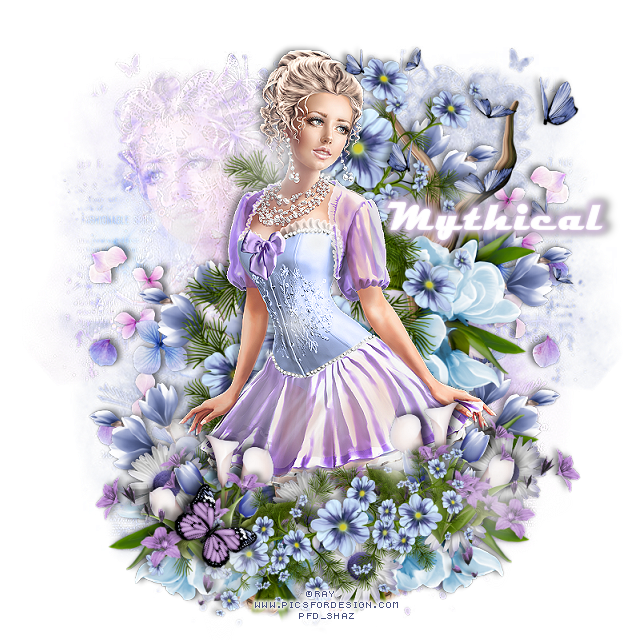
FTU The Look of Beauty


This tut was written April 23rd, 2021 for those with a basic knowledge of psp.

I am using the awesome artwork of  Ray
The tube is called "Christina" 
You need a license to use this tube, do not use without a license.
You can find this tube at PFD store  HERE

I used PSPX6...but any of them should work.
FTU kit  Purple Rain by Mystical Designs HERE
Check out the rest of the Blog  HERE
Miz Teeque Mask 361  HERE
Check out the rest of the blog HERE

Font of choice,  I used Cheetah Kick

Drop shadow is  V -2 H 4, 50, 10, or use what you prefer.
Let's get started
*Remember to add your drop shadow as you go along*

Open a new image 800 x 800 or a size you prefer, can always resize later.
Paste paper 10, apply your mask, delete, merge group, mirror.
Paste paper 8, apply the mask, delete, merge group, adjust to your liking.

Paste element 13, free rotate to the left at 90 degrees, paste a little to the left.
Paste element 14, free rotate to the right at 90 degrees.

Resize your tube to 30%, paste above the flowers.

Go back to element 13, move down so the blue flowers shows at the bottom
by the leg of the tube, erase the wood branches, duplicate, mirror, erase anything 
that needs erasing.
Resize element 14 to 50%, mirror, paste at the bottom above the tube.

Resize your tube to 50%, mirror, paste on the mask on the left, select the mask,
float, defloat, invert, move the tube where you like, delete, select none.
Change the blend mode to Overlay.

Resize element 21 to 40%, paste on the right above the mask layer, duplicate
3 times, move one up, one about center and the other one down, erase the part 
showing on the bottom one.
Duplicate the bottom one and center one, mirror both, adjust on the left.

Resize element 5 to 50%, mirror, paste at the upper right below the tube layer.
Resize element 19 to 40%, paste at the lower right above the tube, duplicate, mirror.
Resize element 15 to 50%, paste at the bottom below the blue flowers to the right, 
duplicate, mirror.

Resize element 10 to 25%, paste below the flowers where you like, duplicate
two or three times and move around.

Resize element 8 to 50%, paste on the right above the mask and up,
duplicate, mirror, move down.
Paste element 26 being on the top layer.

Add any other elements that you would like, make it your own.
Always readjust your mask and elements how you like them before you
 merge your tag, resize, sharpen.

 Then add your copyright and name.
That's it

Hope you enjoyed doing my tut.   
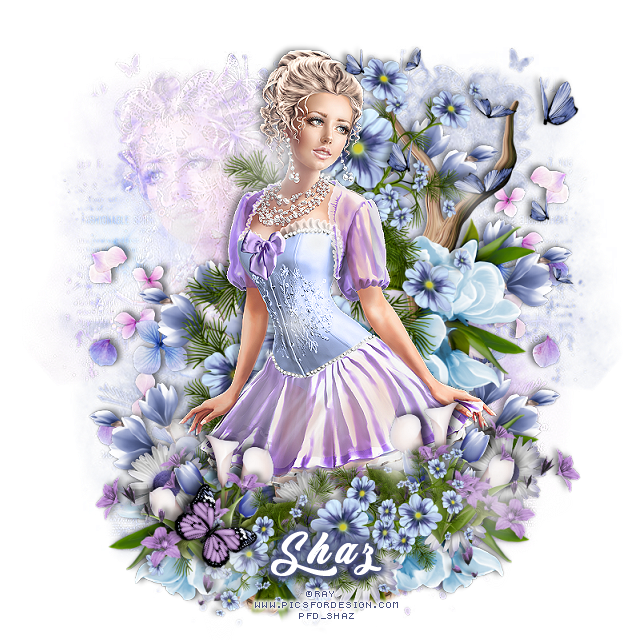
Tag for Mythical

Saturday, April 10, 2021

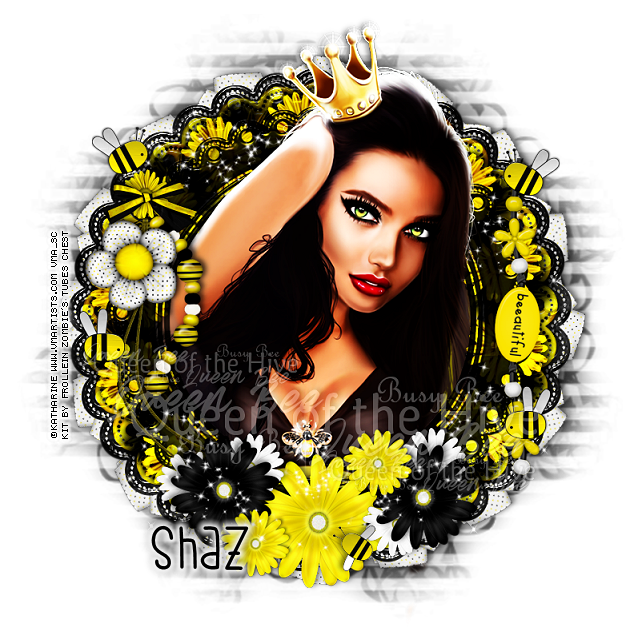
FTU Queen of the Hive

 This tut was written April 9th, 2021 for those with a basic knowledge of psp.

I am using the awesome artwork of  katharine
The tube is called "Queen of the Hive" 
You need a license to use this tube, do not use without a license.
You can find this tube at VMA store  HERE

I used PSPX6...but any of them should work.
FTU kit  Little Bee by Frollein Zombie's Tubes Chest HERE
Check out the rest of the Blog  HERE
WSL Mask 105  HERE
Wordart by me HERE
Filters
 Mura Meister Copies-Encircle
Eye Candy 4000-Glass

Font of choice,  I used Bumble Bee

Drop shadow is  V -2 H 4, 50, 10, or use what you prefer.
Let's get started
*Remember to add your drop shadow as you go along*

Open a new image 800 x 800 or a size you prefer, can always resize later.
Select all, add a new layer, paste paper 9 into selections, select none, apply your 
mask, delete, merge group.
Resize to fit your tag better.

Resize frame 10 to 90%, paste.
Resize frame 11 to 85%, paste above the black frame.
Duplicate the black frame, resize to 85%, move above the yellow frame.
Click inside the frame, expand by 5, resize paper 10 to 70%, paste,  invert, delete.

Apply Eye Candy 4000-Glass on each of the frames with these settings
3.60, 60, 30, 35, 50, 0, 50
Color white
Lighting 99, 53, play around with this to get what you like.
100, 50, 0, 200
Change the blend mode on all the frames to Hard Light.

Resize element 20 to 50%, apply Mura Meister Copies-Encircle, change the
first 3 numbers to
14, 67, 67
move above the mask layer.

Resize element 27 and 28 to 30%, paste element 27, then paste element 28, 
move to the side about halfway, merge the flowers together.
Apply Mura Meister Copies-Encircle, change the first three numbers to
14, 60, 60, move between the the top black frame and yellow frame.
Change the blend mode to Hard Light.

Resize your tube to 90%, (not your close up), mirror, move below the frames, 
duplicate, move above the frames, erase the parts outside the frames.
Duplicate the top tube, change the blend mode to Hard Light.

Resize element 14 to 85%, paste on the left, duplicate, change the blend mode 
to Hard Light, merge down.
Resize element 28 to 15%, paste on the ring part.
Resize element 10 to 30%, paste on the flower.
Resize element 15 to 65%, paste on the right on the frame.

Resize element 1 and 2 to 25%, apply the same Eye Candy 4000-Glass with 
same settings on both, paste where you like, duplicate each and move around.
Resize element 32 to 50%, paste below the tube at the upper left, duplicate, mirror,
move down a little oh the frame, duplicate again, move down toward the bottom more,
duplicate, mirror, erase any on the tube that you don't want.

Resize element 18 to 50%, paste at the bottom above the frame.
Resize element 17 to 40%, duplicate, paste on each side of the yellow flower.
Duplicate the yellow flower, resize to 50%, duplicate, move above the black 
flower how you like.
Resize element 16 to 25%, duplicate 3 or 4 times and move how you like.
Go back and duplicate the sparkles and move to the top layer on the black flowers.
Resize element 3 to 20%, apply the Eye Candy Glass, same settings, paste at the
bottom on the flower.
(Optional)
Add the wordart if you would like to use it.

Add any other elements that you would like, make it your own.
Always readjust your mask and elements how you like them before you
 merge your tag, resize, sharpen.

 Then add your copyright and name.
That's it

Hope you enjoyed doing my tut.