Monday, December 19, 2022

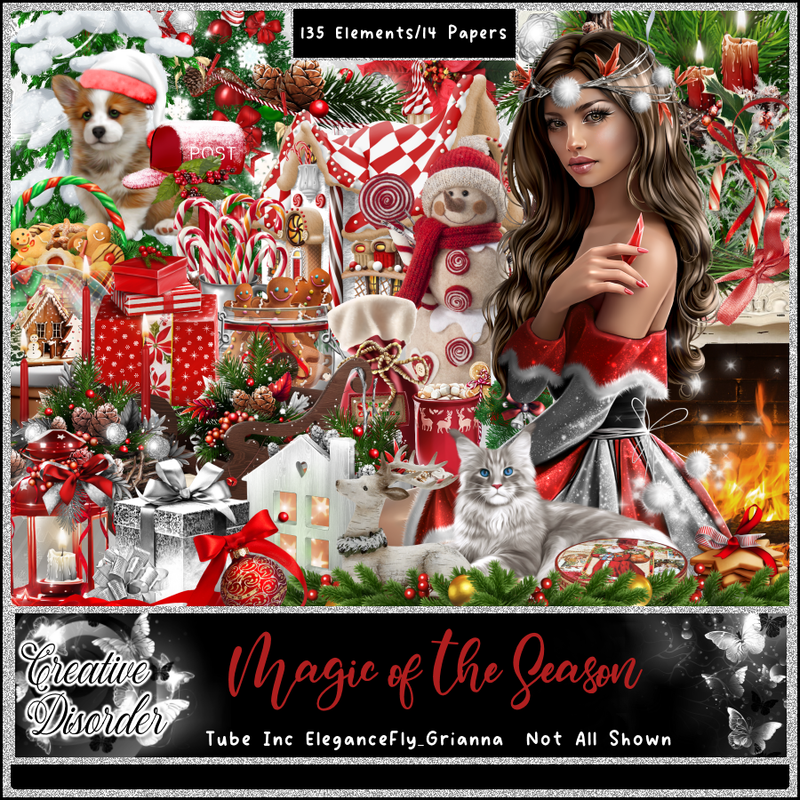
PTU Magic of the Season


 This tut was written December 19, 2022 for those with a basic knowledge of psp. 

I am using the awesome artwork of ©Elegancefly_Grianna
You need a license to use this tube, do not use without a license.
Tube by ©Elegancefly_Grianna is included in the kit.

I used PSP2020...but any of them should work.
PTU Magic of the Season by Creative Disorder  HERE HERE HERE
Kit contains 135elements, 14 papers and ©Elegancefly_Grianna.
Check out her blog HERE
Template 14 by Adrienne's Designs HERE
Check out the rest of the blog HERE
Mask of choice, I used DD Mask 2019 Xmas Mask HERE
Check out the rest of the blog HERE
Filters
EyeCandy 4000-Glass
Mura Meister Copies-Encircle

Font of choice, I used Cimero Pro

Drop shadow is V -1 H -4, 50, 10, or use what you prefer.
Let's get started
*Remember to add your drop shadow as you go along*

Open the template, hold the shift key and hit D to duplicate, close the original, 
go to Image, Canvas size, 800 x 800, paste paper 4 on the bottom layer above the 
white background, apply your mask, delete, merge group.
Delete the credits and all the wordart.

Select layer 11, paste paper 5, invert, delete, delete the template layer as you go along.
Apply Eye Candy 4000, Glass with these settings on each layer as well.
10.65, 75
30, 35, 50, 30, 0, 50 color on white.
Lighting 
263, 57
100, 40, 0, 71
Bevel profile, Button 
Layer 7, paste paper 11, invert, delete, apply the glass settings.

Layer 1, paper 13, invert, delete, glass settings.
Move layer 4 below layer 5 and merge with layer 3, select, paste paper 6,
invert, delete, no glass with this one, keep selected, resize your tube
to 50%, paste in one side, mirror the tube and paste in the other side, delete, both,
select none.
Merge the two tube together, duplicate, go to Adjust, Blur, Gaussian blur, number
on 5, change the blend mode to Overlay or one you prefer.

Merge layer 6 down with 5, change the color to white and add noise at 100%.
Layer 10, paper 11, invert, delete, glass settings.
Layer 8, paper 14, invert, delete, glass.

Resize element 35 to 35%, flip, apply Mura Meister Copies-Encircle, first 3
numbers on 24, 75, 55, move to the bottom layer above the mask.
Resize element 60 to 20%, duplicate, close one, apply Mura Meister Copies, 
first 3 numbers on 24, 76, 56, paste above the greenery circle.
Open the closed one and move to the upper left and right corners.

Resize element 24 to 65%, paste a little off center being on the top layer now.
Resize element 128 to 75%, paste on the tree.
Resize element 46 to 45%, paste at the lower left.

Resize your tube to 25%, paste to the right more.

Resize element 78 to 25%, paste on the right behind the tube.
Resize element 77 to 17%, paste at the bottom above the tube.
Resize element 8 to 25%, paste on the right below the tray of food, duplicate,
move to the left of the tube.
Resize element 35 to 40%, paste at the bottom above the gift on the right,
duplicate, move above the sled on the left, duplicate, move to the center more.

Resize element 28 to 25%, paste at the bottom being on top.
Resize element 30 to 20%, paste at the lower left.
Resize element 10 to 15%, paste by the cat, duplicate, move where you like.
Resize element 17 to 20%, paste at the bottom.
Resize element 15 to 10%, paste by the cup.

Resize element 99 to 25%, paste at the lower right on the greenery.
Resize element 111 to 35%, paste below the sled on the left, duplicate, mirror.
Resize element 42 to 15%, paste on the tree top.

Resize element 18 to 20%, paste below the cat on the left.
Resize element 66 to 25%, paste on the cat's head.
Duplicate, apply Mura Meister Copies-Encircle with the first 3 numbers on
24, 71, 55, move below the red rectangle layer.
Resize element 49 to 25%, paste at the bottom below the cupcake.
Resize element 50 to 20%, mirror, paste at the bottom.
Resize element 94 to 20%, paste at the bottom below the ornament.

Add any other elements that you would like, make it your own.
Always readjust your mask and elements how you like them before you
 merge your tag, resize, sharpen.

Crop your tag to be sure no shadows or lines are on the edges.
 Then add your copyright and name.
That's it

Hope you enjoyed doing my tut.       

Sunday, December 18, 2022

PTU Jingle Blues


This tut was written December 18th, 2022 for those with a basic knowledge of psp. 

I am using the artist ©Julia Fox

Tube is included in the kit

You need a license to use this tube, please do not use without a license. 


I used PSP2020...but any of them should work.
PTU Scrap Jingle Blues by LaReina Designz HERE HERE
Kit includes 60 elements, 5, frames and 10 matching papers
Mask of choice, I used Lori's PSP Graphics Mask 1180 HERE
Check out the rest of the blog HERE

 Font of choice, I used Aromabar

Drop shadow as you go is V -1 H -4, 40, 10, or use what you prefer.
Let's get started
*Remember to add your drop shadow as you go along*

Open a new image 800 x 800, paste paper 4 apply your mask, delete, merge group.
Paste element 60 on the mask at the upper left, duplicate, move down, 
duplicate, mirror, duplicate, move up on the right.

Resize element 28 to 75%, paste on the right and up.
Paste element 17 to the left.
Resize element 20 to 50%, duplicate 3 times and place on the tree where you like.
Resize element 39 to 75%, paste behind the window and up, duplicate, move down.

Resize your tube to 60%, paste to the right of the tree.

Resize element 47 to 25%, paste below the tube by the shoes, duplicate,
move over more.
Resize element 26 to 30%, paste by the other gifts.
Resize element 25 to 10%, duplicate as many times as you like and paste on the tree.
Resize element 40 to 5%, duplicate enough to go on each ornament.

Resize element 50 to 40%, paste on the right above the tube.
Resize element 45 to 20%, paste behind the little snow girl on the right, duplicate,
move down and to the left.

Resize element 49 to 25%, paste on the left on the gift box.
Resize element 37 and 38 to 25%, paste at the bottom.
Paste element 5 behind element 18, erase the parts outside the globe, merge these
 two together, resize element 25%, paste at the bottom.
Resize element 4 to 15%, paste at the bottom by the little snow girl.
Resize element 43 to 25%, paste at the bottom.
Paste element 54 on the mask layer at the upper left.

Add any other elements that you would like, make it your own.
Always readjust your mask and elements how you like them before you
 merge your tag, resize, sharpen.

Crop your tag to be sure no shadows or lines are on the edges.
 Then add your copyright and name.
That's it

Hope you enjoyed doing my tut.   

Saturday, December 17, 2022

PTU Holiday Wishes


Here is a tag I made with the kit also, tube is included ©Attila
no tut for this one 

 This tut was written December 17th, 2022 for those with a basic knowledge of psp. 

Everything used in this tutorial is included in the kit, awesome kit
with lots of fun elements and tubes to use.
You need a license to use this tube, do not use without a license.
You can find all Shelley's kits at her store HERE

I used PSP2020...but any of them should work.
PTU Christmas Wishes by Shelley Lynn Designz  HERE 
Kit contains 125 elements, 10 frames, 10 papers and 1 Tube by ©Attila
Mask of choice, I used Miz Teeque's 288 HERE
Check out the rest of the blog HERE

Font of choice, I used Wingcharm

Drop shadow is V -1 H -4, 40, 10, or use what you prefer.
Let's get started
*Remember to add your drop shadow as you go along*

Open a new image 800 x 800, paste paper 6, apply your mask,
delete, merge group.
Resize element 118 to 90%, paste on the mask on the left, duplicate, mirror.

Resize frame 10 to 65%, paste, click inside with the magic wand, expand by 5,
resize paper 8 to 15%, paste below the frame, invert, delete, select none.
Resize element 112 to 70%, paste on the left above the frame.
Paste frame 4 below the paper layer.
Resize frame 5 to 78%, paste below all the other frames.

Resize element 36 to 75%, paste above the tree.
Resize element 5 to 60%, paste above the fence.
Resize element 64 to 25%, paste on the right above the snowman.
Resize element 38 to 30%, mirror, paste below the snowman on the right.
Resize element 47 to 30%, paste at the lower right being on the top layer.

Resize element 61 to 25%, paste on the left below the snowman layer.
Resize element 30 to 40%, paste on the right above the horse, duplicate, mirror,
move above the bag of toys on the left.
Resize element 40 to 30%, paste on the left below the gifts.

Resize element 115 to 35%, flip, paste at the bottom above the tree on one
side, duplicate, mirror, duplicate once more, move to the center.
Resize element 48 to 25%, paste at the lower right being on the top layer.
Resize element 65 to 20%, paste at the lower left.
Resize element 71 to 10%, duplicate, paste by the cup.

Resize element 54 to 25%, free rotate to the right at 20 degrees, paste below the 
cookies.
Resize element 95 to 15%, duplicate, paste at the bottom.
Resize element 94 to 15%, paste at the bottom.
Resize element 20 to 20%, paste at the bottom.
Resize element 63 to 15%, paste at the bottom left.
Resize element 13 to 15%, mirror, paste at the upper right.
Resize element 115 to 40%, free rotate to the left at 25, paste on the mask layer 
on one side, duplicate, mirror.

Add any other elements that you like, make it your own.
Crop your tag to be sure no shadows or lines are on the edges.
 Then add your copyright and name.
That's it

Hope you enjoyed doing my tut.