Sunday, September 29, 2024

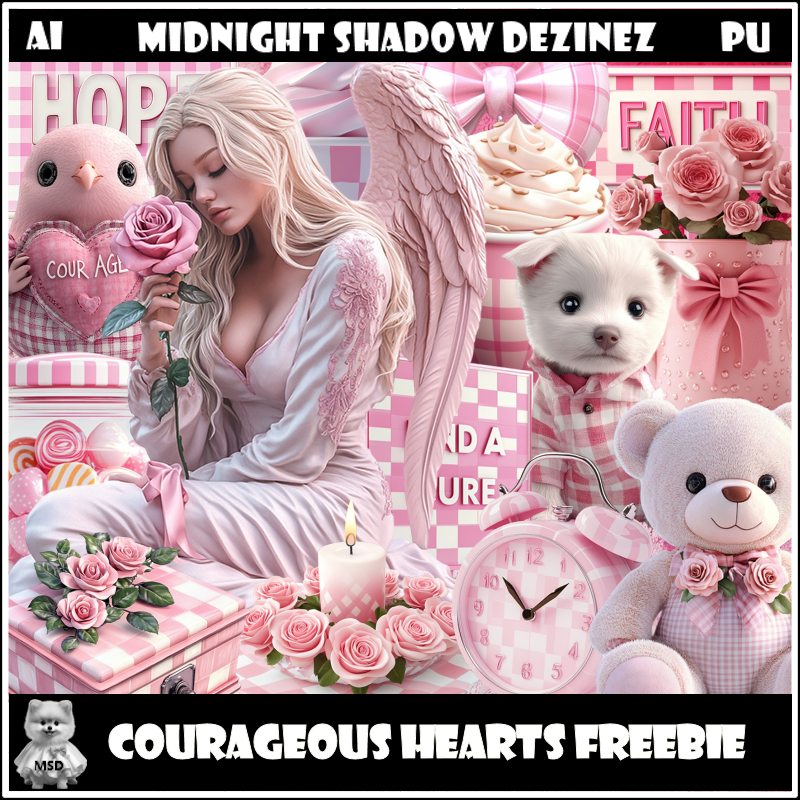
FTU Courageous Hearts


This tut was written September 29th, 2024 for those with a basic knowledge of psp.

Al tube and kit generated by Midnight Shadow Dezinez
This is a free mini kit, tube include

I used PSPX...but any of them should work.
FTU mini kit Courageous Hearts by Midnight Shadow Dezinez HERE
Check out the rest of the blog HERE
Millie's PSP Madness Template 368 HERE
Check out the rest of the blog HERE
Mask of choice, I used Miz Teeques Mask 234 HERE
Check out the rest of the blog HERE
Filters
Mura Meister Copies-Encircle
Eye Candy 4000-Gradient Glow

Font of choice,  I used  With Rose

Drop shadow is  V-1 H-4 Black, 40, 10, use what you prefer.
Let's get started
*Remember to add your drop shadow as you go along*

Open the template, hold the shift key and hit the letter d to duplicate,
close the original, delete the credits.
Go to Image, Canvas size, 800 x 800

Merge layer 1 and 2 together, select all, float, defloat, paste paper 4,
move where you like, invert, delete, select none.
Add a fat white gradient glow.
Delete the template layer as you go along on each one.

Merge layer 3 and 4 together, select all, float, defloat, paste paper 2,
move where you like, invert, delete, select none.
Add a fat white gradient glow.

Select layer 5, select all, float, defloat, paste paper 4, invert delete,
Add a fat white gradient glow.

Select layer 8, select all, float, defloat, paste paper 2, invert, delete,
keep selected, mirror your tube, paste, delete, select none.
Change the blend mode to Hard Light.

Merge layers 9 and 10 together, add noise at 50%.

Merge layers 11 and 12 together, paste paper 4, move to the lighter part,
invert, delete, keep selected, paste your tube in both, delete, select none.
Change the blend mode to Overlay.

Select layer 13, select all, float, defloat, paste paper 1, invert, keep selected,
paste your tube how you like, delete, select none.

Move layers 6 and 7 to the top layer, add noise at 50%.

Resize element 14 to 25%, apply Mura Meister Copies-Encircle, first 
3 numbers on 18, 50, 50, paste below the large circle, duplicate, resize
to 85%, move to the bottom layer to the left behind the smaller
circle, duplicate, mirror.
Resize element 4 to 35%, paste at the bottom.
Resize element 14 to 25%, paste at the bottom above the candle.
Resize element 13 to 30%, paste at the bottom to the left of the box,
duplicate the box and move to the left of the dog.
Resize element 10 to 30%, paste on the bottom right of the box,
duplicate the box, mirror, move to the right of the bear.

Resize element 12 to 20%, paste at the bottom right.
Resize element 3 to 25%, paste on the right below the cup.
Resize element 15 to 30%, paste on the right below the clock.
Resize element 9 to 30%, paste on the bottom left.
Resize element 11 to 25%, paste at the bottom left.
Resize element 5 to 30%, paste on the left above the small tube.
Resize element 8 to 20%, paste at the bottom.

Add any other elements that you would like, make it your own.
Always readjust your mask and elements how you like them before you
 merge your tag, sharpen once.
Crop your tag to make sure no shadows or anything on the edges

 Then add your copyright and name.

That's it

Hope you enjoyed doing my tut.  

Saturday, September 28, 2024

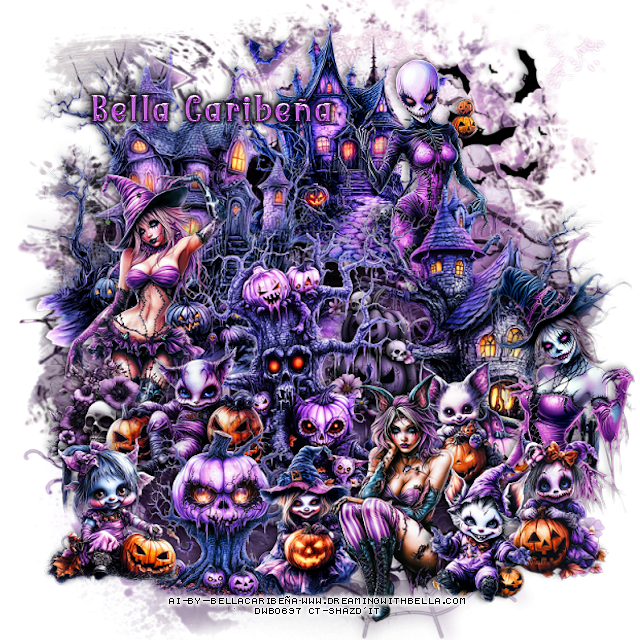
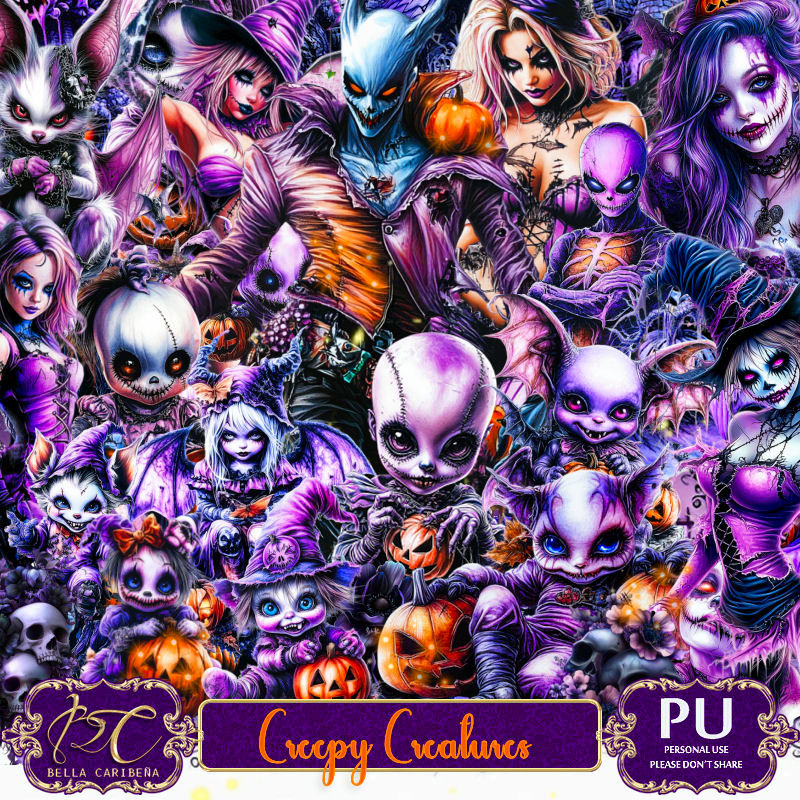
PTU Creepy Creatures


This tut was written Sept 28th, 2024 for those with a basic knowledge of psp. 

Al generated tubes by Bella Caribeña
Tubes are included in the kit
Read the TOU on how to credit your tags

I used PSP2020...but any of them should work.
PTU Scrap Creepy Creatures  by Bella Caribeña  HERE 
Halloween theme, lots of tubes included as creepy elements,
 3 masks, 163 elements  and 15 papers
Check out the rest of her store HERE

Font of choice, I used Witch Mystery

 Drop shadow as you go is V -2 H 4, 50, 10, or use what you prefer.
Let's get started
*Remember to add your drop shadow as you go along*

Open a new image 800 x 800, paste mask 3, move to the bottom.
Paste mask 1 at the top.

Resize element 78 to 65%, paste at the upper left.
Resize element 75 to 60%, paste on the right.
Resize element 77 to 50%, paste at the top below the houses.
Resize element 70 to 50%, paste above the house to the right.
Resize element 81 to 50%, paste above the houses.
Resize element 94 to 30%, paste on the left by the house.
Resize element 146 to 25%, paste to the right below the tree.
Resize element 71 to 30%, paste above the pumpkin.
Resize element 1 to 25%, paste at the bottom of the lady.
Resize element 81 to 50%, paste above the houses.

Resize element 101 to 35%, paste on the left.
Resize element 74 to 30%, paste at the bottom.
Resize element 102 to 30%, paste on the bottom right.
Resize element 93 to 30%, paste at the bottom.
Resize element 111 to 30%, paste at the bottom right.
Resize element 119 to 30%, paste on the right above the house at the bottom.
Resize element 89 to 30%, mirror, paste at the bottom left.
Resize element 118 to 35%, paste at the bottom left below the 2 girls.
Resize element 54 to 40%, paste at the upper right above the mask.

Add any other elements you would like, resize.
Crop your tag to be sure no shadows or lines are on the edges.
 Then add your copyright and name.
That's it

Hope you enjoyed doing my tut         

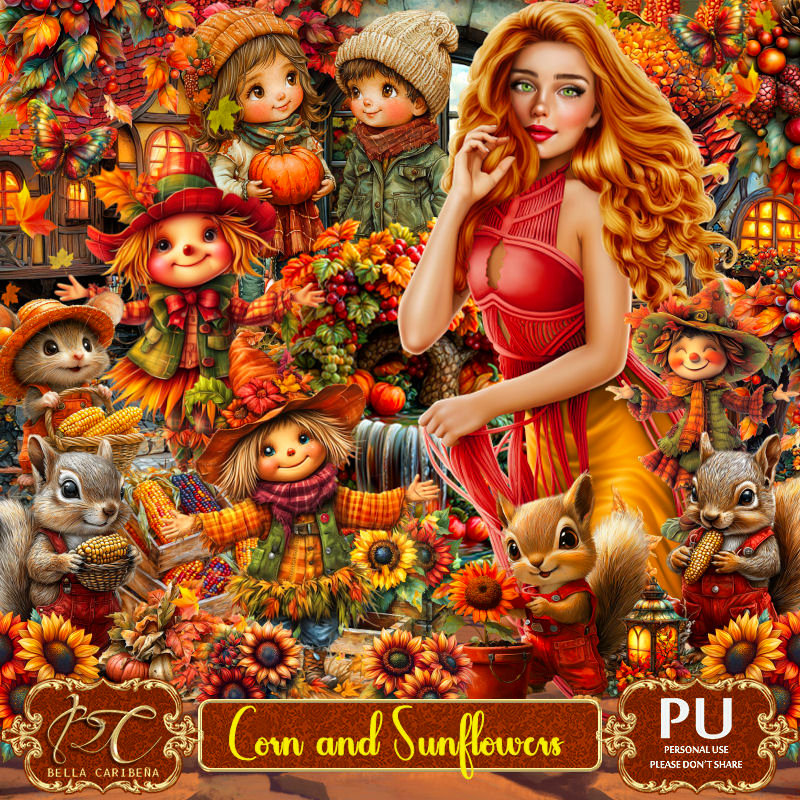
PTU Corn and Sunflowers


This tut was written Sept 28th, 2024 for those with a basic knowledge of psp. 

I am using awesome tube ©Yuki
Tubes are included in the kit
Read the TOU on how to credit your tags

I used PSP2020...but any of them should work.
PTU Scrap Corn and Sunflowers  by Bella Caribeña  HERE 
Fall theme, 3 tubes, 2 masks, 123 elements  and 12 papers
Check out the rest of her store HERE

Font of choice, I used Lovey Dovey

 Drop shadow as you go is V -2 H 4, 50, 10, or use what you prefer.
Let's get started
*Remember to add your drop shadow as you go along*

Open a new image 800 x 800, paste mask 1.

Resize element 38 to 60%, paste at the upper left.
Resize element 39 to 60%, paste at the right.
Resize element 108 to 60%, paste at the bottom of the house on the left.
Paste element 27 at the top below the houses to the left, duplicate, move
to the right and down.

Resize the tube to 25%, paste.

Resize element 26 to 40%, paste below the tube on the left.
Resize element 73 to 30%, paste at the bottom above the tube.
Resize element 49 to 40%, paste on the right below the house.
Resize element 46 to 40%, paste on the right on the rock part of the house.
Resize element 23 to 40%, paste on the right below the tube.
Resize element 22 to 25%, paste at the bottom below the tube on the right.
Resize element 30 to 25%, paste at the bottom by the box of corn.
Resize element 84 to 30%, paste on the right above the corn field, duplicate, mirror.

Resize element 12 to 25%, paste at the bottom below the pumpkin.
Resize element 64 to 20%, paste at the bottom above the tube.
Resize element 25 to 25%, paste at the bottom left.
Resize element 32 to 20%, paste on the left on the steps below the tube.
Resize element 14 to 40%, paste on the bottom left.
Resize element 36 to 25%, paste on the bottom right below the pumpkin.
Resize element 50 to 25%, paste on the left below the steps.

Add any other elements you would like, resize.
Crop your tag to be sure no shadows or lines are on the edges.
 Then add your copyright and name.
That's it

Hope you enjoyed doing my tut