
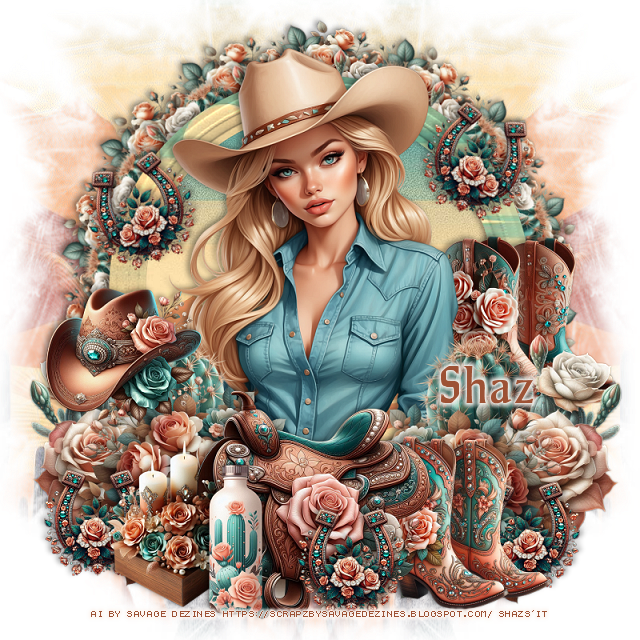

This tut was written July 17th, 2025 for those with a basic knowledge of psp.
I am using the Ai kit Southwest Summer it is part of
Magickal Dreamers Blog Train Southwest Summer
Everything used is included in the kit
Read their TOU on how to credit your tags.
Drop shadow is V-1 H-4 Black, 40, 10, use what you prefer.
Let's get started
*Remember to add your drop shadow as you go along*
Open a new image, 800 x 800, paste paper 4, apply your mask,
move to the right, duplicate, mirror.
Open your Ellipse tool, open paper 4, close off the background color,
up on the tool bar of psp, change the width to whatever you prefer, I used 45,
open the pattern foreground with the paper showing, draw out a circle.
Go to Effects, 3D Effects, Inner Bevel with these settings
Bevel shape 4, width 30
3, 4, 30, 20
0, 35, 40,
Color #fff4e5
Click inside, paste paper 4, paste, move how you like, invert, delete.
Resize element 3 to 20%, apply Mura Meister Copies-Encircle, first 3 numbers
on 14, 55, 55, paste below the frame.
Resize element 2 to 20%, apply Mura Meister Copies-Encircle, first 3 numbers
on 14, 60, 60, paste below the first circle.
Resize the tube to 50%, paste above the frame.
Resize element 5 to 30%, paste at the bottom above the tube.
Resize element 14 to 30%, paste below the saddle on the right, duplicate, mirror.
Resize element 3 to 30%, paste at the bottom right below the flower,
duplicate, mirror.
Resize element 4 to 23%, paste on the right below the saddle.
Resize element 8 to 20%, paste on the left on the cactus.
Resize element 6 to 20%, paste at the bottom.
Resize element 12 to 22%, paste at the bottom left below the bottle.
Resize element 13 to 15%, paste at the bottom, duplicate twice, move one
to each side below the boots and candle, duplicate again, free rotate to the
right at 20, move up on the frame on the right, duplicate, mirror.
Resize element 9 to 23%, paste on the right below the flowers.
Add any other elements that you would like, make it your own.
Always readjust your mask and elements how you like them before you
merge your tag, sharpen once.
Crop your tag to make sure no shadows or anything on the edges
Crop your tag to make sure no shadows or anything on the edges
Then add your copyright and name.
That's it
Hope you enjoyed doing my tut.

No comments:
Post a Comment